Quickmail icon

Quickmail

Maintained by Robert Russo, David Lowe
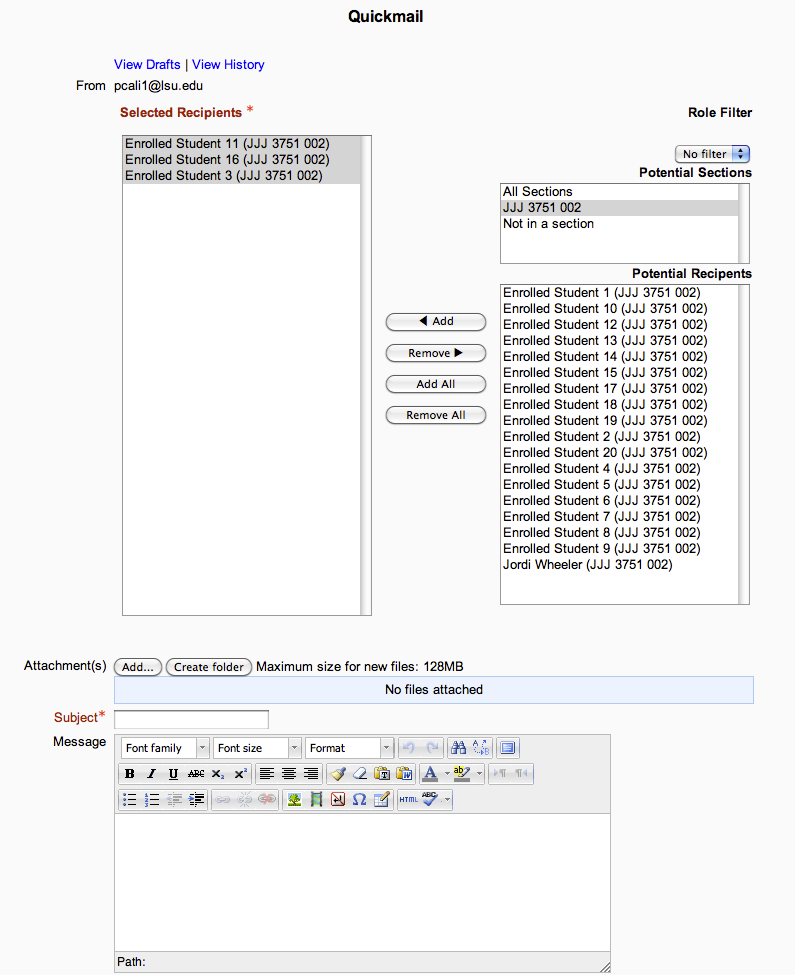
A block that provides selective, bulk emailing within courses. Developed by LSU.
Price option: Free

Supports Moodle 2.1-4.5 See all versions
Latest release: 6 months ago
Installations: 3303
Downloads (last 90 days): 602

Frankenstyle name: block_quickmail
Blocks

Comments

Comments are no longer open for new posts. Existing comments remain available to read.

I am trying to figure out how to use Quickmail at the administrator level. Is there any documentation? I have added the block to my Dashboard and can get into "Quickmail: Compose Admin Message", but I can't seem to be able to filter a group of users based on role and category. It seems like it wants me to specify a username. There is also a blank box with no label. Any assistance would be most welcome as we plan to upgrade next week.
Does anyone have a tip on how to get the text filters to be applied to the outgoing email? We want our TeK equations to be rendered before sending. In the old version this was done in an options array in blocks/quickmail/email.php . I'm not sure where to look now.
Hello,
can someone update the Usefuls links and the current version in last version ?
Without it we can't translate all the new strings mixed
Komal - You need to go to the course you want to add Quickmail to, then Click "Add a block" and select the Quickmail block from the list of options. then you will be able to send an email.
I am having Quickmail fail at the end of a long email list. I am assuming it is timing out. Is there a LAMP setting that might prevent this. Out of 85 recipients, the last two are not getting the message.
Manibhushan you need to firstly verify the outgoing email setting from the server tab, if the setting is correct and testing outgoing email is working then Quickmail should work, if its giving message to contact with admin then you need to login to your email account associated with moodle and allow MOODLE from the account setting (e.g if you are using gmail you need to go to account setting->security and then explorer the option to allow less secure applications). after performing these changes, try to check outgoing email first it it work then Quickmail will also be working. Good Luck
Not sure why it hasn't been updated here but new source control URL is - https://github.com/lsuonline/lsuce-block_quickmail
And Issue tracker is at https://github.com/lsuonline/lsuce-block_quickmail/issues
Hello Dear Members, when I installed this block on my moodle site (Moodle 3.8.2+ (Build: 20200428) I am getting error as "Failed or Pending Recipients 1
We will continue attempting to send to these recipients until the message has been successfully sent." Moreover normal messages from moodle messaging (messaging bubble on top right) are also not getting delivered to email. user is receiving messages in moodle but email is not going. earlier when i sent messages the corresponding email is also delivered to students. Kindly advise on the matter. I will really appreciate any guidance. Thank you.
Yes Peter !
Absolutely agree!
Quickmail should be integrated into the core of Moodle to replace the ridiculous internal messaging.
With the "Send now" option i the News Forum being quite useless, not overriding when the user has chosen digest notifications, and thus is not doing what the teachers think it does (sending the notification to all participants), the Quickmail block seems like an essential feature Moodle should incorporate into core!
Hello,
I installed Quickmail from the Github repository new version on several Moodle 3.8 and 3.9 platforms.
It seems to work very well.
It's a wonderful and indispensable tool.
Thank you for your work.
And live open source software.
Daniel
E-Learning Facile (France)
Hello
I installed quickmail v2 plugin from LSU_37_GRADEBOOK git branch. My current moodle version is 3.5.2. The plugin was installed successfully. However, when I sent a mail to 33 participants, a message appeared "mail sent" but on viewing it under View message details section all the participants names were under failed or pending recipient.

Hello Yong Ra
I followed your tip to download Quickmail available on the Github website: https://github.com/lsuits/lsu-block_quickmail and it worked perfectly.
Thank you!
There is new version that is not on the Moodle.org site. You can download it from the Github site below. I have the V2.x and it works fine with 3.9.x. Below is the Github URL.
https://github.com/lsuits/lsu-block_quickmail

Hello
I'm using Moodle 3.9.1+, I installed version v1.7.6 (2017122001) and it seemed to be working normally.
But when a Tutor went to send messages to his students he was unable, he presented the following error: "There are no users to whom you can send emails."
Would you by any chance have plans to continue updating this plugin?