Drag and drop onto image
Maintained by
Tim Hunt, Chris Nelson, Jamie Pratt, Phil Butcher
As of Moodle 3.0, this question type is part of the standard Moodle release. That is why there is no plugin from Moodle 3.x. You don't need one!
Comments
Comments are no longer open for new posts. Existing comments remain available to read.
thank you
Thanks for your reply. My school is soon to switch all of our classroom devices to Android tablets. We'd really hate to lose access to the Open University question types. Hopefully an upgrade to 2.7 or 2.8 will solve the problem.
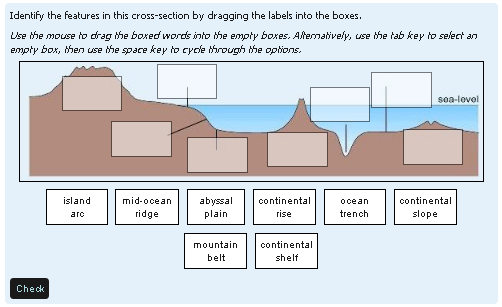
I am using the question type Drag and drop onto image (moodle 2.5) and it is working fine on normal sized screens. On smaller screens (tablets, smart phone) the image is cut due to its size and some of the gaps might not be displayed.
Am I seeing it correctly that there is no option to autosize the image to screen size? Is it possible to add a scrollbar by slight modifications of the php-code (for me, as I do not know anything about PHP)?
Thank you for all the effort!
If you are the sort who tinkers with Moodle code then I believe that the 600 and 400 are easily changed.
If you are the sort who tinkers with Moodle code then I believe that the 600 and 400 are easily changed.
i'm using your question type in Moodle 2.6 and it works great,
except of one little feature. If you have a look at a question in the question bank, it's possible to show the correct answer, but if a participant submits a quiz and he gets his feedback he can't see the correct answer. It would be great, if you can fix this.
At my university the users like this plugin and i would be great to see it become a part of the Moodle core.
Best Regards
Ralf