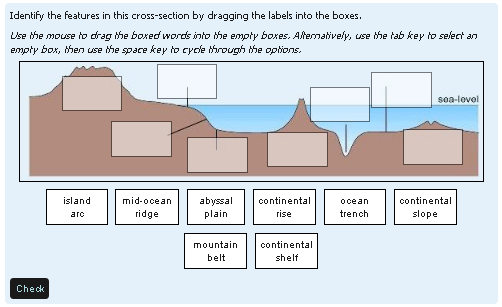
Drag and drop onto image

As of Moodle 3.0, this question type is part of the standard Moodle release. That is why there is no plugin from Moodle 3.x. You don't need one!
Price option: Free

Supports Moodle 2.2-2.9 See all versions
Latest release: 11 years ago
Installations: 56
Downloads (last 90 days): 32

Frankenstyle name: qtype_ddimageortext
Question types
Open University

Comments

Comments are no longer open for new posts. Existing comments remain available to read.

OK, I'm a new Moodle user and a real lunkhead. I just downloaded the code, but I don't know how to install it in Moodle. Is there a site or a resource that would guide me through it? Thanks so much!
Oh well. I hadn't had a need until just today and then two different situations presented almost simultaneously. Looks like I'll a Plan B. Thanks all the same.
We created these drag and drop questions circa 5 years ago and I was expecting our academics to come back and say "that's great" but could we have a way of indicating that zones 1 & 2 could be filled with options A and B and it doesn't matter which way round they're filled. But such requests have been absent. Ok maybe one or two colleagues have raised the possibility, but not sufficient to warrant our investment in developing these question types further. A pity.
Any thoughts on how to make non-unique choices so that zone 1 could be either of two (or more) responses?
No there isn't and you might well ask 'why not?' And the answer comes down to trying to ensure that the feedback is accessible to all users. So we require our authors to write a full solution in the General feedback box. This might include an annotated diagram but if it does that diagram must also have alt-text associated with it - and clearly you can't put that alt-text on the diagram that is used in posing the question.
Is there a way, when reviewing attempts at a drag and drop question, for the review tool to highlight which answers the user got correct for that question type?
OK, I reinstalled the plugin and now everything works! I don't know if any changes were made but now it's OK.
Regarding my report - I have moodle 2.8.1 stable and tested this drag and drop with Clean, More and Elegance themes, all with same result - the background image does not appear on the page. Zones and draggable items do appear but zones not in the question area.
Making this work on Android is on our todo list. Indeed, we have had one go already, and it is better than it was, but still not good enough. Hopefully we will get time to try again soon.
Elton LaClare.
We experienced the same issue so made recommendations for iPad as this was the only tablet that we could get Moodle drag and drop to work with.
It may be a bit late now but have you checked out the Safari Browser for Android: https://play.google.com/store/apps/details?id=com.appdream.cloud ? From memory we were able to have some success with this browser on Android.
Best of luck.
Which theme are you using? Both these question type works find for me in Moodle 2.8.1, using the default 'Clean' theme.
This plugin and drag and drop markers have a bug in moodle 2.8.1 - the background image does not load on the test page
You can certainly add detractors - as many draggable items as you want (http://www.open.edu/openlearnworks/mod/oucontent/view.php?id=52747&section=2.3.2 ). But the marking is that you just get no marks for that drop-zone if you use the detractor - rather than a negative mark.
Is it possible to have draggable options that don't belong on the picture (i.e. 'detractors')? Ideally ones which if placed on the image would be negatively marked.
I read through the comments and the docs, but couldn't find an answer to this. Apologies if I somehow missed it.
Great plug-in btw. Very impressed at the accessibility (keys-only) option as this is always a big issue with these kinds of more interactive question types. Thanks for sharing.
This option is not available. At least, not at the moment. We don't plan to implement it, but that might change.