OU multiple response
Maintained by
Tim Hunt, Mahmoud Kassaei, Chris Nelson, Hieu Vu Van
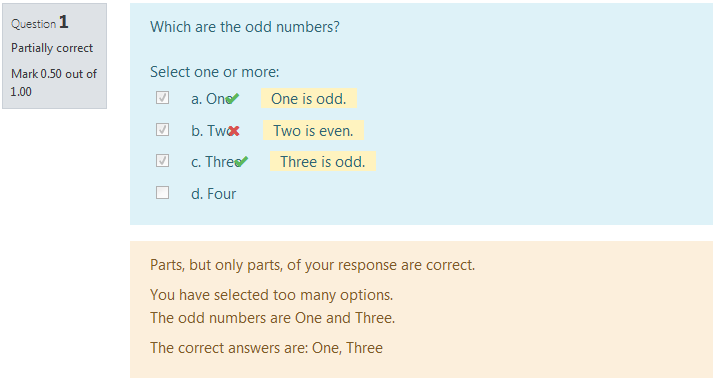
The main difference from the standard Moodle multiple choice question type is in the way that grading works. When creating the question, the teacher just indicates which choices are correct. If there are n correct choices, then the student scores 1/n for each correct choice. If they select too many choices, then incorrect choices outweigh correct ones.
Comments
Comments are no longer open for new posts. Existing comments remain available to read.
Thank you
I can't see any difference with your added text-indent: 0px !Important; Maybe this depends on your Moodle version or theme?
/* Stop OU multiple responses question answers wrapping onto next line */
.que.oumultiresponse .answer div.r0, .que.oumultiresponse .answer div.r1 {
display: flex;
flex-wrap: inherit;
align-items: baseline;
text-indent: 0px !Important;
}
Using Moodle 3.11 (Build: 20210517) and OU multiple response 2020121800 the following change in styles.css does the trick (i.e. remove the flex-wrap: wrap; line):
.que.oumultiresponse .answer div.r0,
.que.oumultiresponse .answer div.r1 {
display: flex;
/* flex-wrap: wrap;*/
align-items: baseline;
}
It's a pity the alignment bug mentioned by Peter Jonker on Mon, 17 Aug 2020 has still not been fixed. Any hope for a fix at some date?
at our moodle-Installation we have installed "Multiple-Choice (OU)". A collegue realized that the questions are not shown correctly in the moodle-App. Do you know anything about this problem?
Any hints or chances to solve this problem?
Best regards,
Birgit from Germany (Rhineland-Palatinate)
This being said, IMHO, the plugin description should mention this so that users are aware of it
Cheers
If the student has selected the right number of choices (3) then their score is the fraction that are correct (0/3, 1/3, 2/3 or 3/3).
If the student has selected too few choices, then add more incorrect choices to make the number exactly 3, then score as above. For example, 1 right and 1 wrong is the same as 1 right and 2 wrong = 33%; or 2 right == 2 right 1 wrong = 67%
If the student has selected too many choices, then remove correct choices, to make the number exactly 3. So, 2 right and 2 wrong == 1 right and 2 wrong = 33%.
(The last point is the only sense in which the student "loses 1/n for each incorrect choice".)
I hope that makes sense. We think this scoring scheme is fair: rewarding students for what they know, and without generating false incetives that help students game the system.