
Contact Form
Maintained by
Michael Milette
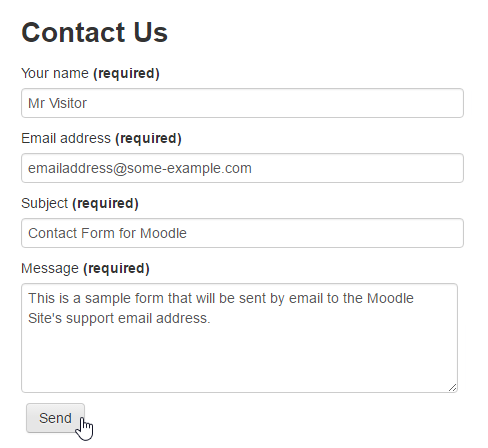
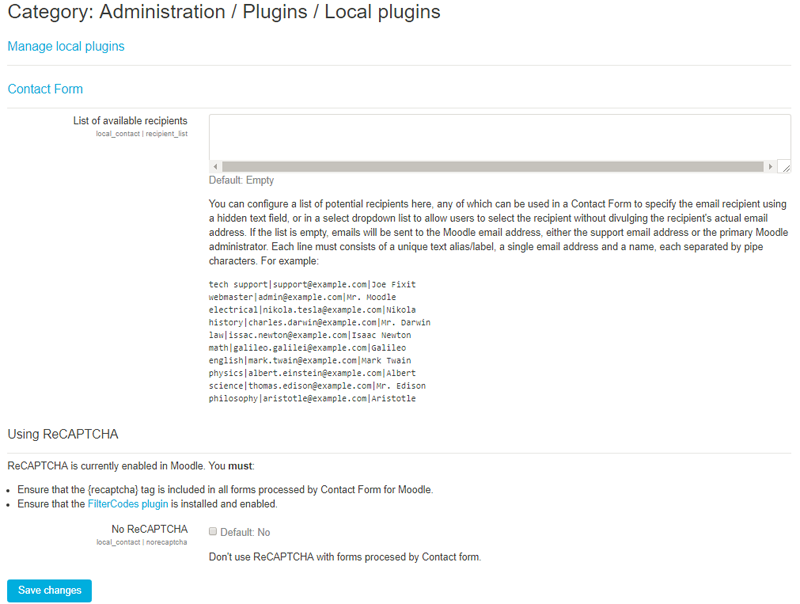
Contact Form is a Moodle plugin that allows your site to process and send information submitted through HTML web forms to the site's support email address or primary administrator if the support email address is not defined.

Comments
Comments are no longer open for new posts. Existing comments remain available to read.
That is indeed what it does. However, if you are using Moodle in a different language, you may need to make some changes to the sample forms as the field names are language specific. For more information, please consult the README.md file included with the plugin or the "More documentation on this plugin" link found on the plugin's page on moodle.org. for more help, please post your questions in the discussion forum - link also on the plugin's page.
Best regards,
Michael
thanks a lot for your answer. I have found one "solution" for my issue with the contact form (using it without Filter codes).
It seems that the filter codes are not working properly within "local_staticpage". I realized that, when I saw, that actually sending the form goes wrong because calling
the index.php does NOT succeed via "{wwwroot}/local/contact/index.php". When I change this to "/local/contact/index.php", then it works.
Then I am not using the Filter code {wwwroot} and just give the correct path directly.
Best Regards
Balazs
Yes to both of your questions.
External email address: There is an example in the README.md file under Optional Contact Form For Moodle Settings. Same idea except that you can just specify one name in a hidden field instead of using a dropdown list. You will still need to configure the email address in the plug-in's settings.
Labels for the fields: You can name the labels for the fields to anything you want in the HTML form.
Field names: You can use any field names you want. For multi-word field names, separate the words using underscores.
For the mandatory fields: You can rename these by customizing the language strings.
For more details on all of this, see the documentation found in the README.md file included with the plugin.
Best Regards,
Michael
Is it possible to use it to send to an external email and customize the names of the fields?
This issue has nothing to do with Contact form. Contact form is the form processor (i.e. only after you submit a form). At the stage where your form is being displayed, Contact Form is not yet involved.
Based on what I could see in your previous screenshot, it looks like Static Pages doesn't like the carriage returns in the middle of an HTML tag. You could try removing them and let me know how it goes. For further assistance with this issue, please report using the Bug Tracker link on the Contact Form plugin page.
This works within a Moodle page-activity but it doesn't work within a page created within the "Static pages" (local_staticpage) plugin.
What could be the reason/issue?
I have checked the following. E-mails can be send from Moodle, that works.
Filter Codes are switched ON for content within the Filter settings.
For the local_staticpage I have switched ON "processfilters" en disabled "cleanhtml".
Thanks a lot for any tips and hints.
Best Regards
Balázs
https://github.com/michael-milette/moodle-local_contact/issues/55
Contact does support mutliple languages are supported. All you need to do is to go into the Moodle Language Pack editor and add your translation for the plugin. Even better, contribute your translation in AMOS and it should be available in Moodle within a few days. Even the templates can be customized in the FilterCodes plugin making it easy to apply and update templates almost anywhere you want. Did you know? If you only use one of the Contact Form templates, you can put anything you want in the others to turn them into global blocks that you can stick almost anywhere in Moodle.
On a side note, I will get back to you soon with the issue you reported. However, please report any bugs you find in the Bug Tracker in GitHub. The link to that that is on the plugin's page on Moodle.org.
the plugin works great, I've been using it for a while now and I really love it
the thing is,
I've been trying to submit a form for multiple recipients at once
and I can't see anything in the documentation explaining how can I achieve that
not sure if I could do that or not
Kindly let me know if that's an option
Thanks again
I tried the ready to go filtercodes forms, but I choose HTML since I need to customize the labels of the form in a non english language, and if I'm not wrong this is not fully supported in the language pack.
I did install the github version of the plugin and I confirm that it works well for the not authenticated users except in these two (not common) cases:
- A user is not logged in but he has an account in moodle. In this case when email of this kind is used I get as a status message
Invalid $user parameter in get_user_preferences() call
Debug Info:
Error code: codingerror
Stack trace:
line 2108 of /lib/moodlelib.php: coding_exception thrown
line 381 of /local/contact/classes/local_contact.php: call to get_user_preferences()
line 318 of /local/contact/classes/local_contact.php: call to local_contact->moodleuserstatus()
line 138 of /local/contact/index.php: call to local_contact->sendmessage()
- Or if I do it second time in the same browser without clearing the browser cache, and again like a non authenticated user but using a mail that is present in the moodle DB, I get:
Invalid get_string() identifier: 'duplicateemailaddresses' or component 'local_contact'. Perhaps you are missing $string['duplicateemailaddresses'] = ''; in /var/www/vhosts/aicadigitalacademy.it/httpdocs/aica_academy/local/contact/lang/en/local_contact.php?
line 353 of /lib/classes/string_manager_standard.php: call to debugging()
line 7298 of /lib/moodlelib.php: call to core_string_manager_standard->get_string()
line 394 of /local/contact/classes/local_contact.php: call to get_string()
line 318 of /local/contact/classes/local_contact.php: call to local_contact->moodleuserstatus()
line 138 of /local/contact/index.php: call to local_contact->sendmessage()
Thank again for your support.
Best regards,
Frosina