Dates

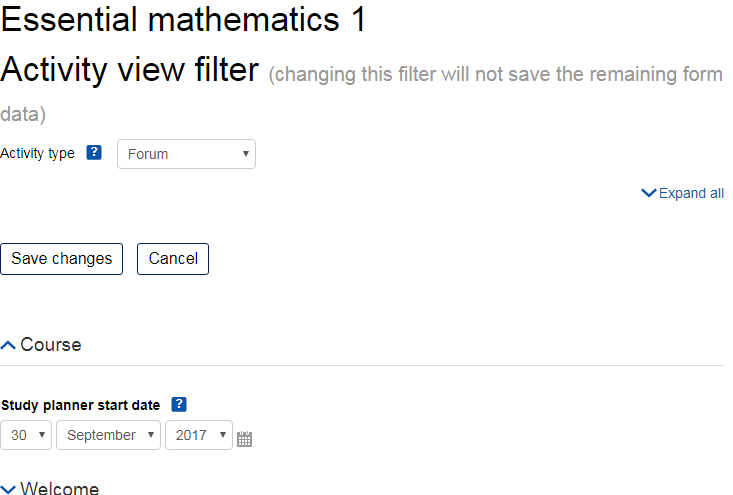
This 'report' is actually a tool to let you edit all the dates in a course on one page.
Price option: Free

Supports Moodle 2.2-5.0 See all versions
Latest release: 9 months ago
Installations: 1569
Downloads (last 90 days): 334

Frankenstyle name: report_editdates
Reports
Open University

Comments

Comments are no longer open for new posts. Existing comments remain available to read.

Hi Tim
I too need the plugin to control showing dates of files (or "ressources"). I installed it and used it normally in 2.5. So there is no way to have it work in 3.1 too for files ?
Thanks
Sébastien
The class name seems to be used in core: https://github.com/moodle/moodle/search?utf8=%E2%9C%93&q=activityicon, including in theme/bootstrapbase/less/moodle/course.less - thought no size is set there.
In many places in core, the activityicon is set without any other class name being specified.
Hi Tim,
Minor one.
class=activityicon does not seem to be set anywhere in bootstrap based themes, so icons can be odd sizes.
Probably worth adding iconlarge or another class which is in Moodle Themes.
Cheers
Stuart
If you click Save changes in the report, Restrict ratings to items of all forums automatically labeling of the current date
Can u fix this this?
Tim Hunt
wrote...
The Activity Type "All" thing is because we were having problems when the form got too big. Therefore, if the course has too many activities, that option is not available. If you want to risk it, you can change this constant to something bigger than 20 https://github.com/moodleou/moodle-report_editdates/blob/master/index.php#L29
what kind of risks do you mean?
Can I change the value to 60?
I'd love to have an option that would list everything on one page in a course that has a due date attached from assignments and quizzes to TurnItIn and everything between. The less clicking to navigate would be best.
@Tim I don't have any specific ideas. It certainly sounds like an odd set of symptoms. I think standard debugging techniques will have to apply: First try to reproduce this on a test server. Once you have clean steps to reproduce, try adding extra debug statements to the code to work out what is happening.
First, turn on Debugging to get a more helpful error message.
I am getting Error 500 - Internal Server Error
An error was encountered while processing your request. Typically this is a temporary condition. Please contact the web site owner for further assistance.
----------------------
This error message appears when I click on Dates in Reports section after installation.... Any ideas how to correct the error?
One of our teachers is having issues with the report in a course. She made a copy of a course by backing it up and then restoring it as a new course. She used the report to change the due dates of the new course and they keep changing. When she opens the report to correct them, some of the activities are reverting back to the date in the original course and some of the dates are changing to the day she opened the report. We can't find anything in the log about how it's happening. Any idea where we should start looking?
Thanks to Eric Merrill for verifying that this plugin works in Moodle 3.0
Update/clarification to my last comment: "Restrict Access" and "Availability" (this plugin) are two separate things and it appears that the date range functionality only applies to "Activity Types" whereas "Upload File to Moodle" (or "Resource") does not have the option to set a date range. In your opinion, would be the best way to proceed? Can we somehow grant the date range functionality to a Resource type?
Well, in Moodle 2.something, conditional availability conditions became much more complicated, so unfortunately we had to remove them from this plugin for all activities.
So, adding a helper for mod_resource would only help in the short-term.
Unless, of course, you wanted to work out how to allow editing of the dates for the new complex availability rules for all activities.
Tim, thank you again for your assistance. We are still having one last issue with this. There doesn't appear to be functionality for Assignment Type "Upload File to Moodle" (aka "resource). So when a faculty member would like to add date ranges to things like PowerPoints or other files, the functionality does not exist. I don't believe this is a custom activity type, but after re-reading your last response I wasn't sure. I believe if needed we could go ahead and create a helper file for this activity type. I just wanted to check in with you before we did that to make sure we are thinking this through properly. Am I missing anything or should faculty be using a different, non-custom activity to upload files to Moodle and set date ranges?
Thank you so much for your quick response Tim! I will give this a try!