
Reservation
Maintained by
Roberto Pinna
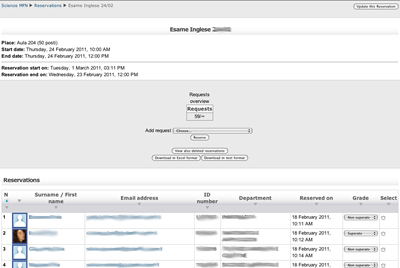
This activity module permits to schedule an event with a defined reservation time.
Comments
Product ratings and reviews are coming to Moodle Marketplace. Until then, existing comments remain available to read, but new posts have been disabled.
It seems a web server performance problem.
You need to enable moodle debugging and take a look to error log.
Then you can try to add a reservation and check any error message.
HTH,
Roberto.
every time I try to add a reservation get an error
504 gateway time out
any suggestions?
I can seem to find where in moodle you can add the events and set up the callander
Is there a way to take attendance for only for people that reserved a specific timeline, maybe creating a specific group automatically? We have several timelines to choose from and right now we see all the enrolled users.
Thank you,
Nico
The team is testing the plugin now, will tell you if we come across any other big errors.
Kind Regards,
Bligh
3.6 is a full code review to meet latest moodle UI and structure.
There's no new features, just small fixes and enhancements.
I'm working now on new things: moodle mobile support and multiple rounds in a single reservation are the big news.
Regards,
Roberto.
the 3.6 release it's out on moodle.org.
If you want take the last release and help me to debug it you can get it from github.
I'm still working on reservation plugin in these days.
Next release on moodle.org will be in May.
Stay tuned.
Cheers,
Roberto.
Just checking around what time you think the update will be available, or if you know a work around. The site we have is live at the moment, and this plugin is used quite frequently by the lecturers.
Regards,
Bligh.
Great to hear, looking forward to getting the plugin back up and running again.
Regards,
Bligh.
i'm working on it in these days. I hope I can release a new version this or next week.
Roberto.
I have this plugin installed on a Moodle 3.6 site, and am having problems with sending out messages to all reserved students. I think that the error has to do with the deprecation of print_textarea() (https://tracker.moodle.org/browse/MDL-50225).
Is there anyway to get this plugin to work with Moodle 3.6? (Can attach error_log but it is quite long).
I have this plugin installed on a Moodle 3.3 site with PostgreSQL database server. I am using version 2017110300 of the plugin and when trying to add a new activity, I see the following error:
Debug info: ERROR: invalid input syntax for integer: ""
SELECT * FROM mdl_reservation WHERE id = $1
[array (
0 => '',
)]
Error code: dmlreadexception
Stack trace:
line 486 of /lib/dml/moodle_database.php: dml_read_exception thrown
line 242 of /lib/dml/pgsql_native_moodle_database.php: call to moodle_database->query_end()
line 776 of /lib/dml/pgsql_native_moodle_database.php: call to pgsql_native_moodle_database->query_end()
line 1558 of /lib/dml/moodle_database.php: call to pgsql_native_moodle_database->get_records_sql()
line 1530 of /lib/dml/moodle_database.php: call to moodle_database->get_record_sql()
line 1509 of /lib/dml/moodle_database.php: call to moodle_database->get_record_select()
line 231 of /mod/reservation/mod_form.php: call to moodle_database->get_record()
line 204 of /lib/formslib.php: call to mod_reservation_mod_form->definition()
line 97 of /course/moodleform_mod.php: call to moodleform->__construct()
line 141 of /course/modedit.php: call to moodleform_mod->__construct()
Please can you help with this?
I'm not implemented it in reservation plugin because you can already do it with assignment plugin.
See to https://docs.moodle.org/35/en/Assignment_FAQ#Can_I_grade_work_that.E2.80.99s_been_done_offline_outside_of_Moodle.3F for details.
HTH,
Roberto
I can see from the Administration page that it is possible to upload reservation activities from CSV file. But is it possible, to upload reservations with users and grades from a CSV? The scenario is that teachers at a firm go out and teach on trainings. Then come home and want the training and its results for the students to show in Moodle (We would like to use the Reservation activity for this). But it would be a pain to add about 10 students to each Reservation activity one by one out of about 200 enrolled students each time.
So is there a possibility to let's say create the attendance sheet in az Excel and then convert it to a CSV and then upload it to a certain reservation activity?
We use Moodle 3.5, and reservation activity 3.4 (2017110300).
Thanks!
Mariann