Evaluation Instrument Importer (local_evalimport)
Evaluation Instrument Importer is a Moodle plugin that allows teachers to import rubric-based evaluation instruments from a CSV file directly into course activities.
This tool simplifies the creation of advanced grading rubrics by allowing instructors to prepare their evaluation instruments externally (for example in Excel or Google Sheets) and import them into Moodle in seconds.
The plugin integrates directly into the course administration menu, allowing teachers to select an activity and import a rubric without navigating through Moodle's advanced grading interface.
PLUGIN FEATURES
Import rubrics from CSV files
Integrated directly into the course interface
Works inside the course context
Supports Assignment and Forum activities
Automatically validates rubric structure
Prevents importing if a rubric already exists
Verifies compatibility with the activity maximum grade
Respects activity visibility restrictions
Respects group and grouping restrictions
Allows teachers to go directly to Advanced Grading after import
SUPPORTED ACTIVITIES
Currently supported modules:
Assignment (mod_assign)
Forum (mod_forum)
Future versions may support additional activities compatible with advanced grading.
HOW IT WORKS
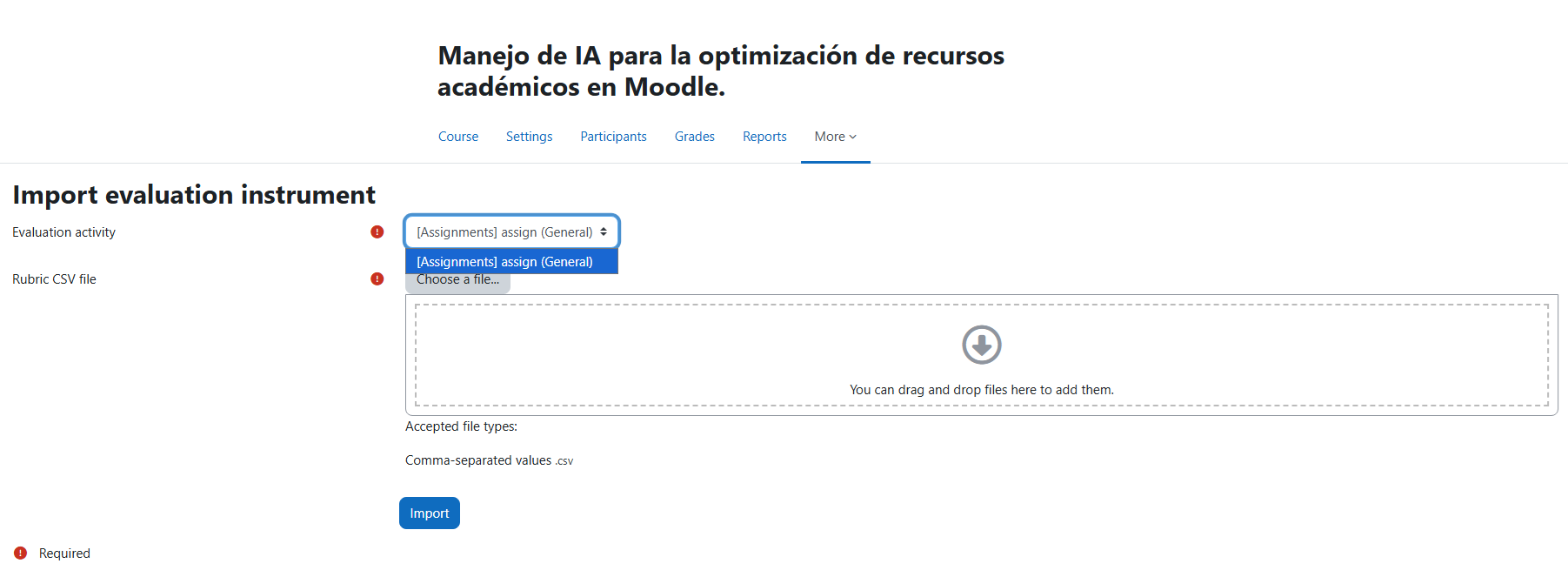
Open the course.
In the course navigation menu click:
Import evaluation instrument
Select the activity where the rubric will be applied.
Upload the CSV file containing the rubric definition.
Click Import.
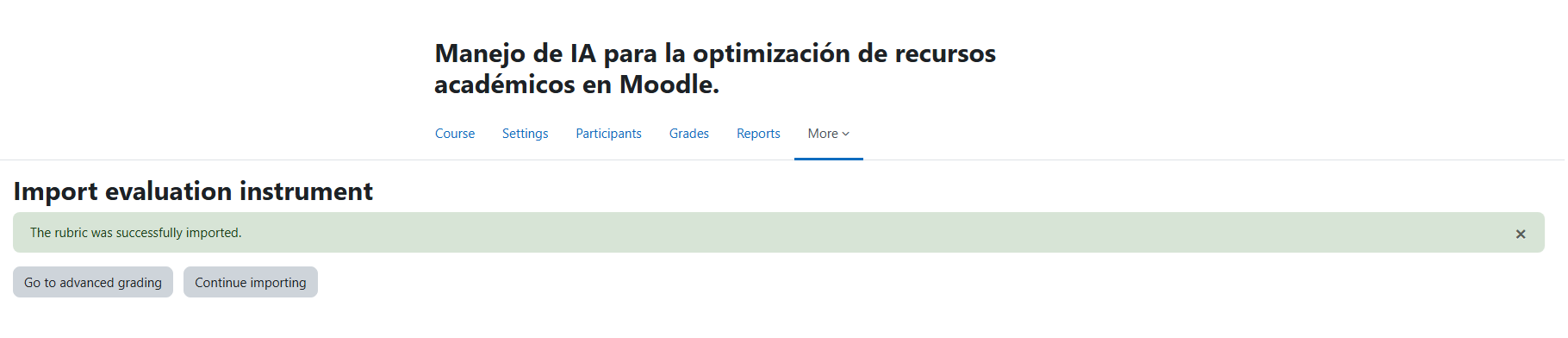
If the import succeeds the teacher can:
Go directly to Advanced grading to review the rubric.
Continue importing additional evaluation instruments.
CSV FILE FORMAT
The CSV file must contain the following four columns:
criterion, level, level_description, score
Column description:
criterion
Name of the rubric criterion.
level
Name of the rubric level.
level_description
Description that will appear in the rubric.
score
Numeric score assigned to the level.
CSV EXAMPLE
criterion,level,level_description,score
Argumentation,Excellent,Clear and well-supported argument,10
Argumentation,Good,Argument mostly supported,7
Argumentation,Weak,Limited argument support,4
Argumentation,Poor,Argument missing or incorrect,0
Structure,Excellent,Well structured and organized,10
Structure,Good,Mostly structured,7
Structure,Weak,Some organization problems,4
Structure,Poor,No clear structure,0
Each criterion can contain multiple levels.
The highest score within each criterion contributes to the total rubric score.
VALIDATION RULES
The plugin performs several validations during import.
Existing rubric validation
Import will fail if the activity already contains a rubric.
Maximum grade validation
The sum of the highest score of each criterion must match the maximum grade of the activity.
Example:
Activity maximum grade = 20
Criterion A max score = 10
Criterion B max score = 10
Total = 20 (valid)
Duplicate score validation
Scores cannot be duplicated within the same criterion.
Example of invalid configuration:
Criterion A
Level 1 = 5
Level 2 = 5
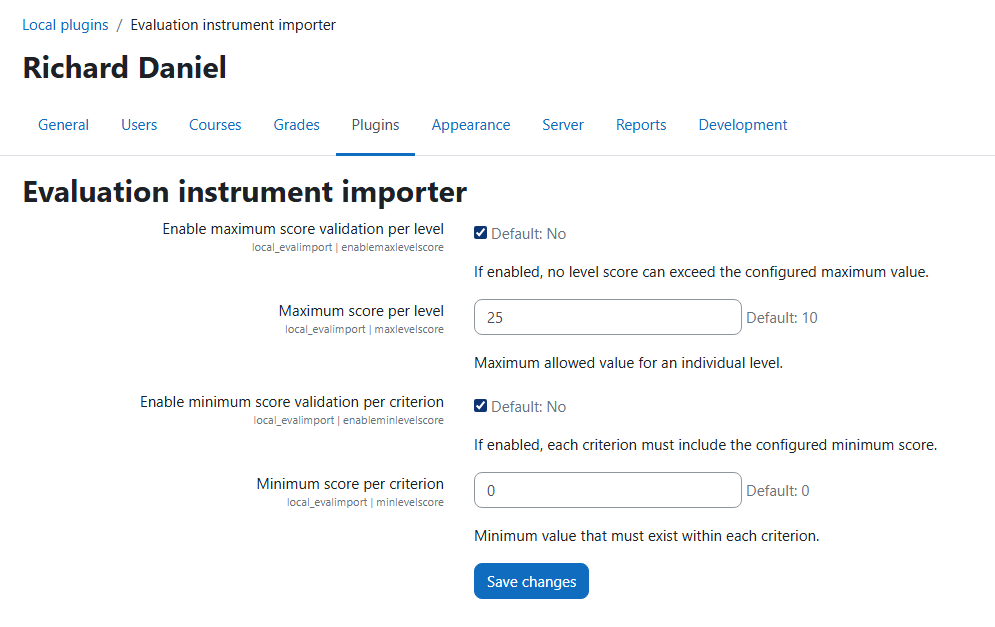
Optional administrator validations
Administrators can configure additional validation rules such as:
Maximum allowed level score
Minimum level score requirement per criterion
These settings can be configured in:
Site administration ' Plugins ' Local plugins ' Evaluation instrument importer
PERMISSIONS
Users must have the capability:
moodle/grade:managegradingforms
This capability is typically available to editing teachers.
The plugin also respects:
Activity visibility
Group restrictions
Groupings
Availability restrictions
INSTALLATION
Download or clone the plugin.
Place the plugin folder in:
/local/evalimport
Visit:
Site administration ' Notifications
Complete the installation process.
PRIVACY
This plugin does not store personal user data.
It only reads existing course and grading information from Moodle in order to perform rubric imports.
LICENSE
GNU GPL v3 or later
http://www.gnu.org/copyleft/gpl.html