Jitsi icon

Jitsi

Maintained by Sergio Comerón
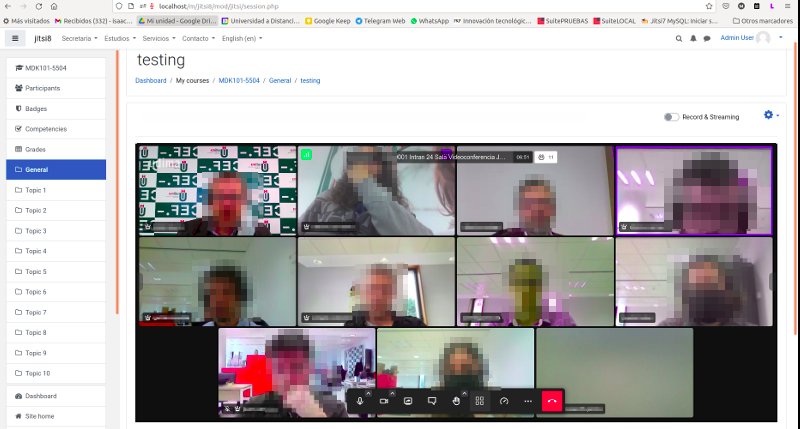
This module allows creating jitsi-meet videoconference sessions.
Price option: Free

Supports Moodle 4.4-5.2 See all versions
Latest release: 1 month ago
Installations: 3240
Downloads (last 90 days): 1627

Frankenstyle name: mod_jitsi
Activities

Comments

Product ratings and reviews are coming to Moodle Marketplace. Until then, existing comments remain available to read, but new posts have been disabled.

Sergio muchas gracias, entendido
Hi Sergio.
we do not have a special configuration - neither on the jitsi server side nor on the moodle plugin side. The problem with user photos appeared after upgrading our jitsi server. The problem will probably be there.
Hola Pierre,
puedes configurar el nombre de las sesiones con el parámetro jitsi_sesionname. En este panel puedes configurar los campos que componen el nombre y entre ellos esta el SESSION ID con el cual te aseguras de que dos sesiones distintas no tengan el mismo nombre de sesión.
Por otro lado que tuviesen el mismo nombre de sesión no implicaría que te echase de la misma, lo único que pasaría es que accederías todos a la misma sesión.
Hi Ondřej,
I have tried with the latest version 3.9.4 of moodle and 2.8.3 of jitsi plugin and the profile photo still appear correctly. is it possible that it is some special configuration on your server? until when have they appeared?
Hola, observo que la conferencia toma el nombre de la clase, más no del título de la conferencia, por lo cual dos conferencias en una misma clase comparten la misma URL. Desde ayer me saca de la conferencia a los segundos de conexión, no se si será por este problema.
Hi, after last jitsi update and jitsi-plugin update (Moodle 3.9, jitsi-plugin 2.8.3), Moodle does not transmit profile photo to jitsi session. Do you not have a similar experience?
Hola Dácil,
el plugin ahora no permite deshabilitar los chats privados entre usuarios... he estado mirando un poco la api de jitsi y solo he visto posibilidad de deshabilitar todos los chats, por lo que no veo forma de poder quitar solo los privados.
Si tienes tu propio servidor podrías quitarlo por css, tocando el /usr/share/jitsi-meet/css/all.css ocultando el privmsglink. He visto alguien que lo ha ocultado con un [id*="privmsglink_"]{display:none}, pero no lo he probado.
Estaré atento por si encuentran una forma mejor de hacerlo.
Buenos días Sergio.
Tengo moodle 3.5.13+ e instalación de jitsi-meet en un servidor propio, cuando se inicia la videoconferencia los participantes pueden enviarse mensajes privados entre ellos, sin que el profesor lo vea. Existe la posibilidad de solo permitir el chat general, pero prohibir la mensajeria privada entre los partcipantes de la videoconferencia? ¿Se podría hacer por medio del plugin?
Un saludo y muchas gracias.
Erhard, the Jitsi plugin you mention could be the problem.
In our environment the problem you describe is not happening but our Jitsi server is deployed in Debian servers with the oficial packages and we use the ansible playbook referenced in this page in order to deploy easily. We haven't tested mod_jitsi with docker deployed servers.
Looking for something related with the jitsi-token-moderation-plugin I found this in our prosody configuration files in /etc/prosody/conf.d
Component "conference.xxxx.xxx.xx" "muc"
storage = "memory"
modules_enabled = {
"muc_meeting_id";
"muc_domain_mapper";
"token_verification";
"token_moderation";
}
It looks like we have enabled a token_moderation module in our prosody.
Isaac Marco Blancas, thank you for your answer. Well, it is possible to invite others, but they cannot join the meeting. They're asked for username and password. So this configuration should be fine. Searching on the internet i read about a jitsi plugin called "jitsi-token-moderation-plugin". Could it be, that i have to install this plugin, or schould it work with the standard docker installation?
Erhard Scharf, are you sure you docker installations only allow access with token? If you can "invite" other users with an URL and they can go into the session probably token access is not restricted. If you share a link the user should see a dialog asking for user and password, the same dialog used when the installation is configured to restrict access with ldap.
Review your config in your /etc/prosody/conf.avail/your_domain.cfg.lua , this value should be false:
allow_empty_token = false
in order to avoid access to users with no token.
Hola Sergio, no puedo mandarte mensajes desde moodle.org; no sé por qué me dice "no puedes enviar mensajes a este usuario". Yo lo que hago estoy intentando hacer para registrar la conexion, como tú tienes metido el plugin en el archivo session.php pues capturo con time() el momento de entrada y salida (mediante un addEventListener beforeunload) de la misma para que en ese momento se grabe en una tabla que he creado de mySQL. Funciona correcto... excepto si antes de cerrar el navegador pulsas el botón de colgar... si lo haces, no sé por qué funciona aleatoriamente. Gracias!!
Hola Pedro, ¿puedes escribirme por la mensajería de Moodle.org? Te cuento más o menos como imagino que podría ser.
Buenas tardes Sergio y resto de comunidad. Estoy intentando hacer una especie de registro de conexiones (sencillo). Para ello he pensado en capturar la hora de carga de la página session.php para el inicio de llamada y volver a capturarla al pulsar el botón de colgar para que figure como hora final de llamada. Lo primero es sencillo pero no sé si es posible capturar ese "click" sobre el botón de colgar. He buscado por la comunidad jitsi y he visto que se puede realizar, bien con un servidor propio o modificando un archivo javascript disponible en la API pero que en este plugin no existe (o no encuentro). Alguien sabría como puedo hacer para poder capturar ese click al boton de colgar que me permita ejecutar un script de php o, incluso, aunque solo fuese poder redireccionarlo a otra página para capturar la hora de la pulsación?. Muchas gracias!! y enhorabuena por el plugin
Hello, i have problems with moderation rights. I am running jitsi on our own server with docker and configured token. Everything is running fine. But one thing is not working. When students get into the meeting, they become moderators, who can kick out even the trainer/teacher. when looking into the student-role, there is no right for moderation, while trainer/teacher-role has this right.
Do i have to configure something more on th jitsi-side, or is this a known problem with moderation rigths?