
Jitsi
Maintained by
Sergio Comerón
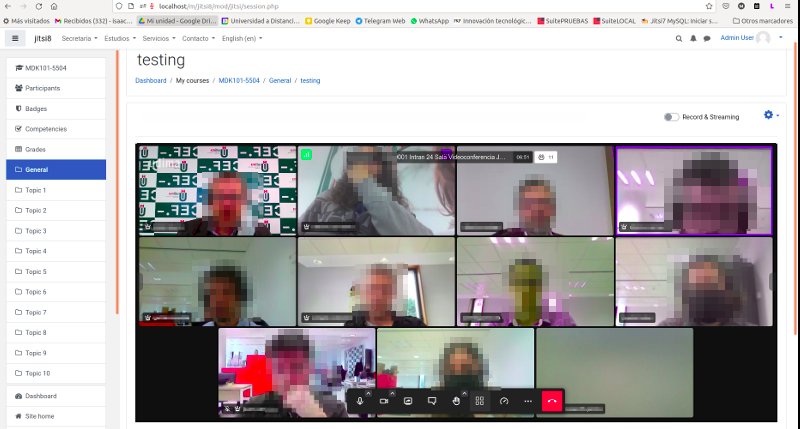
This module allows creating jitsi-meet videoconference sessions.
Comments
Product ratings and reviews are coming to Moodle Marketplace. Until then, existing comments remain available to read, but new posts have been disabled.
- new version of youtube api with some security patches.
- A new search page for recordings by date and time
- Added more error notifications to administrators
- We also fixed some bugs with services not implemented.
- The possibility of creating a queue of youtube accounts to distribute recordings among different accounts.
(More info at https://github.com/udima-university/moodle-mod_jitsi/blob/master/CHANGES.md)
Thank you for getting back to me. I have sent you an email and I am now waiting for your response.
I would need more information to know what could be happening. How did you inform the jitsi_domain parameter of the plugin configuration? Can you give me the url of the jitsi to test? if you want you can send it to jitsi@sergiocomeron.com
All the best.
I have installed and hosted my own Jitsi server using its self-guide for hosting, and it's working fine. However, when I use the domain in the Moodle Jitsi plugin, it gives me a 404 error page. I'm unsure if I need to make any changes in the Jitsi config files to resolve this problem. Furthermore, I haven't installed or configured any tokens for the plugin.
Today we have released version 3.3.2, which includes the following improvements:
- We have added a page visible only to administrators where all sessions being recorded through the integrated method in Moodle can be viewed.
- Moodle integrated recordings are now locked so that no other user, except the one who initiated the recording, can stop the ongoing recording.
- We store the maximum number of participants a recording has had for future use in reports and analysis.
- The list of recordings marked for deletion is now paginated.
- It includes the new Google API version 2.13.1 used for the integrated recordings in Moodle.
- A task has been included to permanently delete recordings that have been marked for deletion.
(More info at https://github.com/udima-university/moodle-mod_jitsi/blob/master/CHANGES.md)
As previously announced, the default server we include, meet.jit.si, is now limiting sessions to a maximum of 5 minutes. However, we remind you that Jitsi is open source, and you can install your own Jitsi server. If you don't want to install your own server, you can look for other public servers or rent the service at https://jaas.8x8.vc/
8x8 offers an 80% discount to all plugin users when purchasing their services using the coupon code MOODLE23.
8x8 is the company supporting the Jitsi project, and buying their services is the best way to support the project and ensure its future."
If you are using the public Jitsi server (meet.jit.si), which is the default set in our plugin, you have to check this announcement from Jitsi Developers.
https://community.jitsi.org/t/important-embedding-meet-jit-si-in-your-web-app-will-no-longer-be-supported-please-use-jaas/123003
Our plugin uses the embedded mode to be able to log users participation, so it will stop working with meet.jit.si
As a temporary workaround you can try setting up a different public Jitsi service but you will have to do your previous testing. This list may help you to find your best server https://jitsi.github.io/handbook/docs/community/community-instances/
In any case, our recommendation is that for professional use you install your own Jitsi server or hire Jitsi as a service at https://jaas.8x8.vc
Sorry but at the moment the plugin does not offer the possibility to open sessions in a separate window without being embedded.
How can I use Jitsi on a private VPS, I have one for Moodle and another for Jitsi, but I would like it not to be embedded on the Moodle page as the example image shows, I would like to open on a new tab but still have all the connections to the moodle platform. I suppose that would work with tokens?
Good news, I inform you that the incident in the local recordings is already solved in the public jitsi server (meet.jit.si).
That's right, it seems that the jitsi beta has fallen. Still, you would expect these things to happen in an environment they have for testing. At the moment I can't give you news about when the jitsi team will implement the solution in production (meet.jit.si).
About streaming on sites other than youtube. At the moment the plugin does not support other options.
the workaround doesn't work anymore if I use beta.meet.jit.si the conference does not start
Any suggestion?
thanks