moodle-local_freshdesk

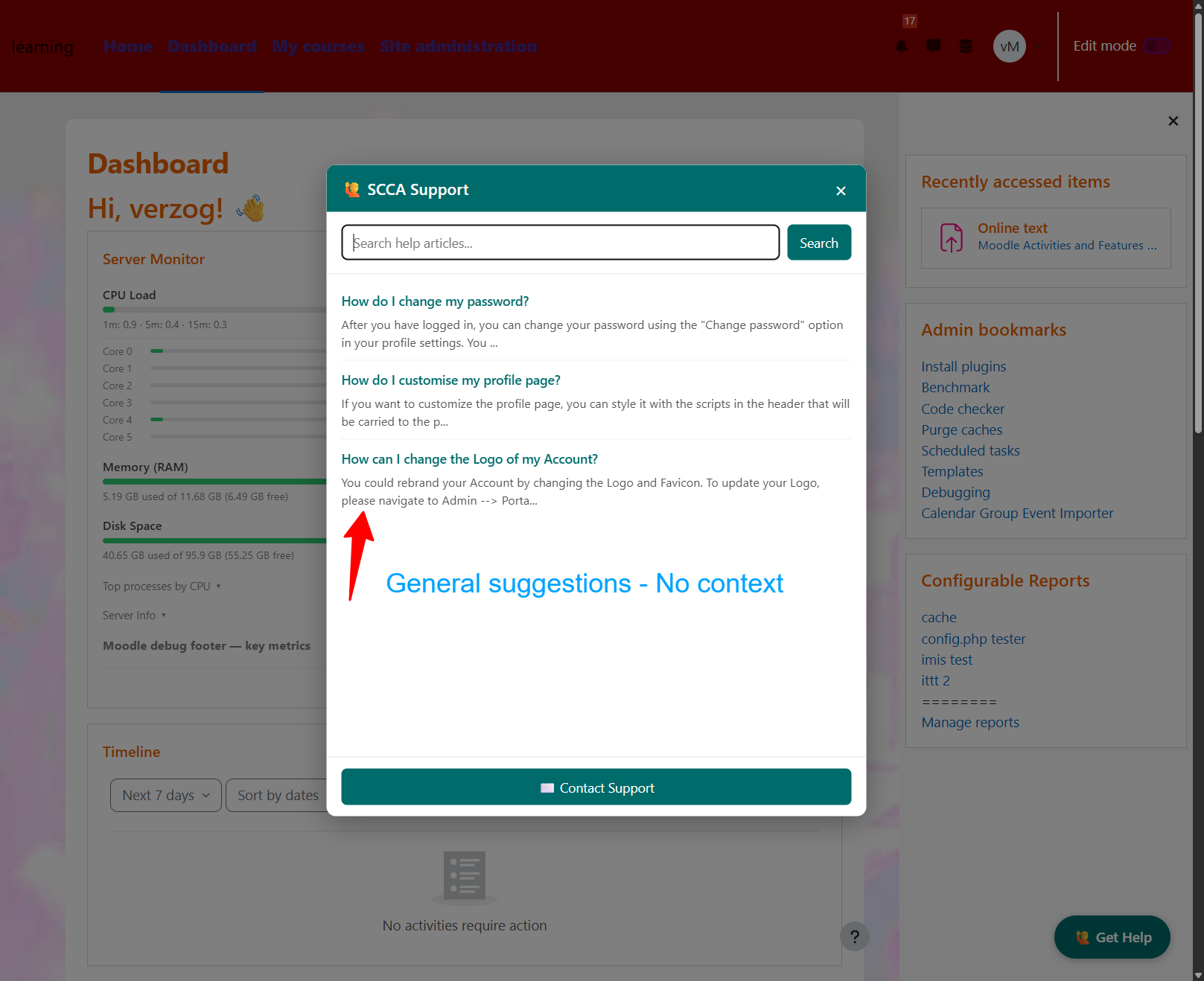
A Moodle local plugin that adds a floating Get Help button to every page, opening a support modal powered by your Freshdesk account.
Features
- Floating Get Help button on every Moodle page
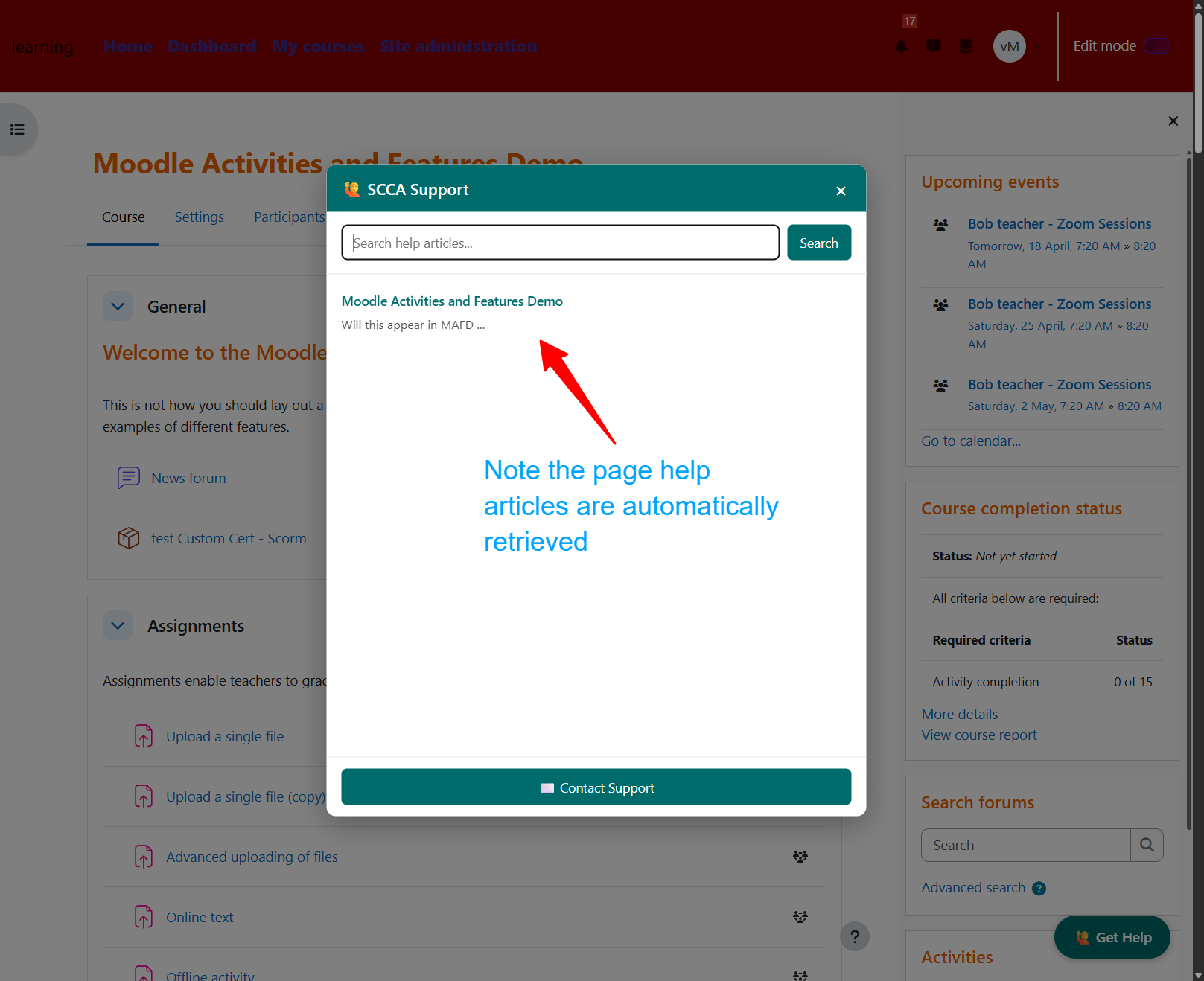
- Auto-suggested articles appear immediately when the widget opens, based on the current course name and activity type (e.g. quiz, forum, assignment)
- In-modal knowledge base search via the Freshdesk API
- Inline article viewer with option to open the full article in Freshdesk
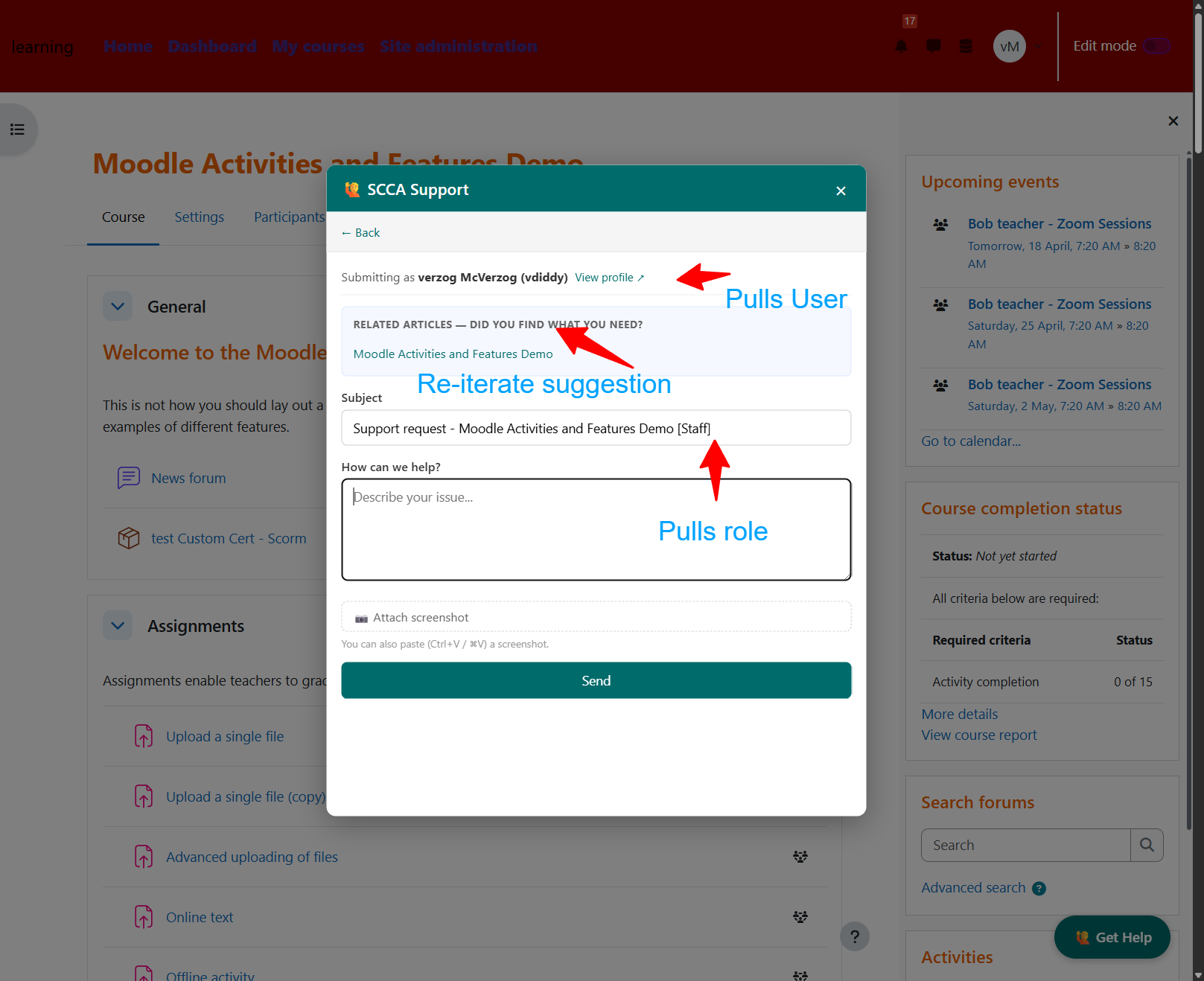
- Native contact/ticket form — no iframe; submits via a Moodle AJAX server-side proxy so the API key never reaches the browser
- Contact form shows the submitting user's full name, Moodle username, and a profile link
- Auto-suggested related articles also appear inside the contact form
- Submitted tickets include page URL, course name, user role, Moodle username, profile URL, and Moodle user ID in the description
- User role detection (Staff / Student) based on Moodle course capabilities
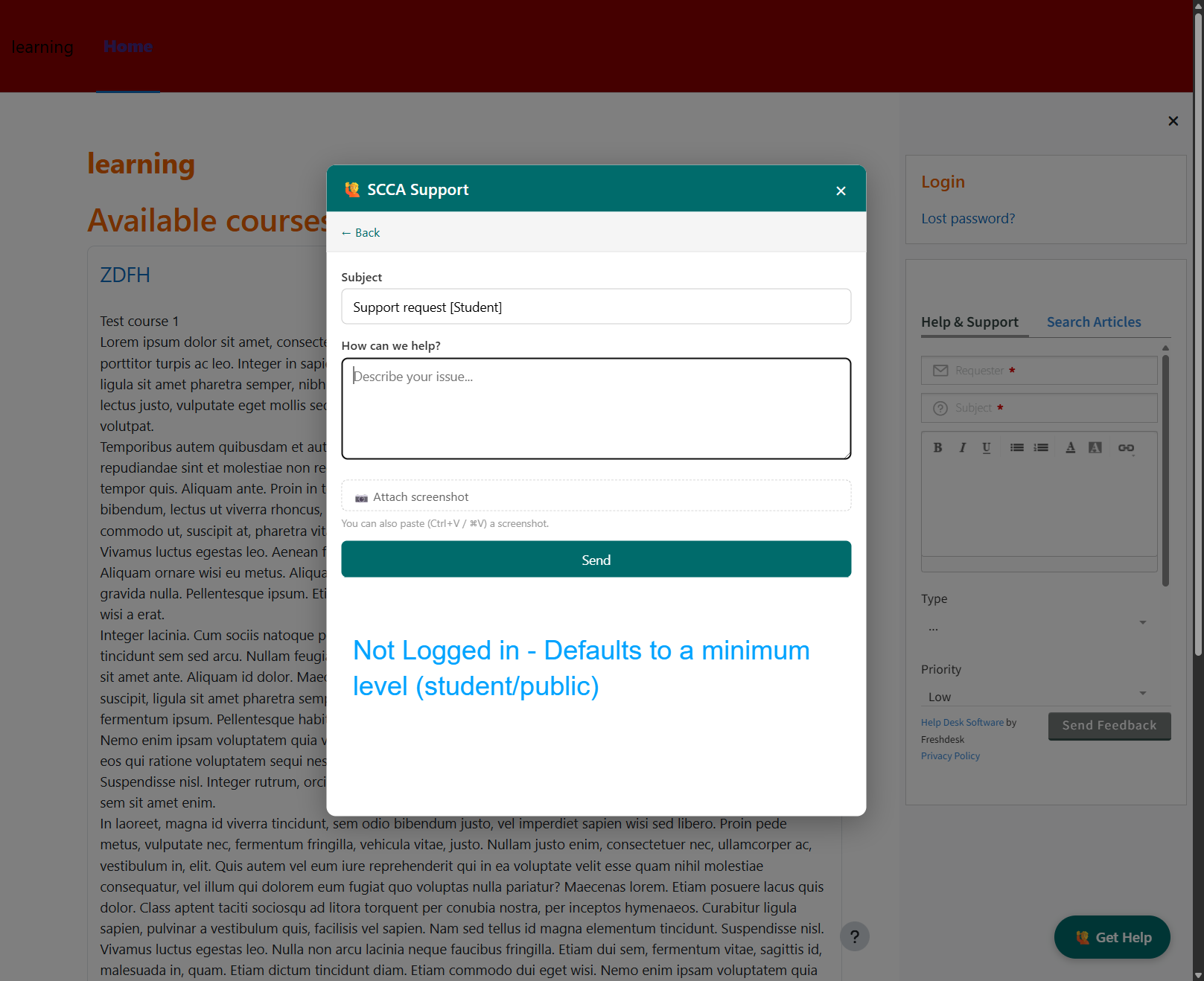
- Tiered access via the
local/freshdesk:use capability — logged-in users get the full in-page widget, guests get a pass-through link to the Freshdesk portal
- Optional setting to hide the widget from site administrators
- Configurable portal URL, API key, and button colour
Requirements
- Moodle 4.5 or later
- A Freshdesk account with API access
Installation
Copy the plugin folder into your Moodle installation:
/path/to/moodle/local/freshdesk/
Log in as a site administrator and go to:
Site Administration ' Notifications
Moodle will detect the new plugin and run the installer.
Go to Site Administration ' Local plugins ' Freshdesk Support Widget to configure the plugin.
Upgrading from v1.x (local_freshdeskwidget)
Prior to v2.0.0 the plugin was named local_freshdeskwidget and installed under local/freshdeskwidget/. To upgrade an existing site:
- Move the plugin folder:
mv local/freshdeskwidget local/freshdesk
- Log in as admin and go to Site Administration ' Notifications to run the upgrade
Moodle treats the rename as a fresh install and runs db/install.php, which automatically detects and copies your existing settings (API key, portal URL, colour, etc.) from the old component name — no need to re-enter them.
Configuration
| Setting | Description | Default |
|---------|-------------|---------|
| Enable widget | Show or hide the widget site-wide | Enabled |
| Freshdesk portal URL | Your Freshdesk account URL | https://thefeaturecreep.freshdesk.com |
| Freshdesk API key | Found in Freshdesk under Profile Settings ' Your API Key | (empty) |
| Widget button colour | Hex colour for the Get Help button | #006B6B |
| Hide for site administrators | Suppress the widget for Moodle admins | Disabled |
Access modes
The widget renders in one of two modes, depending on the viewer's
local/freshdesk:use capability (granted by default to user, student,
teacher, editingteacher, and manager archetypes):
- Full widget (capability granted): in-page modal with knowledge base
search, article viewer, and the contact form. All Freshdesk traffic is
proxied through Moodle AJAX endpoints that re-check the capability
server-side.
- Pass-through link (capability denied — guests, not-logged-in users,
any role with an explicit deny): the floating "Get Help" button is
rendered as a link that opens the Freshdesk portal home in a new tab.
No AJAX endpoints are called, so the proxy attack surface is limited
to authenticated users with the capability.
Site administrators retain full-widget access (subject to the existing
"Hide for site administrators" setting). To customise access, edit
local/freshdesk:use under Site administration ' Users ' Permissions '
Define roles.
Data sent to Freshdesk
This plugin makes outbound HTTPS requests to the Freshdesk REST API at the
configured portal URL. All API traffic is server-side; the API key never
reaches the browser.
| Endpoint | When | Data sent |
|----------|------|-----------|
| GET /api/v2/search/solutions | When the user opens the modal or runs a search | Search term derived from course name / activity type / user input |
| GET /api/v2/solutions/articles/{id} | When the user clicks a suggested article | Article ID only |
| POST /api/v2/tickets | When the user submits the contact form | Name, email, Moodle username, user ID, profile URL, course name, page URL, role label, ticket subject, message, and optional screenshot |
Connection and read timeouts are bounded (5s connect / 10–20s read) so a slow
or unreachable Freshdesk endpoint never stalls a Moodle page. Requests are
rejected at the proxy layer if the configured portal URL is not HTTPS.
The data sent on ticket submission is also declared via the Moodle Privacy API
(classes/privacy/provider.php).
Improving article suggestions
Suggested articles are driven by the Freshdesk knowledge base search API. To maximise the chance of relevant articles appearing:
- Publish articles (drafts are not returned by the search API)
- Set the folder visibility to All Users (not Agents Only or Logged-in Users)
- Add tags to articles matching your course names and Moodle activity types (
quiz, assign, forum, lesson, etc.)
- Keep article titles short and keyword-rich — the search API weights titles heavily
The widget searches with up to two terms simultaneously: the current course full name and the activity type from the page URL (e.g. on a quiz page inside a named course, it searches both Introduction to Moodle and quiz).
Building the JavaScript
The amd/build/widget.min.js file is currently an unminified copy of the source. To generate a proper minified build, run Grunt from your Moodle root:
cd /path/to/moodle

npm install

grunt amd --root=local/freshdesk
File Structure
local/freshdesk/

"── amd/

│   "── build/

│   │   └── widget.min.js                    # Built AMD module (loaded by Moodle)

│   └── src/

│       └── widget.js                        # Source AMD module

"── classes/

│   "── event/

│   │   └── ticket_submitted.php             # Audit event fired on successful submission

│   "── external/

│   │   "── get_article.php                  # AJAX external function (article fetch proxy)

│   │   "── search_articles.php              # AJAX external function (search proxy)

│   │   └── submit_ticket.php                # AJAX external function (ticket submission proxy)

│   "── hook/

│   │   └── output/

│   │       └── before_footer.php            # Hook callback — injects widget config and AMD module

│   └── privacy/

│       └── provider.php                     # Privacy API provider (declares external data flow)

"── db/

│   "── caches.php                           # Cache definitions

│   "── hooks.php                            # Registers the before_footer hook callback

│   "── install.php                          # Sets default config values on install

│   "── services.php                         # Registers AJAX external functions

│   └── upgrade.php                          # Upgrade steps between versions

"── lang/

│   └── en/

│       └── local_freshdesk.php              # English language strings

"── templates/

│   "── help_button.mustache                 # Floating Get Help button

│   └── modal.mustache                       # Support modal markup

"── lib.php

"── settings.php                             # Admin settings page

"── version.php                              # Plugin metadata

└── README.md
Bug reports and contributing
Issues and pull requests are welcome at
github.com/verzog/moodle-local_freshdesk.
When reporting a bug, please include your Moodle version, the plugin
version (from version.php $plugin->release), and the relevant
contents of your browser's JavaScript console.
License
This plugin is licensed under the GNU General Public License v3 or later.
Disclaimer
Freshdesk is a commercial product owned by Freshworks Inc. This plugin is an independent, community-developed integration and is not affiliated with, endorsed by, or supported by Freshworks Inc. Use of Freshdesk requires a separate account and is subject to Freshworks' own terms of service and pricing.