Response Template — Assignment Submission Plugin
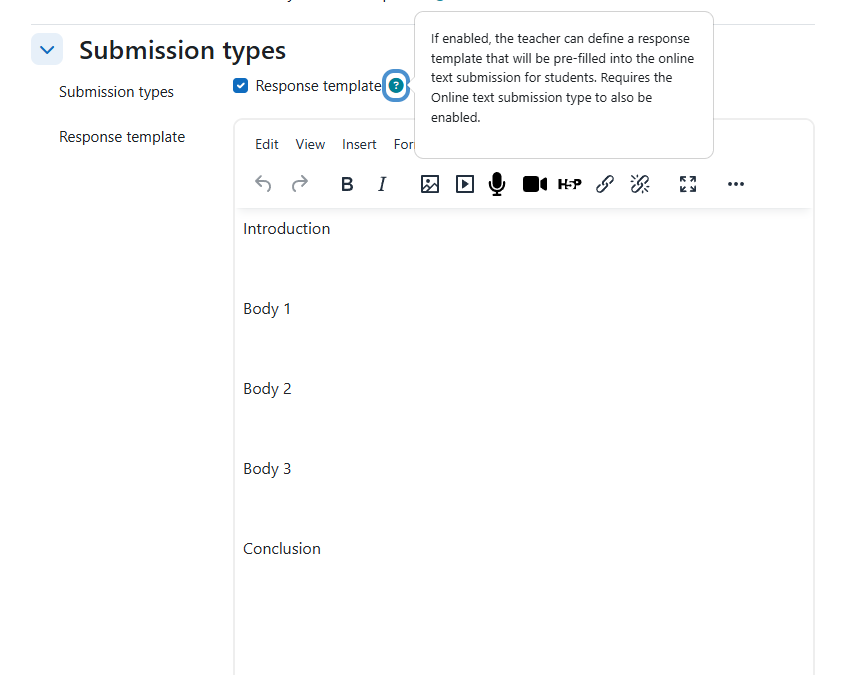
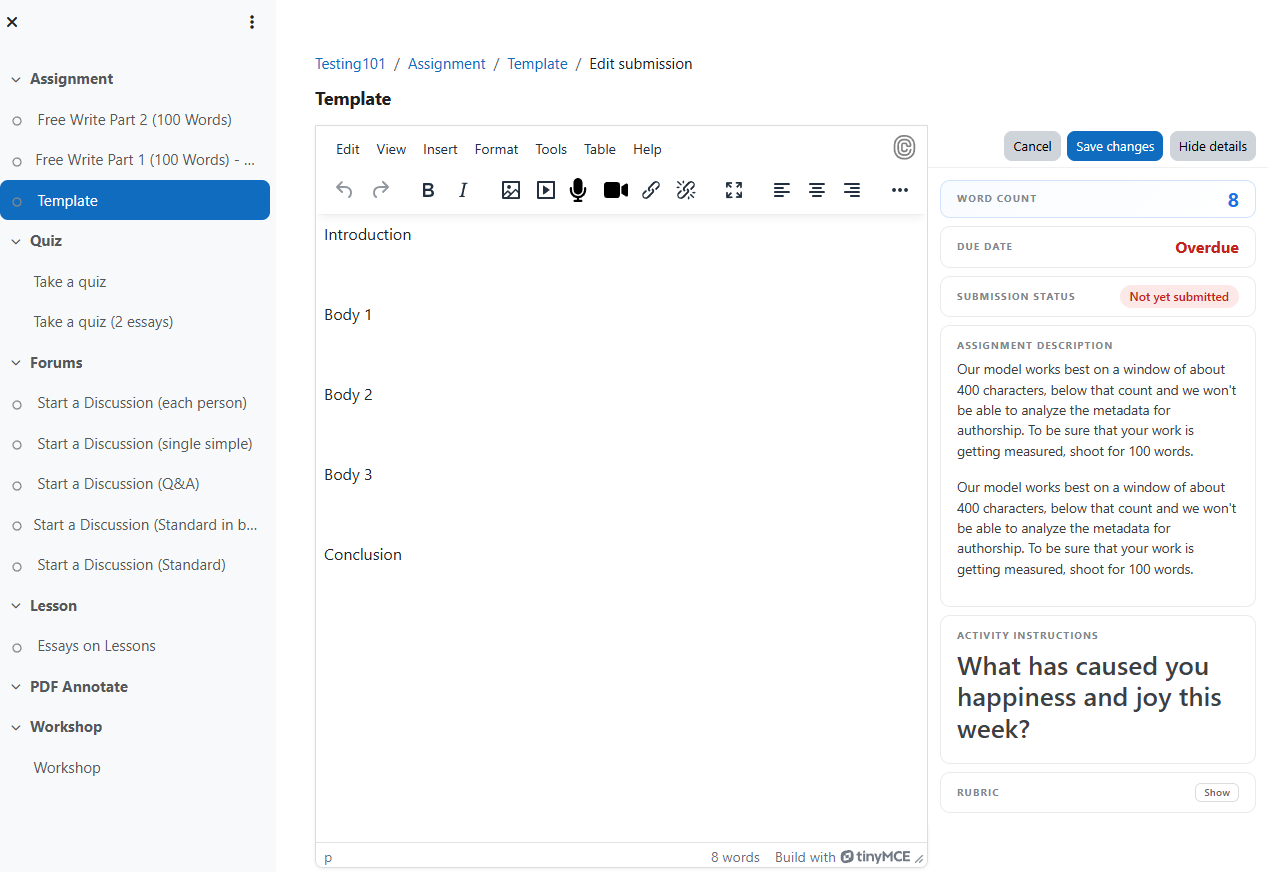
An assignment submission plugin for Moodle that lets teachers define a response template which is pre-filled into the online text editor when students first open their submission.
Use case
Assignment grading and feedback workflows are often better suited than quiz for exam-style scenarios. This plugin brings the "essay question with template" pattern from quiz into assignments — teachers provide structured prompts
(headings, numbered sections, tables) and students fill in their responses.
How it works
- Teacher enables both Online text and Response template in the assignment settings, then writes template content in the WYSIWYG editor.
- Student opens the assignment for the first time — the template appears pre-filled in their TinyMCE editor.
- Student edits, adds their work, and saves/submits as normal.
- On return — if the student already has a saved draft or submission, the template is not re-applied. Their work is preserved.
No core modifications required
Previous versions of this plugin required a patch to
mod/assign/submission/onlinetext/locallib.php. This version works entirely
through Moodle's plugin API.
The plugin registers as a submission plugin with a sort order lower than
onlinetext. When Moodle builds the submission form, it iterates through plugins
in sort order. This plugin runs first and writes the template into the shared
$data->onlinetext property. The onlinetext plugin then picks this up and loads
it into the editor — no core hack needed.
Requirements
- Moodle 4.0 or later (tested against Moodle 4.05 LTS and Moodle 5.0).
- PHP 8.1 or later.
- The Online text submission type must be enabled on the same assignment.
- The plugin sort order must be lower than the onlinetext plugin so it executes
first. This is set automatically on install (sortorder = -1, see
db/install.php).
Tested with

| | PHP 8.1 | PHP 8.2 | PHP 8.3 |
|---|---|---|---|
| Moodle 4.05 (PostgreSQL) | " | " | " |
| Moodle 4.05 (MariaDB) | " | " | " |
| Moodle 5.0 (PostgreSQL) | " | " | " |
| Moodle 5.0 (MariaDB) | " | " | " |
(Confirm against the latest CI run before relying on the badge above.)
Installation
Copy or clone into mod/assign/submission/responsetemplate/ and visit the
Moodle admin notifications page to trigger the database upgrade.
git clone https://github.com/MURBASLMS/mod_assign_submission_responsetemplate.git \

    /path/to/moodle/mod/assign/submission/responsetemplate
Known limitations
- Depends on plugin execution order. The plugin must run before onlinetext
in the submission plugin loop. If an administrator manually reorders plugins
via the database, the template injection may stop working.
- No per-question templates. There is one template per assignment, not per
question or section. For multi-part structured responses, include all parts in
a single template.
- Template is text-only from the student's perspective. Embedded images and
files in the template are copied to the student's draft area, but the student
cannot distinguish template files from their own uploads.
- First load only. Once the student saves any draft (even a blank one), the
template will not re-appear. This is by design to prevent overwriting student
work.
File structure
responsetemplate/

  .github/workflows/ci.yml      — Moodle Plugin CI matrix

  classes/privacy/provider.php  — GDPR: null_provider, no user data stored

  db/install.xml                — Schema for assign_submission_resptemp table

  db/install.php                — Sets sortorder = -1 on first install

  db/upgrade.php                — Schema migrations with savepoints

  lang/en/                      — English language strings

  lib.php                       — File serving (pluginfile callback)

  locallib.php                  — Main plugin class

  tests/                        — PHPUnit tests

  version.php                   — Version metadata
Issue tracker
Report bugs and request features at
https://github.com/joethibault/mod_assign_submission_responsetemplate/issues.
License
GNU GPL v3 or later — https://www.gnu.org/copyleft/gpl.html