Windows Share access (AKA Network Drive Access, SMB Web Client)

Maintained by Guy Thomas
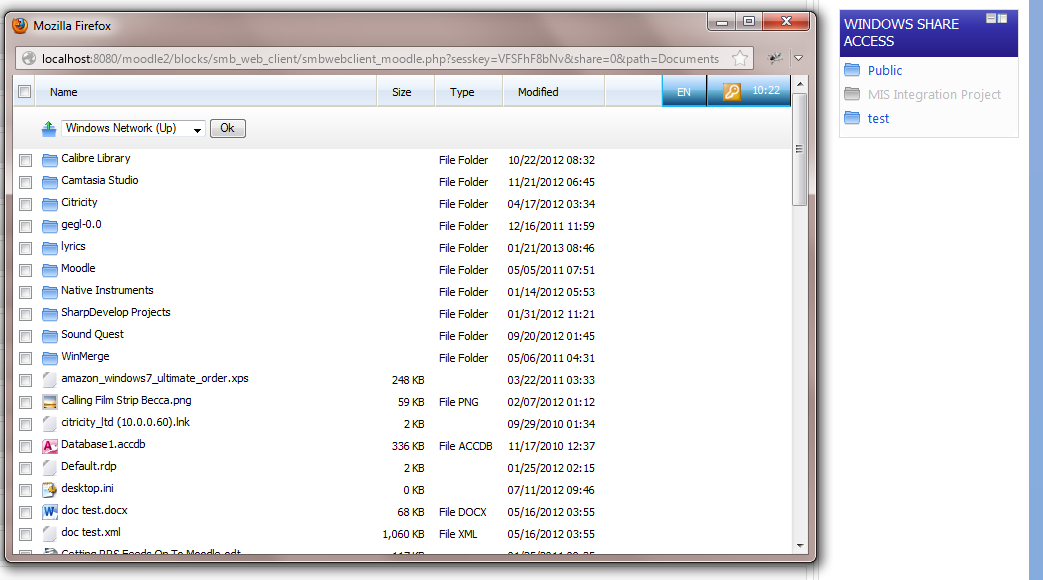
Access windows shares via a Moodle web interface.
Price option: Free

Supports Moodle 2.2-2.7 See all versions
Latest release: 11 years ago
Installations: 14
Downloads (last 90 days): 16

Frankenstyle name: block_smb_web_client
Blocks

Comments

Comments are no longer open for new posts. Existing comments remain available to read.

Martin, if you are happy to give me remote access to your server during a telephone conference I can help you resolve this. Please private message me with your phone number if you want me to get in touch.
Hi Martin. Sounds like it could be an issue with smbclient's ability to work with shares that utilise DFS http://forums.fedoraforum.org/showthread.php?t=274746
Hi Guy. I'm using 2013090300
Hi Martin. What version of the block are you using?
Hi Guy I've increased logging and this is what I got, any ideas
##### START DEBUG MESSAGE #####
file: class_smbwebclient.php
function: Debug
line: 223
Path =
##### END DEBUG MESSAGE #####
##### START DEBUG MESSAGE #####
file: class_smbwebclient.php
function: Debug
line: 1513
file: class_smbwebclient.php
function: _ParseSmbClient
line: 1495
file: class_smbwebclient.php
function: _SmbClient
line: 1242
EXEC CMD ATTEMPT 0 : /usr/bin/smbclient '//domain/FileStore' -c 'dir' -D 'UserData/Staff/username/Documents' -U 'domain/username%****' -d 0 -O 'TCP_NODELAY IPTOS_LOW$
[smbclient]
Domain=[domain] OS=[Windows Server 2012 Datacenter 9200] Server=[Windows Server 2012 Datacenter 6.2]
cd \UserData\Staff\username\Documents\: NT_STATUS_PATH_NOT_COVERED
[/smbclient]
##### END DEBUG MESSAGE ####
Chris - I've replicated the bug and I will consider adding your fix in when I get a chance. Thanks for your contribution - I will credit you in the changelog
I'm not sure Martin. The user prefix should be the short name of the domain with a forward slash - e.g. MYDOMAIN/ If this doesn't work for you then you will need to increase the logging level for the block and then take a look at the logs on the server - on linux normally /var/log/messages
Hi Guy, I have put in the short name and the long name I still do not see any files for either name.
Hi Martin. Its because your home directories are on a different server to the server your user authenticate via. In this case you have to add a domain prefix to the username. The config accommodates these scenarios - just put the domain and a forward slash into the username prefix.
I'm having a problem with my install when I click My Files I get a blank page, if I put a share in //server/share$ then I can access that. Upon inspection our homeDirectory is //domain/filestore/userdata/ if i change that to //server/share$ that I can see the files, what I am doing wrong as I don't want to have to change all the users home directory paths.
Hi Guy.
There seems to be a small problem if you view/create an empty folder in that the dropdown navigation is not displayed (Version 2013090300), this was working in the previous version we used (2012030612).
However the following tweak to the source code seems to resolve the problem, comment out line 773 - $actionbar = $this->ViewForm ($this->type, $style, $headers); and change line 724 from “$line= ‘ ‘; to $line= $this->ViewForm ($this->type, $style, $headers);
Is there any reason not to make these changes to the source code?
Regards
Chris
Can I ask anyone who experiences the 1KB max file size issue to let me know what web server they are using as I can't replicate this on my LAMP stack.
Hi, I've updated to the latest version of this block and while the shares are being authenticated and listed correctly, downloading any file doesn't get past 1KB. Any idea what might be happening?
Leonard Ingle managed to fix his problem with smb client not working on IIS (other than with Firefox) - if you have SMB web client set up to use basic authentication then it wont show the login box if you have site wide authentication switched on in IIS. He explains it as follows: Its in IIS! you have what seems to be three levels of authentication, server-wide, site-wide authentication, so it will authenticate across the whole website, or you can have authentication per folder in moodle, for example for NTLM and auto login, you set windows authentication on the auth folder for it to work, very different when compared to apache. The solution was to keep windows authentication enabled on the auth folder in moodle, but disable it for the site-wide authentication. and re-enable anon login. this then brought the pop-up box on chrome and IE to point to our shares :D but still kept our auto login working internally! and yes you can add this to the page so it may help others if they have this issue aswell!!
Hi,
I've installed this block and managed to successfully configure it on our Windows based server and when I click the share links in the block I correctly see a directory listing. However, the links associated with all of the files and folders point to "C:\blocks\smb_web_client..." rather than my correct wwwroot. I've even tried manually going through all the php files and replacing dynamic calls to $CFG->wwwroot into static values pointing to the full web address, but this seems to have no effect. Is there any reason why this is happening and is there an easy fix?
Thanks