
Drag-and-Drop Matching
Maintained by
DualCube Team
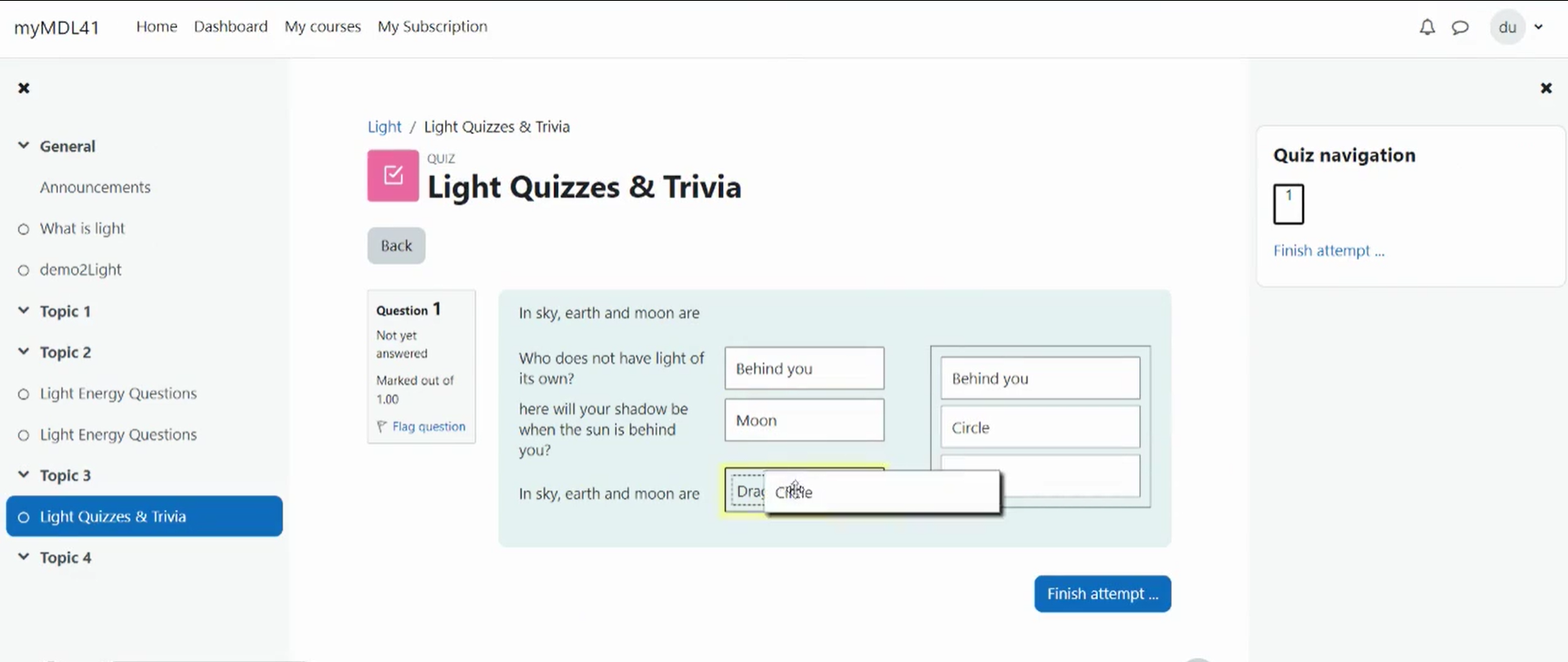
Drag-and-drop matching is a simple solution that is meant to help learners with matching quizzes. The students must simply "drop" their responses into a pre-defined space from the list of options that are available. The drag-and-drop interface makes learning fun and interesting.
Comments
Product ratings and reviews are coming to Moodle Marketplace. Until then, existing comments remain available to read, but new posts have been disabled.
1) We use "Drag-and-Drop Matching" questions with Tex. in 2.6 no one Tex formulae not displaed.
2) "Drag-and-Drop Matching" - several box which student can move with mouse, but in 2.6 this question looks like usual match question - just dropdown list.
is any apgrade panned?
I should have written something about the problem in the readme, but unfortunately I didn't
Thank you so much for your quick response. No worries, I spotted the problem before any of the old courses were removed.
I am looking forward to downloading the updated version! Once again, thanks a million for all the work you put into the ddmatch question type. It's appreciated!
Thanks for reporting this problem. Unfortunately this is not the same problem
I apologize for any inconveniences his may have cused to ddmach users.
I will release a corrected version ASAP but I want to test it before release.
Until this new version is released, don't make any backup of course containing ddmatch questions.
I just added a Moodle Docs page at http://docs.moodle.org/25/en/Drag_and_drop_matching_question_type
and listed this question type in http://docs.moodle.org/25/en/Question_types#Third-party_question_types
I hope you don't mind
The problem in restore of backups should be fixed now, and I have released separated versions for Moodle 2.4 and 2.5 for better adaptation to the changes in the question edit page in Moodle 2.5. Report any problem.
we are having a problem restoring courses: When restoring a course with ddmatch questions from a backup file, it fails with the following error:
—
the table "question_match" doesn't exist
Debug info:
Error code: ddltablenotexist
Stack trace:
line 554 of /lib/dml/moodle_database.php: dml_exception thrown
line 1579 of /lib/dml/moodle_database.php: call to moodle_database->where_clause()
line 197 of /question/type/ddmatch/backup/moodle2/restore_qtype_ddmatch_plugin.class.php: call to moodle_database->set_field()
line 84 of /backup/moodle2/restore_plugin.class.php: call to restore_qtype_ddmatch_plugin->after_execute_question()
line 362 of /backup/util/plan/restore_structure_step.class.php: call to restore_plugin->launch_after_execute_methods()
line 108 of /backup/util/plan/restore_structure_step.class.php: call to restore_structure_step->launch_after_execute_methods()
line 153 of /backup/util/plan/base_task.class.php: call to restore_structure_step->execute()
line 163 of /backup/util/plan/base_plan.class.php: call to base_task->execute()
line 157 of /backup/util/plan/restore_plan.class.php: call to base_plan->execute()
line 315 of /backup/controller/restore_controller.class.php: call to restore_plan->execute()
line 147 of /backup/util/ui/restore_ui.class.php: call to restore_controller->execute_plan()
line 46 of /backup/restore.php: call to restore_ui->execute()
—
we recently upgraded from 2.3 to 2.5 (it was OK in 2.3) Apparently the restore script calls to the old mdl_question_match table, instead of mdl_qtype_match_options
I filed a bug report: CONTRIB-4437 (if my solution is correct, please close the bug report)
However, after reviewing the script "restore_qtype_ddmatch_plugin.php" (in ddmatch/backup/moodle2/), the only reference to "question_match I found was in line 202:
$DB->set_field('question_match', 'subquestions', $subquestions,
So, I replaced "question_match" by "question_ddmatch" as below:
$DB->set_field('question_ddmatch', 'subquestions', $subquestions,
After that, in a test moodle site I created a new course with one ddmatch question and performed the backup / restore without errors.
Since I'm not an sql expert I'd like you to confirm this before I make the change in my production site.
Thanks in advance, Rui ruas
Also there is a hidden feature in Moodle: if you have this question type installed and import question using the Blackboard format, all matching questions are imported as drag and drop matching questions, so you can author your questions in Examview or TestGen, export them as Blackboard files and import them into Moodle, all will be drag and drop questions.
I never documented this feature anywhere, so surely I must write it somewhere.