
Drag-and-Drop Matching
Maintained by
DualCube Team
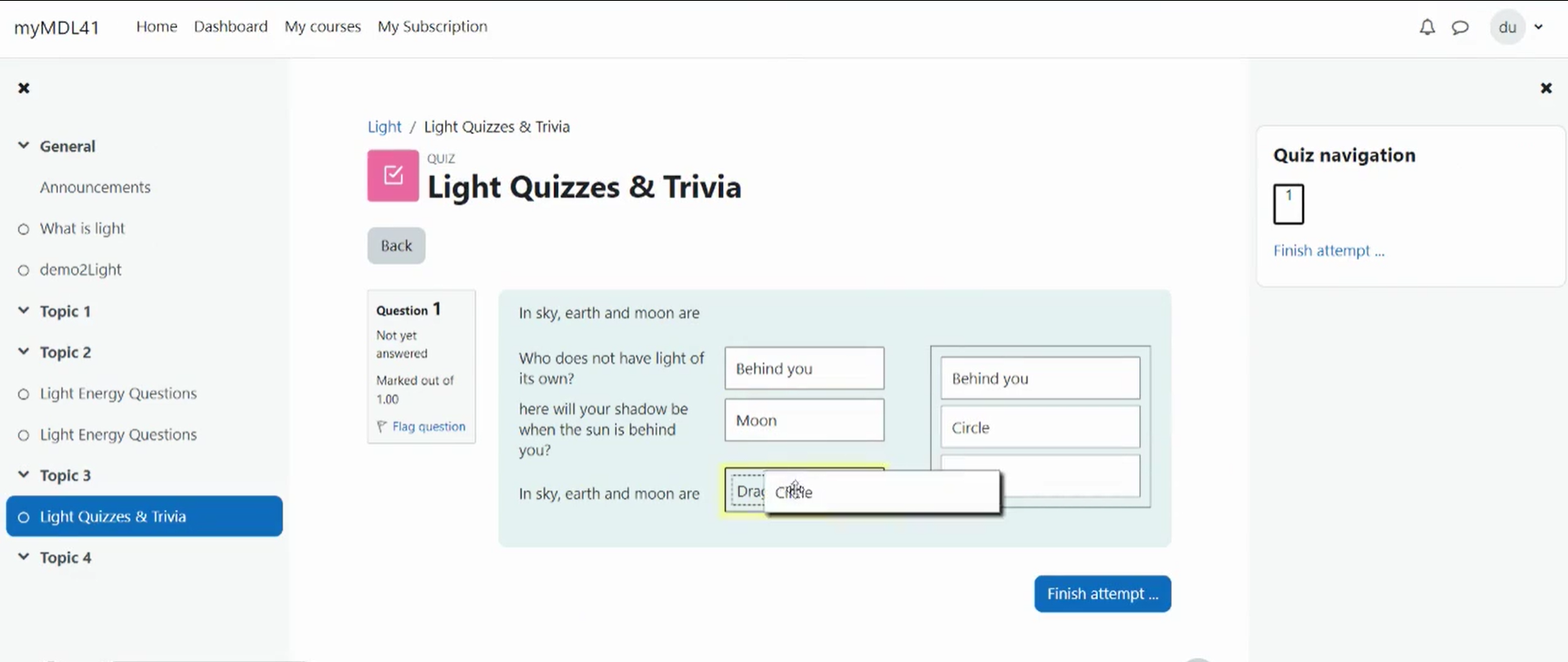
Drag-and-drop matching is a simple solution that is meant to help learners with matching quizzes. The students must simply "drop" their responses into a pre-defined space from the list of options that are available. The drag-and-drop interface makes learning fun and interesting.
Comments
Product ratings and reviews are coming to Moodle Marketplace. Until then, existing comments remain available to read, but new posts have been disabled.
Thanks for the great plugin. i installed it on Moodle 2.9 and so far it works fine.
I came across one bug: If the answer text of the subquestions is longer than 255 characters it throws an error. I changed the DB table qtype_ddmatch_subquestions answertext column to and it seems to work fine. It also allows longer answers
BTW, in a few questions, the sub-questions are dates and the sub-answers are descriptions of events, some of which are longer than 255 characters. It works great with the modification above.
I hope this helps
Will theis plugin be available for moodle 2.9 some time soon?
Thanks,
Przemek
I've actually tried this qtype on a tablet - it works more or less: you just "drag" the right choice to the "Drag answer here" box.
However, when you have a lot of stems and/or choices, and/or you have a lot of text/pictures in choices and stems, the boxes grow big (and so all stems and choices just can't fit to the screen). So you have to scroll WHEN you're dragging the choice - which might be impossible on some devices (well, it was impossible on that low-budget tablet my co-worker lent me: whenever I tried to scroll, the "focus" just "dropped" from the choice currently being dragged. Haven't tested on other devices yet - I'll have to try with a "proper" device with Multitouch, I think).
Well, thought it might be worth sharing this here.
My company is interested in finding someone who would be willing to develop a version of drag and drop as well as matching that offers all-or-nothing grading. We wish to avoid partial grading and from what I gather this is currently not an option with any of the drag and drop or matching question types. We are certainly willing to compensate the developer for their time and in turn would hope the developer would share this with the Moodle community. Do you know how or who I should reach out to for this? Certainly if you are available I would love to discuss further.
Yes images are supported na dcontrary to core matching questions they are supported both in stems (left) and in choices (right). All images are exported and imported correctly using Moodle XML format. For touchscreen devices, I don't know, it would be good somebody test and report.
Does this question type supports input from devices with touch-screen (i.e. smartphones)?
Does it supports export & import of questions with images in body and answers in Moodle XML format?
Sorry for asking here, I couldn't find this information in documentation or discussion thread.
I don't think David is right because "Drag and drop question type" (qtype_ddmatch) is only dependant on "Matching question type" (qtype_match) and is not dependant at all on qtype_gapfill.
So surely this error message is caused by something else than the "Drag and drop matching question".
Maybe you have installed another question type than is dependant on qtype_gapfill ?
Go to Site Administration -> Plugins -> Plugins overview
Scroll to question types section and look at what question types are dependant on qtype_gapfill and what question types are missing.
It sounds similar to my problem. See Jean-Michel's advice above (18 Nov 2014, 5:06 PM), but looking for a Missing from disk error by qtype_gapfill.
The qtype_match Standard is indicated as Missing from disk. I reinstalled it from the latest mdl 2.7 package, and everything is working again.
Thanks for walking through this with me. I'm happy that the questions are accessible again, although a little concerned about how the qtype_match directory disappeared.
The error in your second message is just the sign that the plugin was not properly installed, which is quite understandable as you said "Following up my previous message, I disabled the ddmatch folder so I could get past the plugin overview (update) screen. "
So I think we should focus on your first problem: why can't the install of qtype_ddmatch work ? I am mystified that you are the second user reporting that qtype_match can't be found. It's very unfortunate that back in August we have not found why Steven had this problem.
So lets try to solve it properly now so that your install of qtype_ddmatch can succeed and I am sure that the other problem will vanish once it is properly installed.
I am assuming you use Moodle 2.7.x and language is set to English in my explanations
Go to Site Administration -> Plugins -> Plugins overview
Scroll to question types section and verify you see a line like
Matching qtype_match Standard 2014051200 enabled
If you don't see it or if it is disabled then you have found a problem
I your version is different copy the version number so that I can see if something is wrong.
In the rightmost column you should see what other plugins require this plugin, you should see qtype_randomsamatch and maybe qtype_ddmatch
Once this is verified, we will try other tests to find what is wrong.
When I re-enabled ddmatch, and tried to access the quiz question with ddmatch, I got the following debug messages:
Debug info:
Error code: codingerror
Stack trace:
line 95 of /question/engine/bank.php: coding_exception thrown
line 831 of /lib/questionlib.php: call to question_bank::get_qtype()
line 862 of /lib/questionlib.php: call to _tidy_question()
line 153 of /mod/quiz/attemptlib.php: call to get_question_options()
line 163 of /mod/quiz/locallib.php: call to quiz->load_questions()
line 178 of /mod/quiz/startattempt.php: call to quiz_start_new_attempt()
I don't know if it is related, but I reported another question type error this week: https://moodle.org/mod/forum/discuss.php?d=275019
-- Could there be a link?
I am getting an error with a drang-and-drop matching question. It worked until ... recently. I upgraded the plugin to the current 2014110900 release, but in the plugin overview, it indicates that qtype_match (2013050100) is missing.
This was previously reported and addressed by Steven Long and yourself (20 Aug 2014).
Has something broken in the connection between the drag-and-drop match plugin and the core qtype_match ?