
Drag-and-Drop Matching
Maintained by
DualCube Team
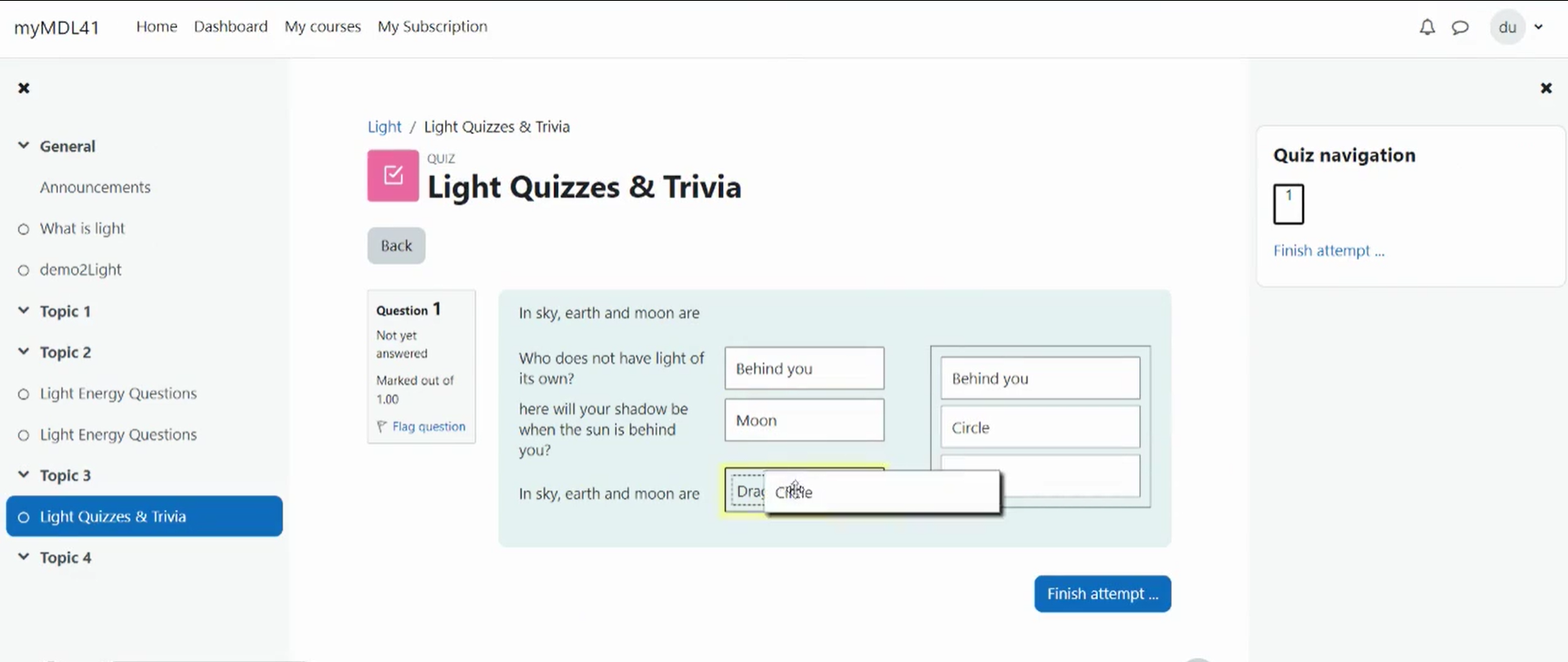
Drag-and-drop matching is a simple solution that is meant to help learners with matching quizzes. The students must simply "drop" their responses into a pre-defined space from the list of options that are available. The drag-and-drop interface makes learning fun and interesting.
Comments
Product ratings and reviews are coming to Moodle Marketplace. Until then, existing comments remain available to read, but new posts have been disabled.
Thanks for getting in touch with us. Unless you drag and drop an answer, it won't take an answer by itself.
So, you have to drag the right or wrong answer and drop it at the dropping field so that it recognizes what you have selected.
Thank you.
I have problem with drag and drop matching plugin.
If my answer already placed in front of question and I submit the quiz in this case it showing message "Your answer is incorrect".
Ex. My question have 2 options
If by default question populate like this
Question1 = Answer1
Question2 = Answer2
After submission it is always showing "Your answer is incorrect." while my answer is correct.
These bad data were created by a backup/restore or duplicate problem.
@PAGEVIEWBYID and a lot of other expressions surrounded with @ are used during backup/restore
Most probably the faulty questions come from another Moodle course or from a restored course, and of course these expressions should have been decoded during restore.
So i don't understand why these data were left undecoded in the question text.
I had an error when trying to duplicate a quiz : error/error_qtype_ddmatch_subquestion_missing_in_db
This was thrown by question/type/ddmatch/backup/moodle2/restore_qtype_ddmatch_plugin.class.php function process_match($data)
After investigation, $data->questiontext value was something like $@PAGEVIEWBYID*12345@$ instead of http://mywebsite/mod/page/view.php?id=12345 in the database which explain why the test if(!isset($this->questionsubcache[$data->questiontext][$data->answertext])) failed
I patched it like that :
if (!isset($this->questionsubcache[$data->questiontext][$data->answertext])) {
$pattern="#\\$\\@PAGEVIEWBYID\\*([0-9]*)\\@\\$#";
$replacement="https://mywebsite/mod/page/view.php?id=$1";
$data->questiontext=preg_replace($pattern, $replacement, $data->questiontext);
$data->answertext=preg_replace($pattern, $replacement, $data->answertext);
if (!isset($this->questionsubcache[$data->questiontext][$data->answertext])) {
throw new restore_step_exception('error_qtype_ddmatch_subquestion_missing_in_db', $data);
}
}
This patch seems to work, but i don't know why my $data contains bad data :s. Have you any idea of the origin of this "value" $@PAGEVIEWBYID*12345@$ ?
If i have time i will try to investigate more, but it was also looking like it goes through all questions of all quiz in the course to duplicate only one quiz with two question (which was not looking efficient when there is a lot of small quiz in the course :s)
Thanks for reaching us. We have no such type of extension for the plugin, you can do either point 1 or 2.
1.Please go to Dashboard / ► Site administration / ► Language / ► Language customisation / ► choose your language / ►click the button "Open language pack for editing" / ► click the button "Continue" / ►select "qtype_ddmatch.php" / ► add "your text" into the box of "Local customisation" / ►then click the button "Save changes to the language pack".
2.Please go to "Your moodle directory"/question/type/ddmatch/lang/en folder copy the qtype_ddmatch.php file then back to "lang" folder and create an folder named as "es" then paste the file into "es" folder. After that replace all the string with Spanish language.
Thanks and Regards,
Arindam
Regards,
Arindam
I am not sure that Dualcube Team solution will work, here is why : In Moodle 2.2 there was a big change : Tim Hunt completely changed the question engine and to take this into account all question type have an upgrade script to upgrade their data to the new question engine. Fortunately I have added this kind of script to the ddmatch question type (it is in question/type/db/upgradelib.php) But I don't know if it will be executed after upgrading to Moodle 3.2 when Konrad will install the new version of ddmatch.
So my best advice is NOT to do this on your production server because there is a risk to loose all existing ddmatch data ! You need to Install a copy of your server and test if the upgrade is successful on this copy first. If it works then you can do the upgrade on your production server.
I tried to look if I can find any old version of ddmatch for Moodle 2.2 but my search was unsuccessful and I can't remember what I did when I upgraded to Moodle 2.2 (this is several years old and my memory is not good
If this method doesn't work the only way to solve Konrad's problem would be to start from the oldest version of ddmatch in my github (https://github.com/jmvedrine/moodle-qtype_ddmatch) and edit it so that it can work with Moodle 2.2. This would surely be doable but would require some knowledge of the changes between Moodle 2.2 and 2.4 (only minor changes if I remember correctly), of course you will also need to edit version.php so that Moodle 2.2 accept this version of the plugin.
Unfortunately I am not able to do this work.
Unfortunately, this plugin supports Moodle V2.4.1 to moodle V3.2. There is no support for V2.2.
You can update your moodle from your version to latest version i.e., 3.2. After the Moodle up-gradation you can install the this version of Drag-and-drop Matching.
Let me know for any further clarification.
Thanks and Regards,
Arindam
You can send us the ZIP package to our official email address admin@dualcube.com
Thanks and Regards,
Arindam
The version of this plugin for Moodle 1.9 was maintained by Adrian Boyd, but I think nobody is maintaining it since many years.
I began to maintain this plugin with Moodle 2.2 or 2.3, I don't remember exactly.
This problem is fixed in all the recent versions of this plugin (I fixed it when it was fixed in the match qtype).
To my best knowledge there is no github repository for the 1.9 version and I erased all files related to Moodle 1.9 long ago. Sorry.
I think that apart from creating your own github repository there is no way to submit your fix.
This plugin supports from Moodle version 2.4
Please visit this link: https://moodle.org/plugins/pluginversions.php?plugin=qtype_ddmatch
Thanks and Regards,
Arindam