Enrol by user profile fields
Maintained by
Nicolas Dunand
This plugin allows users to be enrolled according to any value stored in their user profile.
Comments
Product ratings and reviews are coming to Moodle Marketplace. Until then, existing comments remain available to read, but new posts have been disabled.
This is a limitation of this plugin, it only works using custom profile fields (i.e. the one(s) you created yourself). So no standard fields can be used.
The default role only shows one profile field - and it's the one that I created "Profile Fields" - it doesn't allow me to choose any other profile field, nor does it allow me to choose anything further. I do have the plugin enabled as well. If I could attach as screen cap it might explain better what I'm seeing, but I don't have that option here.
In the main plugin settings, you have to set the "Default role" and at least one item in Profile fields to be used in the selector". Is that the case ?
Then, under your Moodle administration, under "Manage enrol plugins", make sure this plugin is enabled.
After that, you should have the option to add this enrolment method to any of your courses.
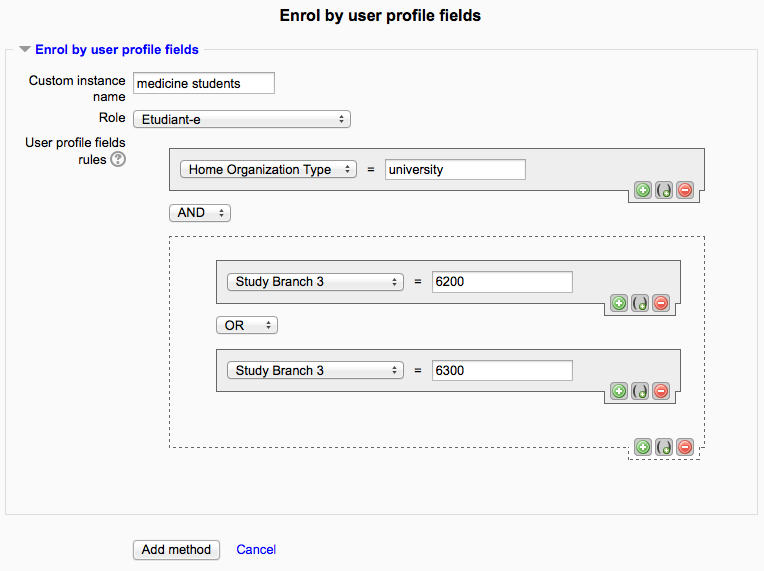
Thanks for your feedback. You can use two (or any number of) conditions by cliking the "+" sign to add a condition. However, this plugin currently only checks for equality (i.e. if some attribute is equal to a value). You would need to check for a value smaller than another (i.e comparing dates), which is not possible at the moment.
This could probably be programmed quite easily but I really don't have any time to do this in the foreseeable future. If you could come up with a code change providing this feature, I'd be happy to integrate it.
It says "If you don't select any role here, this makes the plugin moot and hence disables its use in courses.
The feature below may however still be used in this case."
Any idea what I'm doing wrong??? The option isn't offered in the courses either.
My screen certainly doesn't look like your screen cap in the description either.
Thanks
First of all, plug in is GREAT!
Can I use two conditions? I have two custom fields, one is starting day of work and I want enroll users started working BEFORE some day.
Second, i have another custom field, employed, or not.
Can you help?
A very good usage of this plugin indeed ! It should work but it appears that the space is causing some problem.
When you display the rule editor when editing an existing rule, the plugin should display debugging information at the bottom of the page. Could you send me those? (preferably via private message)
I'm trying to use the pluggin to enrol users by a city of a region, in the User profile fields rules I set firstly the "Region" field, then I added a field "autoenrol" in order to be able to unenrol users and finally I added group of fields where I put several cities. It looks like this:
Enrol if: (region=metropolitana)AND(autoenrol=1)AND((city=santiago)OR(city=La Pintana)OR(city=melipilla))
Everything works good, but when I use city named with two word like "La Pintana" the pluggin does't work.
Can you help me?
So your enrolment instance seems to be set up correctly. If you don't click the button, users will be enrolled when they log in.
what if you use the "Force enrolments" button, does it work on these users?