Enrol by user profile fields
Maintained by
Nicolas Dunand
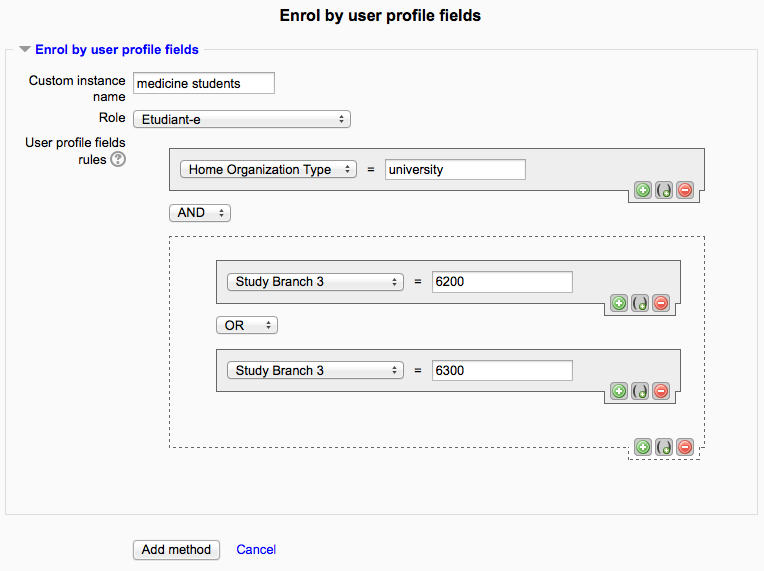
This plugin allows users to be enrolled according to any value stored in their user profile.
Comments
Product ratings and reviews are coming to Moodle Marketplace. Until then, existing comments remain available to read, but new posts have been disabled.
Thanks for the prompt reply!
Unfortunately Andrew's method doesn't work for my use case. Maybe I should explain why. I create a Moodle course on my website for an outside agency and they have their employees register and enrol by distributing a key code to enter into a custom profile field at registration, and they are enrolled by using your great module.
If the key is is compromised (distributed outside of the agency) or enrolment is closed, I change or remove the key. If I re-enrol everyone now, they won't be re-enrolled because the old key still in their user profile field is no longer valid.
Additionally, people can auto-enrol in an additional course by changing their profile field to the code for that new course. But they correctly remain enrolled in the first.
Sometimes people need to be removed from a course, eg. if they upgrade to a better course. So I do need to be able individually to unenrol people.
But I figured out how to enable the feature I need, if you have any comments or can see something I've missed, please let me know - for anyone else, here's what I did:
Add the following code to enrol/attributes/lib.php:
[code]
public function get_user_enrolment_actions(course_enrolment_manager $manager, $ue) {
$actions = array();
$context = $manager->get_context();
$instance = $ue->enrolmentinstance;
$params = $manager->get_moodlepage()->url->params();
$params['ue'] = $ue->id;
if ($this->allow_unenrol_user($instance, $ue) && has_capability("enrol/attributes:unenrol", $context)) {
$url = new moodle_url('/enrol/unenroluser.php', $params);
$actions[] = new user_enrolment_action(new pix_icon('t/delete', ''), get_string('unenrol', 'enrol'), $url, array('class'=>'unenrollink', 'rel'=>$ue->id));
}
return $actions;
}
public function allow_unenrol_user(stdClass $instance, stdClass $ue) {
return true;
}
[/code]
We also need to add the new capability enrol/attributes:unenrol so add the following code to enrol/attributes/db/access.php:
[code]
/* Unenrol anybody (including self) - watch out for data loss. */
'enrol/attributes:unenrol' => array(
'captype' => 'write',
'contextlevel' => CONTEXT_COURSE,
'archetypes' => array(
'manager' => CAP_ALLOW,
'editingteacher' => CAP_ALLOW,
)
),
[/code]
Bump the version number in enrol/attributes/version.php:
[code]
$plugin->version = 2017012501;
$plugin->requires = 2014051200; // Moodle 2.7
$plugin->component = 'enrol_attributes';
$plugin->release = '2.4.1.1 for Moodle 2.7-3.2 (build 2017012501)';
$plugin->maturity = MATURITY_STABLE;
[/code]
Then visit the site admin notifications page to install the new capability in the db.
That all seems to work ok.
For a much simpler way, see Andrew Shaw's explanation of how he's dealing with this on his April 25 comment.
Thank you for your module which is working very well.
However I now very badly need to be able manually to unenrol individual users who have previously been enrolled by profile field.
>>One could: 1. add the unenrol feature (relatively easy) and 2. deactivate the automatic enrolment (i.e. via cron and upon login) to leave only the "Force enrol" option.
So a user who has completed the course can be unenrolled by:
1. changing the value in the profile field that enrolled them
2. manually unrolling them
Can you suggest the code changes to enable part 2. of this? How can I help you implement this feature?
Thank you again
It indeed looks like it's the best solution in your case.
I have been testing this checkbox method and it seems to work well.
Yes, it's a hidden user profile field which defaults to being checked (I simply named this "auto-enrol"). I then add this checkbox as a requirement for all enrollments using this plugin, so if we ever want to exclude a certain user from auto-enrollments we can just go into their profile and untick this checkbox. It does mean, however, that we then have to manually enrol them on all courses which are still needed and were previously auto-enrolled but there's not that many exceptions so it shouldn't be too much work to manually do.
The other option I thought of would be to create hidden checkboxes as user profile fields for every course and then you would apply the relevant one to the plugin rule. Then when you don't want a particular course you just untick the checkbox relating to that course/rule then the remaining courses which were enrolled using this plugin would remain. you would have A LOT of tickboxes if you had many courses though, which is the only downside. We unfortunately do so I went with the one tickbox option above.
I'm not sure I see where you would put this checkbox. In the user's account?
My first idea (although I haven't thought it through, really) would be the following.
One could: 1. add the unenrol feature (relatively easy) and 2. deactivate the automatic enrolment (i.e. via cron and upon login) to leave only the "Force enrol" option.
Then you could (either once at the beginning of the course or periodically if needed)
1. force enrol -> would enrol all users corresponding to the rule
2. unenrol some users
I'm thinking about adding a checkbox for "auto-enrol" and unticking it when we have exceptions (making the check box a requirement for this plugin), which will then unenrol the user when unticked.
If a user profile field changes and they are unenrolled using this plugin, will it keep the course/activity if we manually re-enrol them?
No, there is not way to do that at the time. Plus, if you could unenrol that user, he would be reenrolled later on if his attributes still match the rules.
Is there a way to manually unenrol a user after they are auto enrolled using this plug-in? I can't seem to find a way to do this.
We have some users who are exceptions to the rules but these are not definable via the profile fields so initially a user will get the training then if we discover that they do not need that particular course then we would have to just manually unenrol them.
Thanks,
Andy
Thanks for your reply.
All 4 fields are definitely set when the account is created, we've tested all possible ways of creating an account (manually -user, manually- admin, bulk upload) all of which have the same outcome.
Our 4 profile fields look like this,
Field1 – 1 option
field2 - 10 options
field3 - 3 options
field4 - 3 options
Thanks for reporting this. Is it possible that in some way the 4th profile fiels – is it always the same? – would not be set when the user first creates his account?
We're having issues with auto enrolments when the criteria is slightly more complex, we're using Moodle 3.0.1 and are trying to auto enrol using 4 custom profile fields. I've set the requirements, but when a user creates an account they are not automatically enrolled. However if i go into the settings and select "force enrolments" the desired users are enrolled. This only seems to happen when all 4 critieria are required, my other courses with 3 or less are all fine. Anyone got any ideas?
I'll make sure this is corrected in the next release – probably for when Moodle 3.3 gets released.
I was using the default theme that come with the 3.2 version, which is "Boost". After your comment I changed it to the "Clean" theme and the pluging now look's good. Thanks a lot!!!!