Enrol by user profile fields
Maintained by
Nicolas Dunand
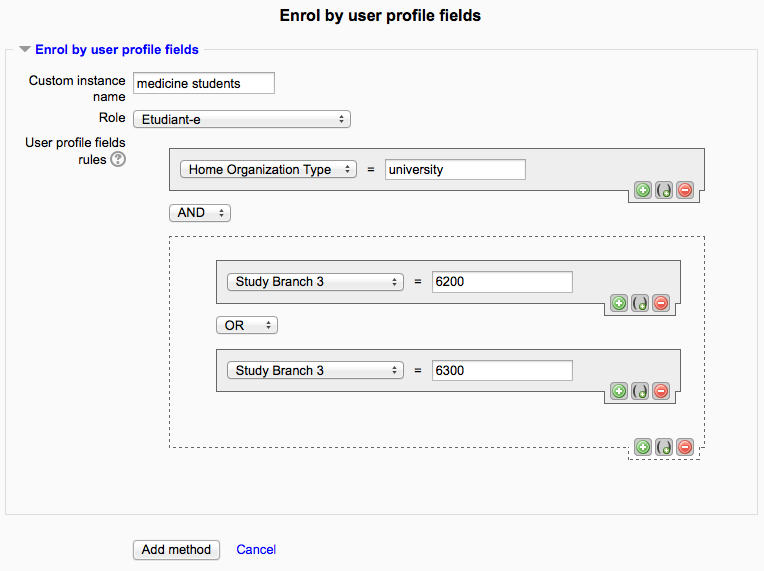
This plugin allows users to be enrolled according to any value stored in their user profile.
Comments
Product ratings and reviews are coming to Moodle Marketplace. Until then, existing comments remain available to read, but new posts have been disabled.
There are a couple spots in edit.php, but that's the only file that needs patching. The upcoming release addresses this issue, and you won't have to patch it anymore.
The cron function is in lib.php.
I need to check something with you that you answered for me previously.
You said.....
The enrollments are processes as follows:
a.) When a user logs in, all rules are check to see whether any apply. If so, the user is enrolled in any relevant courses before arriving on the landing page.
b.) There is a cron job running every 6 hours (because this is heavier lifting) to check for all rules, enrolling any users that need to be enrolled.
So I have now.....
Just applied your plugin to a moodle v3.1 and configured it just as I did in moodle v3.0
My tables are prefixed mood_ and not mdl_ so I changed your edit.php file to match
But my user isn't logged in as per a) above. Maybe there are other references to mdl_ I need to change, please advise
also with regards b) what is the name of the cron job that runs?
Many thanks in advance.
Peter
I see. This is likely because this plugin only works with additional profile fields – so the only fields you could select here would be some of these. To define additional profile fields, go to Site admin > Users > Accounts > User profile fields.
I'm not sure if I'm having a dense moment but I'm assuming you're referring to Site admin > plugins > enrolments > Enrol by user profile or did you mean something else?
This is all I get on that page:
To activate the plugin you have to check its settings (in the Administration block -> Site Administration -> Plugins -> Enrolments) and make sure at least one field is selected.
Sorry for being too late to help, and glad that Peter could help. Could you please write down a couple lines here to help me locate the issue, so that I could improve the plugin ? It could also be beneficial to other users that could be stuck with the same issue.
Thanks,
Nicolas
From our testing, the current version fully supports Moodle 3.1. I'll release an update in the coming weeks, providing official Moodle 3.1 support.
Sorry I was away for a few weeks. Thanks for your feedback.
Actually, the HTML editor does have this drawback. The solution for such fields is to use a field of type "text input" instead of "text area". I actually didn't think of the case when people would use a text area to store these values.
The enrollments are processes as follows:
a.) When a user logs in, all rules are check to see whether any apply. If so, the user is enrolled in any relevant courses before arriving on the landing page.
b.) There is a cron job running every 6 hours (because this is heavier lifting) to check for all rules, enrolling any users that need to be enrolled.
Cheers,
Nicolas
Cheers.
1. A student that has the correct text in the 'text entry' profile field, does not get enroled.
I noticed that the text editor I was using was wrapping my profile field entry like this in the database
course1
This lead to a failure to find the entry and therefore enrol the user.When using the plain text editor, or removing the characters from the entry, ( i.e. use 'course1' ) the users were enroled.
Nice plugin though. Thanks Nicolas.
2. When I have multiple profile fields created and then add additional enrolment methods to the same course, the drop down in the plugin only shows a single profile field to select from, rather than allowing me to select a different profile field for my second enrolment method.
So you need to select all of the fields you want to use in the plugin configuration, and then all are displayed in dropdown.