Enrol by user profile fields
Maintained by
Nicolas Dunand
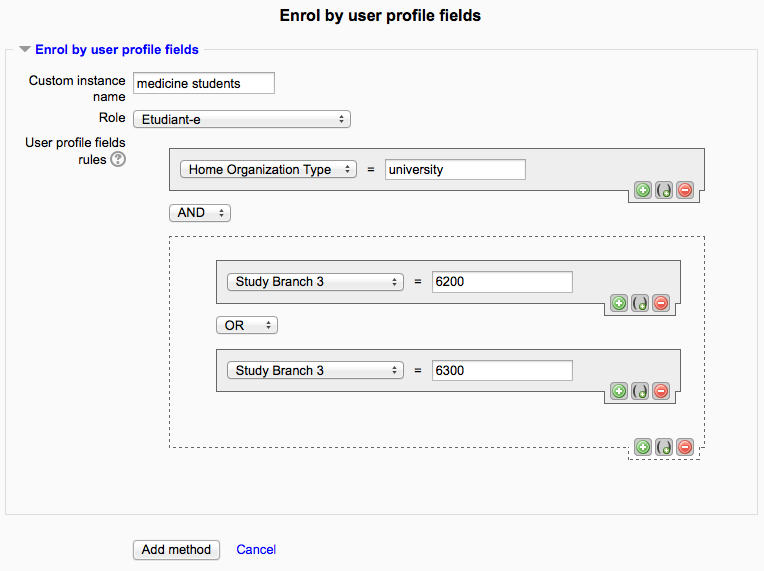
This plugin allows users to be enrolled according to any value stored in their user profile.
Comments
Product ratings and reviews are coming to Moodle Marketplace. Until then, existing comments remain available to read, but new posts have been disabled.
I've installed your plugin in moodle version 3.0.
Setup follows your instruction i.e. plugin activated, enrolment method applied to course, custom profile field created.
When I setup the enrolment method I can see the profile field, and then select the course group that I want to enrol the users into.
I have two issues.
1. A student that has the correct text in the 'text entry' profile field, does not get enroled.
2. When I have multiple profile fields created and then add additional enrolment methods to the same course, the drop down in the plugin only shows a single profile field to select from, rather than allowing me to select a different profile field for my second enrolment method.
Have I missed something?
Cheers.
For example: I get employee no from Active Directory. I'd like to enroll all users whose employee no is greater then some value to a course.
This is the debugging message:
customtext1= stdClass Object ( [rules] => Array ( [0] => stdClass Object ( [param] => Job [value] => Personal Trainer ) ) )
line 95 of /enrol/attributes/edit.php: call to debugging()
fieldsandrules= Array ( [customuserfields] => Array ( [1] => job [8] => clubname [9] => hspcanumber ) [rules] => Array ( [0] => stdClass Object ( [param] => Job [value] => Personal Trainer ) ) )
line 97 of /enrol/attributes/edit.php: call to debugging()
arraysql= Array ( [select] => [where] => )
line 99 of /enrol/attributes/edit.php: call to debugging()
sqlquery= SELECT DISTINCT u.id FROM mdl_user u WHERE
line 102 of /enrol/attributes/edit.php: call to debugging()
For some context. The custom profile field has the shortname "job" and the fullname "Job Description". One of the Job Descriptions you can select from the dropdown is "Personal Trainer". The other two fields (i.e. 3 in total) are Clubname and Hspcanumber. Job Description and Clubname are compulsory fields and hspcanumber is not, however in the settings for your plugin, I specifically selected "Student" as the role and "Job Description" as the field.
Can you make sure to turn debugging display on, the go and display the faulty enrolment instance, and report back with the debugging text displayed beneath the form (the debugging text should begin with "customtext1 = ...").
You have to add an instance of this enrolment plugin to a course to use it. See for instance https://docs.moodle.org/30/en/Enrolment_methods#Managing_enrolment_methods
I am using Moodle 3.0.1 and as previous comments have stated, I too am having the "Error reading from database" error along with the following debug message when I go into my course>users>enrollment methods>instance name:
Debug info: You have an error in your SQL syntax; check the manual that corresponds to your MySQL server version for the right syntax to use near '' at line 1
SELECT DISTINCT u.id FROM mdl_user u WHERE
[array (
)]
Error code: dmlreadexception
Stack trace:
line 443 of /lib/dml/moodle_database.php: dml_read_exception thrown
line 1080 of /lib/dml/mysqli_native_moodle_database.php: call to moodle_database->query_end()
line 103 of /enrol/attributes/edit.php: call to mysqli_native_moodle_database->get_records_sql()
Along with:
Exception encountered in event observer 'enrol_attributes_plugin::process_login': Error reading from database
line 1080 of /lib/dml/msqli_native_moodle_database.php: call to moodle_database->query_end()
line 291 of /enrol/attributes/lib.php: call to mysqli_native_moodle_database->get_records_sql()
line 218 of /enrol/attributes/lib.php: call to enrol_attributes_plugin::process_enrolments()
line ? of unknownfile: call to enrol_attributes_plugin::process_login()
line 155 of /lib/classes/event/manager.php: call to call_user_func()
line 75 of /lib/classes/event/manager.php: call to core\event\manager::process_buffers()
line 804 of /lib/classes/event/base.php: call to core\event'manager::dispatch()
line 4309 of /lib/moodlelib.php: call to core\event\base->trigger()
line 185 of /login/index.php: call to complete_user_login()
Please advise as to why this could be happening and what I could do to fix it.
Thank you so much for your time.
I follow the instructions and nothing appears in the course. Any idea ?
The plugin is activated, i add "User profile field" and in the plugin options i select the profile field created. But nothing is happenning after.
Sorry you are quite right, admins need to
ADD a "User profile field" under site admin, users, as well as
ADD an option in this "User profile field"
for the plugin to show in Moodle courses at all.
Once I had done this, it appears in the course. I will continue to play with this, but looks great Nicolas, great work, thanks
Richard
This plugin (for now) only allows to use extra profile fields, not core profile fields. Core fields are all Moodle 'normal' user's profile fields (such as username, first name, phone, department, etc.), whereas extra profile fields are any extra profile fields you define yourself. So if your LDAP plugin can use those extra fields you're good.
See my comment to Franky above. Setting the role only does not activate the plugin, what have you set the "Profile fields to be used in the selector" field to?
Did you set the plugin's settings in "Site Administration > Plugins > Enrolments > Enrol by user profile fields" ? Can you tell me in particular what you've set the "Profile fields to be used in the selector" field to?
I've first changed the mdl table prefix issue. But plugin isn't working, not under the role menu, and not under text option or whatever. Moodle 3.0.2 installed.