Enrol by user profile fields
Maintained by
Nicolas Dunand
This plugin allows users to be enrolled according to any value stored in their user profile.
Comments
Product ratings and reviews are coming to Moodle Marketplace. Until then, existing comments remain available to read, but new posts have been disabled.
Thankyou Nicolas for releasing this plugin once again and fixing issues. You have done really a goodjob by making this plugin.
Once again thankyou
Sudhanshu
Yes, I would like to add this in the future. I've added this as a feature request (see https://github.com/ndunand/moodle-enrol_attributes/issues ).
In the meantime if anyone is willing to work on this feature I'd be glad to include it.
I've just released a new version of this plugin, which addresses all known problems. It is available immediately, and also officially supports Moodle 3.0.
Thanks to all who reported bugs, and especially to Martin from Canada and Kathrin from Germany, who wen to great lengths to provide details of their debugging sessions.
This is a known problem that I'm currently fixing. If you're confortable using a pre-release version of the plugin, you can try out the latest release available on GitHub (see the "Source control URL link near the top of this page). If not, I should release an official new version of this plugin within a couple days.
I have some custom profile field in moodle and when i am adding this enrolment plugin in moodle and setting rules to automate user enrollment in course and when user matching the criteria could not enrolled and also when I am clicking force enrollment button but still it is not working.
--------------------------------------------------------------------
stdClass Object
(
[rules] => Array
(
[0] => stdClass Object
(
[param] => Key
[value] => ABC
)
)
)
line 95 of /enrol/attributes/edit.php: call to debugging()
Array
(
[select] =>
[where] =>
)
line 97 of /enrol/attributes/edit.php: call to debugging()
SELECT DISTINCT u.id FROM mdl_user u WHERE
line 99 of /enrol/attributes/edit.php: call to debugging()
Error reading from database
More information about this error
Debug info: You have an error in your SQL syntax; check the manual that corresponds to your MySQL server version for the right syntax to use near '' at line 1
SELECT DISTINCT u.id FROM mdl_user u WHERE
[array (
)]
Error code: dmlreadexception
Stack trace:
line 443 of /lib/dml/moodle_database.php: dml_read_exception thrown
line 1080 of /lib/dml/mysqli_native_moodle_database.php: call to moodle_database->query_end()
line 100 of /enrol/attributes/edit.php: call to mysqli_native_moodle_database->get_records_sql()
------------------------------------------
Any ideas?
I set up everything exactly like you described in your manual above. Unfortunately it does not enrol any of my test user. I tested it with Moodle 2.8 and Moodle 2.9.2. If I run cron manually I see the following error
Running cron for enrol_attributes...
... used 3 dbqueries
... used 0.018087148666382 seconds
Scheduled task failed: Legacy cron processing for plugins,Error reading from database
Any ideas why it won't work?
Many thanks!
Please ensure the following :
1.- In Site Administration > Users > Accounts > User profile fields, here are the user profile fields that can be used by the plugin.
2.- In Site Administration > Plugins > Enrolments > Enrol by user profile fields : the default role should be set and in the "Profile fields to be used in the selector" the user profile fields you want to use with the plugin have to be selected, then save the options.
3.- In that same screen, leave the Shibboleth Mappings field empty.
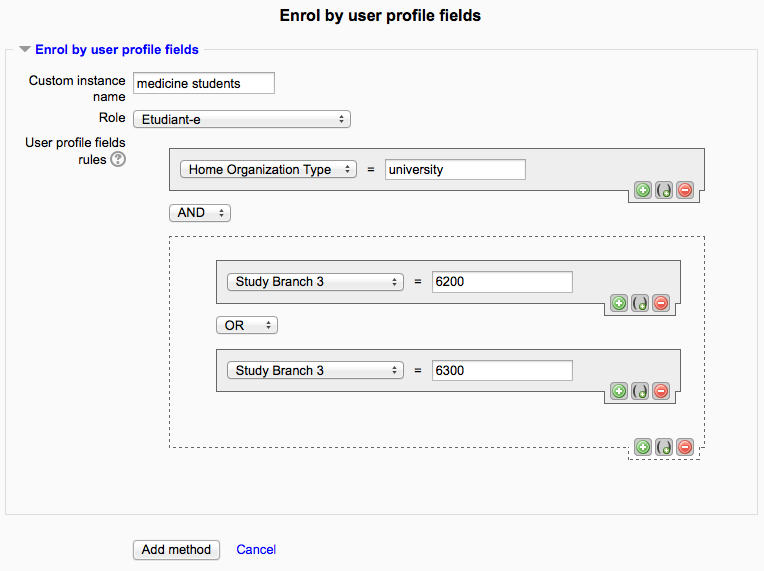
4.- In a test course, go into Course Administration > Users > Enrolment methods and create a new "Enrol by user profile fields method" : optionally give it a name and – that's mandatory – a rule set, it can be one simple rule or a set of rules.
Users are then enrolled when they next login, or when you click the "Force..." button within the enrolment instance settings.
Just note that if any user is already enrolled in the course (i.e. by another enrolment method), that user is skipped by the plugin.
First, thanks for everyone's feedback. The new version (2.0) if this plugin is now available, the main enhancements are:
- official support for Moodle 2.7 to Moodle 2.9
- the enrolment plugin does not have to rely on Shibboleth authentification any more
- you can now easily define the custom user profile fields you wish to use