Enrol by user profile fields
Maintained by
Nicolas Dunand
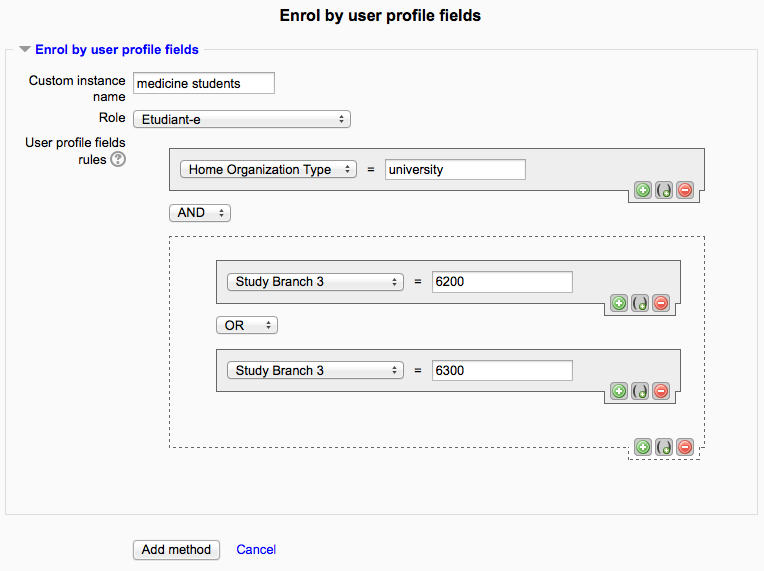
This plugin allows users to be enrolled according to any value stored in their user profile.
Comments
Product ratings and reviews are coming to Moodle Marketplace. Until then, existing comments remain available to read, but new posts have been disabled.
It's a great plugin THANX. I've made a simple script to check if a specific profile field with a specific value exist is true then they will enroll into the course with your plugin.
Now i don't want to wait for 6 hours. Is there a function in your code wich i have to call or can you tell me which cron job i have to execute to enroll right away?
Thank you!!!
It is a SQL query made from the PHP in https://github.com/ndunand/moodle-enrol_attributes/blob/master/lib.php#L181 . See on that line 181, you can change ";" to "," (4 places, L181 and L 182) to make it work as you want.
if it's PHP - where to watch the code? Or is it mysql request?
How do i unenrol a participant who has been enrolled with this plugin?
Without purging enrolments, is there a way to unenrol a single participant who signed up via the user profile field?
Because I can't seem to unerol the user with manual or self-enrollment.
I await your response.
That's a great use case and I'm glad the plugin helps.
1. The "Force enrolments" and "Purge enrolments" buttons are there so that you can fiddle with a rule and see immediately if and how it works (by seeing how many users are enrolled), or if you want to make sure that a rule change takes effect immediately.
2. Self registration and Attributes registration are independent and additive. That is, a user can be enrolled into a course by either method, or both – it won't make any difference to them.
Eventually, we are going to open up registration so that anyone who self-registers will be able to access the courses. How will using this plugin affect this? We want the students enrolled this way to stay enrolled in the course so I'm not sure if the "Unenrol after attributes expiration" would help or interfer with this?
Again, this plugin may be a lifesaver for our use case. I just want to make sure it will meet all of our needs
No, this is not possible at the moment and would need to be programmed in the plugin code.
Is it possible to connect this feature to standard profile items? E.g. connecting it to the authentication method? Or (a part of) the email address? I have a semi open site in which some content is open and some not.
Bert
This plugin works with custom fields only, not regular profile fields.
1. You have to define at lease one extra profile field in Site administration > Users > Accounts > User profile fields.
2. In the plugins settings, you can then select this field.
3. In the course enrolments, you will then see the enrolment method available.
Same answer as to Andrew : did you check the plugin settings and what are they set to? This is why the enrolment method does not show up
I have installed plugin and enabled with default role of student, but when I go into a course management -> users -> enrollment methods - it does not display in menu "add method".
Only other metods
Moodle 3.5
Please make sure to set all plugin settings correctly in the site administration. If you don't set these up, the plugin can't work and hence won't show up in the course enrolment methods.
By cron (every 6 hours), or you can click the "Force enrolments now" (after the created rule has been saved) if you want the enrolments to happen immediately.