
Videofile
Maintained by
Jonas Nockert
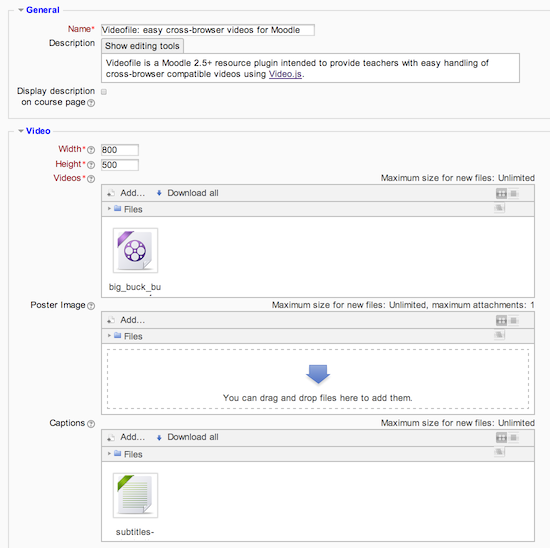
Easy cross-browser compatibility videos using Video.js.
Comments
Comments are no longer open for new posts. Existing comments remain available to read.
I'm using Moodle 2.5.3+ (Build: 20131115), Essential 2013100800 and Videofile 1.04 so we're not running exactly the same software. However, I think it might be something else, are you running any custom blocks?
Best regards, Jonas
Has anyone an idea to solve this?
Observe though that the big downside to removing the download options is if anyone has problems with playing the videos, they will not be able to play them in an alternate player. Video in browsers comes with problems when trying to reach 100% coverage but if you can control the environment for your users, then this is not much of an issue.
I'll try to add this functionality in the next release.
Best regards, Jonas
Observe though that the big downside to removing the download options is if anyone has problems with playing the videos, they will not be able to play them in an alternate player. Video in browsers comes with problems when trying to reach 100% coverage but if you can control the environment for your users, then this is not much of an issue.
I'll try to add this functionality in the next release.
Best regards, Jonas
Observe though that the big downside to removing the download options is if anyone has problems with playing the videos, they will not be able to play them in an alternate player. Video in browsers comes with problems when trying to reach 100% coverage but if you can control the environment for your users, then this is not much of an issue.
I'll try to add this functionality in the next release.
Best regards, Jonas
Observe though that the big downside to removing the download options is if anyone has problems with playing the videos, they will not be able to play them in an alternate player. Video in browsers comes with problems when trying to reach 100% coverage but if you can control the environment for your users, then this is not much of an issue.
I'll try to add this functionality in the next release.
Best regards, Jonas
Observe though that the big downside to removing the download options is if anyone has problems with playing the videos, they will not be able to play them in an alternate player. Video in browsers comes with problems when trying to reach 100% coverage but if you can control the environment for your users, then this is not much of an issue.
I'll try to add this functionality in the next release.
Best regards, Jonas
I've installed Videofile on my Moodle 2.5.3 and everything works well, including Macedonian Cyrillic subtitles. There are only two things that are causing a big headache.
First, I have the following text under the video: "Video not playing? Try mp4". How can I delete this message?
Second, how can I disable the right-click with the mouse over the video? Right-click allows users to download the video which is something that I'd like to avoid. What I'd like to do is to protect my videos from downloading.
Is any of this possible?
Best regards,
Aleksandar
Just installed another plugin using same method and same file/folder permissions, so there is the culprit.
Thanks for the quick response and all your work on a brilliant addition to Moodle!
Cheers
Brett
Also, have you installed other plugins that did work properly? Could you point me to one of them so I have something to reference?
Thanks!
Downloading and installing the videofile mod via moodle internal installer seems to set the module permissions as folders 0777 and files 0666
Produces an Internal Server Error 500 message when attempting to run a demo video.
Log shows:
[Fri Sep 13 13 11:16:12 2013] [error] [client xx.xx.xx.xx] File does not exist: /home/xxxx/public_html/500.shtml, referer: http://xxxxxxxx.com.au/course/view.php?id=xx
[Fri Sep 13 11:16:12 2013] [error] [client xx.xx.xx.xx] SoftException in Application.cpp:256: File "/home/xxxxxx/public_html/mod/videofile/view.php" is writeable by group, referer: http://xxxxxxxx.com.au/course/view.php?id=xx
Changing permissions to folders 0755 files 0644 for all in /videofile module folder fixes the issue.