Brickfield Education Labs
Lead maintainer
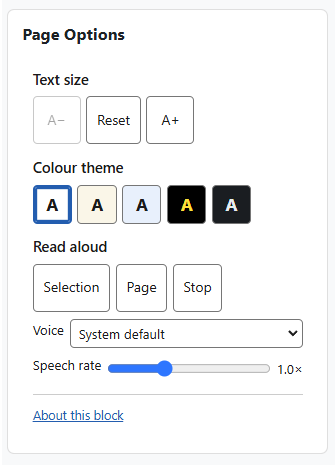
The Page Options block gives every reader a small, self-contained set of on-page tools to adjust how Moodle looks and reads: text size, colour theme, and read-aloud.
The Page Options block was formerly the Accessibility block; it was renamed to avoid confusion with the accessibility-review tools in the Brickfield Toolkit (Accessibility Review, Review+, and Overview).
It is a complete rewrite and simplification of the original block. It runs entirely in the reader's browser — there is no third-party toolbar, no server round-trips, and no database table. Read-aloud uses the browser's own built-in speech, so nothing extra is loaded.
Once a reader chooses a setting it follows them across the whole site: preferences are kept in a single functional cookie and reapplied before each page paints, so there is no flash of the default styling as the reader moves from page to page — even on pages where the block itself is not shown.
Text size. Increase, decrease, or reset the text size for the whole page. The page scales smoothly, and the reader's choice is remembered site-wide.
Colour themes. Five whole-page colour themes, shown as compact swatch buttons that preview each theme:
Each theme recolours the whole page — the navigation, side drawers and menus, cards, tables, book and quiz pages, and blocks — not just the main content area. Every theme's colours were contrast-checked against their own backgrounds and meet WCAG 2.2 AA.
Read aloud. Read the current text selection or the whole page aloud using the browser's built-in speech, with an adjustable speech rate and a choice of voice. The voice list offers the on-device voices installed on the reader's own computer or device (plus a System default); online, server-streamed voices are deliberately left out because they can fail or fall silent. Reading follows the page's language marking, so content in another language is read with a matching installed voice. No external service is contacted and no audio is uploaded anywhere — a chosen voice runs on the device. The read-aloud controls are hidden automatically on browsers that do not provide built-in speech (for example some older or embedded browsers). Text size and colour themes work on every supported browser.
Accessible by design. The block's own controls are real, keyboard-operable buttons with screen-reader labels; changes are announced through a live region; the selected theme is shown with more than colour alone; and the block honours reduced-motion and Windows High Contrast (forced-colours) settings. Built to WCAG 2.2 AA.
Private by design. No personal data is stored, transmitted, or processed. The text size, colour theme and read-aloud voice choices are held only as a functional preference in the reader's own browser, and the block does not read that preference on the server.
There is nothing to configure. The block has no site-level settings and needs no API keys or accounts — add it to a page and it works.
Who can add the block is controlled by the standard Moodle capabilities block/accessibility:addinstance (editing teachers and managers, on a course or other context) and block/accessibility:myaddinstance (any user, on their Dashboard).
2026 Onward Brickfield Education Labs. Licensed under the GNU GPL v3 or later.
This plugin has been developed to work on Moodle releases 4.5 and 5.0, 5.1 and 5.2 on PHP 8.1 or later.
Earlier versions of this block (then called the Accessibility block) depended on the third-party ATbar toolbar to provide their tools, along with server-side YUI JavaScript and several endpoints.
This version removes that dependency entirely. Read-aloud now uses the browser's own built-in speech instead of ATbar, and text size and colour themes are applied with CSS and a small cookie — so the block is self-contained, lighter, and makes no third-party requests. The old YUI JavaScript, the per-instance colour configuration form, the changesize.php, changecolour.php, database.php and userstyles.php endpoints, and the Internet Explorer workarounds were removed at the same time.
This plugin has been developed and is maintained by Brickfield Education Labs.
block_accessibility.Further installation instructions can be found on the "Installing plugins" Moodle documentation page.

