Accessibility Page Options icon

Accessibility Page Options

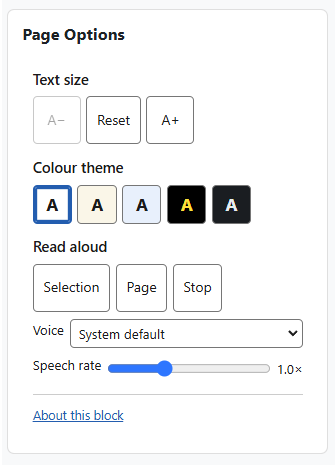
The Page Options block gives every reader a small, self-contained set of on-page tools to adjust how Moodle looks and reads: text size, colour theme, and read-aloud.
Price option: Free

Supports Moodle 2.2-5.2 See all versions
Latest release: 1 week ago
Installations: 2659
Downloads (last 90 days): 491

Frankenstyle name: block_accessibility
Blocks

Comments

Comments are no longer open for new posts. Existing comments remain available to read.

Is this now an abandoned plugin?
Hello,
Love this plug-in - any thoughts on when you will have a 4.1 version available? We are going live with the 4.1 upgrade Aug 1 - any way to get an updated label before then?
Thanks, Lori
Dear developers,
Is there any forecast for the publication of the accessibility plugin for Moodle Version 4.0?
This is really wonderful plugin and we all can't wait to see a new version of it for Moodle 4. Also it would be very awesome if this block would work for unauthenticated users on home page
Dear developers,
You are awesome!
We use this plugin around 4 years and we never had any issues.
Congratulations!
However, recently, we updated to moodle 4 and we noticed that the accessibility block stoped working correctly with the navbar superpositioning it. Are you intending to fix this behavior any time soon? We have several students with special needs that rely on this plugin. It would be most appreciated to have it back to normal as soon as possible.
Thank you in advance.
Prof. Marotta.
Hi, Do you have a release date for version 4.x?
Hi, this is wonderful. Likewise, can I check on the Moodle 4.0 ETA?
Hello,
Do you plan a release for Moodle 4.0 ?
if so, when will it be published?
Thank you
Hi Byron, as @Tim Williams kindly already commented above (thanks!), to add the plugin on all pages, if you want the plugin to show up on every page you need to add it as a site-wide block after enabling if not then it needs to be added to the pages where you want it. See: https://docs.moodle.org/311/en/Block_settings
Hello, nice plug-in. How can i add this plug-in in all my website? In all courses.
Thanks.
Hi Al, we have retested internally and we can't replicate your findings as it's working fine on our test sites. Can you confirm if this issue still happens when you test with core Boost theme?
We have investigated a bug where the size does not increase or decrease sometimes. It appears to work when you log in as admin but does not work when you log in as a student. So the font size increase and decrease does not always work for a student but will if you are an admin, it appears to be fine. I hope this helps you to solve the issue. Cheers.
@Junior Goude, if you want the plugin to show up on every page you need to add it as a site-wide block after enabling if not then it needs to be added to the pages where you want it. See: https://docs.moodle.org/311/en/Block_settings
Could do with some updated documentation on this plugin please and I can't seem to get it to work!
Hello, the tool is not showing on my course pages, any idea why this may be, I have checked and the plugin is enabled, it just isn't showing up?