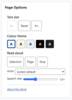
Accessibility Page Options
Maintained by
Brickfield Education Labs
The Page Options block gives every reader a small, self-contained set of on-page tools to adjust how Moodle looks and reads: text size, colour theme, and read-aloud.
Comments
Comments are no longer open for new posts. Existing comments remain available to read.
Word of caution: Using custom CSS to style your Moodle site does ~not~ play well with ATbar either. (As admin: go to Dashboard / Site administration / Appearance / Themes / Boost, then Advanced settings.)
I'm using the following relevant custom styling; it works fine for screens / internet browsers wider than about 780px. But the "move ATbar buttons to the right a bit" fix causes them to overlap each other on smaller screens.
Raw initial SCSS
```
html, body {
font-size: 16px;
}
.breadcrumb-item {
font-size: 1.125rem;
}
.instancename {
font-size: 1.25rem;
}
.sectionname {
font-size: 1.625rem;
}
.mr-2 {
font-size: 1.5rem;
}
#page-content {
font-size: 1.125rem;
}```
Raw SCSS
```
body div#sbarGhost, body div#sbar {
top: 50px !important;
}
body div#sbar {
a#sbarlogo {
position: relative;
left: 140px !important;
margin-left: 140px !important;
}
div#at-btn-ftw, div#at-btn-resizeUp, div#at-btn-resizeDown, div#at-btn-fontSettings, div#at-btn-spell, div#at-btn-dictionary, div#at-btn-tts, div#at-btn-wordprediction, div#at-btn-css, div#at-btn-overlay {
position: relative;
left: 140px !important;
}
}```
Is there a version compatible with Moodle 3.4? or Moodle 3.5?
Greetings.
Verónica.
First very good plugin.
Second, I suggest the following change:
edit_form.php line 59
Color scheme # '. $ I.'
change it by
'.get_string (' color_scheme ',' block_accessibility ').' # '. $ i.'
From already thank you very much.
Best regards.
Veronica.
This plugin has been put up for adoption and is now seeking a new maintainer. Please see https://moodle.org/mod/forum/discuss.php?d=260354 for more details.
thanks
Isabel
When will it be available for version 3.2.1?