Grade Me

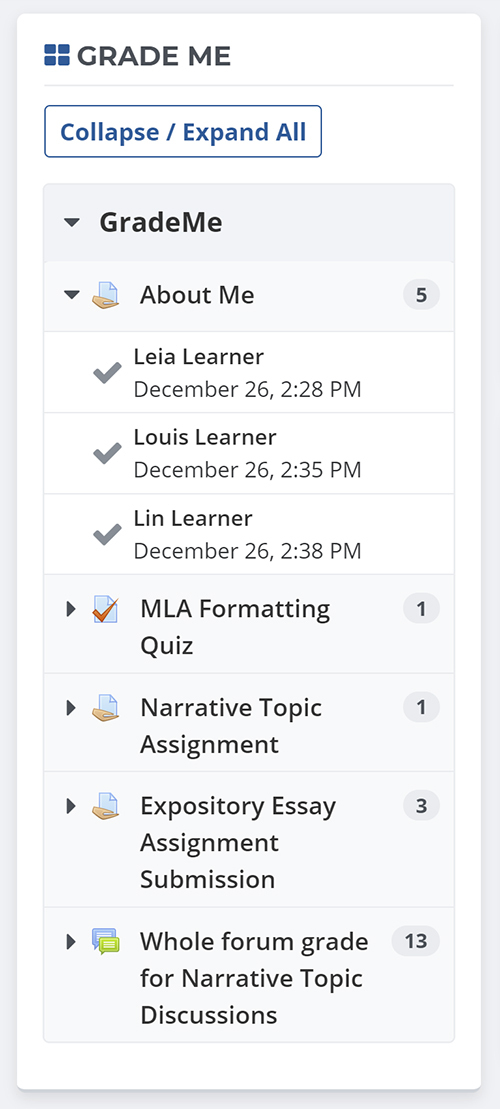
Shows a teacher all of the assignments and manual quiz questions (essays and file responses) that have been submitted, but not graded.
Price option: Free

Supports Moodle 2.3-4.5 See all versions
Latest release: 1 year ago
Installations: 3456
Downloads (last 90 days): 774

Frankenstyle name: block_grade_me
Blocks

Comments

Comments are no longer open for new posts. Existing comments remain available to read.

It seems that the Grade Me block has changed a little when there are no assignments for a teacher to grade. It used to still appear but show a message that said something like "You have no items to grade" with a smiley face. Now though, if there are no assignments, it just doesn't appear at all. Is there any way to switch it back on so it does appear when there are no assignments. My teachers are getting confused and thinking something is wrong when they cannot see it. Thanks!
We are using the latest version of moodle 3.2.1+ and we can't get the grade me block to work, I read there was a update coming at the end of Feb 2017, is there any news on a timeline please?
Hi guys, I've just been having some issues with the block not refreshing at all. I'm using moodle 3.1 and I noticed ever since the latest update it no longer removes graded activities from the block. I find myself having to directly go to the plugin -> blocks ->grademe settings to manually refresh each time.
Also like someone mentioned submitted assignments no longer appear on the grademe block.
Appears to be a tracker issue open for assignments not showing on Moodle 3.1.x. https://github.com/remotelearner/moodle-block_grade_me/issues/17
We are experiencing this too so hoping for this bug to be squished rather soon.
John, thanks for the tip. I had both myself and a colleague try that trick but it didn't seem to work. I've had a few items pop up in my Grade Me Block since trying this, but still not nearly all of them.
Brittany - one thing to try that worked for me. Create a brand new Editing Teacher role based off of the Editing Teacher Role archtype. Add a test user into this role in a course that currently uses the block. Attempt to see if you can see the empty grade me block with your test user. This worked for me, so I deleted my current teacher role and re-created it using the newly made teacher role. The teacher role we were using was created back on 2.4 (not that that should matter)... but creating the new teacher role (and then setting up the same permissions on it as we had on the old role) worked for us.
We currently updated our moodle to 3.1.3+ and the Grade Me feature no longer seems to be working. As others have reported, teachers are given the "Nothing to Grade smile" however when entering into specific assignments/quizzes there are submissions that are not yet graded. Also, if an assignment is viewed but not graded, it disappears. Was there a fix to this?
@Ricardo we will have a 3.2 version but we don't have a timeline yet. If you end up testing the 3.1 version on 3.2, please post results. Thanks!
Any upgrade to Moodle 3.2?
@Paul - Thanks for your answer. I have set groups in my test course but still a teacher sees all submissions. If the teacher then tries to garde a submission (no matter if from his group or another group) there is this error: "The grade changes were NOT saved, as it was not possible to determine which submission they were for." Navigating through the assignment instead of grade me the grading works normal. Thanks, Pascal
@Pascal - it sounds like you don't have groups set up in your course. We have multiple teachers in each course with their own group of students. Each teacher only sees the things they need to grade - they do not see what other people need to grade.
In the course settings we have 'Group Mode: Separate groups'; 'Force Group Mode: Yes'
Hello. Looks like a nice plugin, however for me it doesn't work with grading workflow. Although an assignment is assigned to a specific grader, it is shown as waiting for grading to ANY tutor in the grade me block. And when non-assigned grader tries to access is, there is an error. Is that a known issue or is there a way to avoid this? Thanks
@Edmund - Is your site cron running? Some items may require the cron to run before they show up in the block.
@simon - You shouldn't have to uninstall and reinstall. This plugin is upgradeable using the standard Moodle plugin upgrade process.
Hi Grade me Team,
How can I upgrade the grade me block? Do i need to uninstall the block and reinstall?