
Microsoft Word File Import/Export (Question Format)
Maintained by
Eoin Campbell
Import questions (including images and equations) from structured tables in a Word file (.docx format) into a course question bank, and also export questions to a Word file, allowing for round-trip editing.
Comments
Comments are no longer open for new posts. Existing comments remain available to read.
It seems to be largely around format and debugging....
(cf. "importpreprocess:116: XSLT not installed").
Read the section "Pre-requisites" on the WordTable plugins page [1] for
instructions on how to fix this.
Links:
------
[1] https://moodle.org/plugins/view.php?plugin=qformat_wordtable
importpreprocess:92: Word file = Pre-sales Questions_Automation Systems_DB.docx; path = /home/nhp/moodledata/temp/questionimport/Pre-sales Questions_Automation Systems_DB.docx
•line 92 of /question/format/wordtable/format.php: call to debugging()
•line 114 of /question/import.php: call to qformat_wordtable->importpreprocess()
importpreprocess:116: XSLT not installed
•line 116 of /question/format/wordtable/format.php: call to debugging()
•line 114 of /question/import.php: call to qformat_wordtable->importpreprocess()
If anyone can help, its my first time to try and upload form Word and it comes with:
importpreprocess:92: Word file = Pre-sales Questions_Automation Systems_DB.docx; path = /home/nhp/moodledata/temp/questionimport/Pre-sales Questions_Automation Systems_DB.docx
•line 92 of /question/format/wordtable/format.php: call to debugging()
•line 114 of /question/import.php: call to qformat_wordtable->importpreprocess()
importpreprocess:116: XSLT not installed
•line 116 of /question/format/wordtable/format.php: call to debugging()
•line 114 of /question/import.php: call to qformat_wordtable->importpreprocess()
I checked the Word file you sent by email and responded, but you may not have received it.
Here is my answer again:
The structure of each table looks correct.
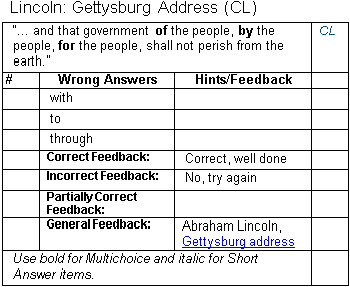
However, the table cells must also comply with the styles used to format
the question components. If you download and install the Word template at
http://www.moodle2word.net/mod/resource/view.php?id=29, and use it to create
sample questions, you will notice that the table for each question contains cells
for the question type, grades for each answer, fields like default mark, labels
for each field, etc. The text in each cell has a particular style such as "QF Type", "Table Row Head",
etc. The heading rows are also marked using the "Repeat Header Rows" marker in the Table Layout ribbon.
In addition, there are custom properties in the Word file that you can view using the command
File > Properties > Advanced Properties (Custom tab group).
All of these styles and custom properties are essential to the conversion process, so you cannot
simply create a Word file with tables that look similar.
If the LXR files are in XML or text format, The Word macro language (VBA)
might not necessarily be the best language to use to convert the files.
If you send me a sample LXR file, I could take a look and see if I can do
anything for you.
I've run into a small hiccup and I'm hoping that you can point me in the right direction to solve the issue. Our organization is in the process of transitioning from our old LMS (LXR) to Moodle. As a result I’m working on the conversion of our LXR question banks to Moodle banks. I’m not a programmer but I know an individual, also not a programmer, who has some experience with building macros for Microsoft Word. He has developed a macro that will convert my LXR .txt exports into a Word Table format that visually matches the online templates. Unfortunately when I attempt to import the newly created Word Table into Moodle I receive the following error notification:
"There are no questions in the import file."
Any help would be greatly appreicated
how do i experiment on the number of questions in a word file.??
"Advanced Properties" from the drop-down menu to bring up the properties dialog box.
Click on the "Custom" tab, then select the property "moodleLanguage" from the list of custom properties, and change the value from "en" to "en_us".
Then try importing it again.
To avoid this problem in new question files, edit the Word template file moodleQuestion.dotx in your own Word Templates folder, and make the same edit. Any new question files you create will then have the correct language set.
Can you help?