
Microsoft Word File Import/Export (Question Format) icon

Microsoft Word File Import/Export (Question Format)

Maintained by Eoin Campbell
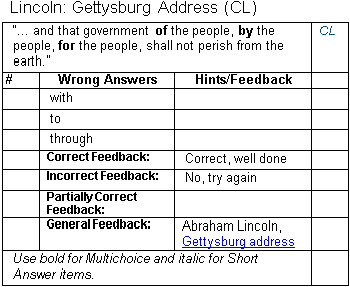
Import questions (including images and equations) from structured tables in a Word file (.docx format) into a course question bank, and also export questions to a Word file, allowing for round-trip editing.
Price option: Free

Supports Moodle 1.9-5.0 See all versions
Latest release: 1 year ago
Installations: 4468
Downloads (last 90 days): 1044

Frankenstyle name: qformat_wordtable
Question formats

Comments

Comments are no longer open for new posts. Existing comments remain available to read.

Yes, it should be fine with Moodle 2.5, though I haven't had a chance to test it yet.
Is this plugin supported/compatible with Moodle 2.5?
A Warning:
When you have debugging on (siteadmin/development/debugging) a file is produced containing debugging messages. Obviously the export does not work anymore.
Deactivating debug gets it going again.
Added Moodle 1.9 download, and fixed errors in Cloze question Word output for 1.9
Buen día, al hacer clic en exportar preguntas a un archivo me aparece un mensaje de error "Lo sentimos, el archivo solicitado no se encuentra". Por favor si alguien sabe que debo hacer, favor informarme y utilizo la versión 2.2.1+ de moodle.
Good day, clicking on export questions to a file I get an error message "Sorry, the requested file is not found". Please if anyone knows what should I do, please inform me and I use version 2.2.1 + of moodle
I love this. It makes life so much easier for me. In testing this is found the following two problems.
1. When exporting from Moodle it does not export the images that are part of the Question Text box. It however does make a place holder with the text "The linked image cannot be displayed. The file may have been been moved, renamed, or deleted.
2 in Many cases there is a < p > Some Text < /p > in the Document.
Am I doing something wrong or was the installation wrong.
I used the latest version with Moodle 2.2.5+ (Build: 20120914)
Fixed the warning message and updated the version, thanks for pointing it out.
The version file generates a warning:
Notice: Use of undefined constant qformat_wordtable - assumed 'qformat_wordtable' in .../question/format/wordtable/version.php on line 28
$plugin->component = qformat_wordtable; => $plugin->component = 'qformat_wordtable';
I found out. I opened the word file in a Text Editor and found the line. You are right. It works when we remove that line. Thank you very much.
I am still not able to find any extra line. Unable to locate the extra line The exported file is fully empty.
Where should I look for the extra line?
The line was: <script src="/google_analytics_auto.js"/>
Checked the Word file exported, and for some reason it included an extra line: Deleting this line fixed the problem. However, still need to figure out how it got in there.
I installed this pulgin on my moodle version Moodle 2.2.7+ (Build: 20130118). I exported a Quiz which is in Moodle XML format to Word using this plugin. It generates a doc file. But when I opened it in Word 2003 as well as in Word 2007, the file is fully empty. But the converted file has some file size like 200 K. Can any one guide me. What could be the issue?Ty