Generico Filter icon

Generico Filter

Maintained by Justin Hunt
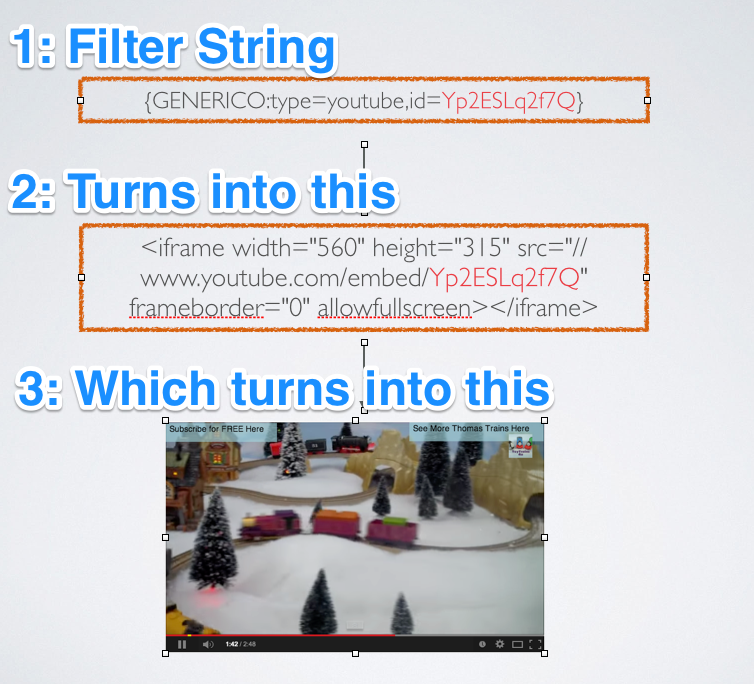
Generico is a simple filter for creating templates of code snippets and text that can be inserted into Moodle text areas.
Price option: Free

Supports Moodle 2.1-5.2 See all versions
Latest release: 9 months ago
Installations: 2564
Downloads (last 90 days): 551

Frankenstyle name: filter_generico
Filters

Comments

Comments are no longer open for new posts. Existing comments remain available to read.

The tag names you pasted look like they have been customized. That might just be creative copy and pasting, or you might have made custom versions of the templates. I just checked on a Moodle 4.1 and it was working fine. Can you check those tag names? In my case it looked like:
{GENERICO:type="accordian"}
{GENERICO:type="accordianitem",titletext="This is one"}
111111
{GENERICO:type="accordianitem_end"}
{GENERICO:type="accordianitem",titletext="this is two"}
222222
{GENERICO:type="accordianitem_end"}
{GENERICO:type="accordian_end"}
Hi Justin, I am trying to use the Generico accordion on WORKPLACE_401_LATEST. When information is added to the accordion and saved, the accordion will not open to show the information inside. Here is the code in question:
{GENERICO:type="accordion_container"}
{GENERICO:type="accordion_card",expanded="false",heading="Level 1"}
1. Test 1
2. Test 2
{GENERICO:type="accordion_card_end"}
{GENERICO:type="accordion_card",expanded="false",heading="Level 2"}
1. Test 1
2. Test 2
{GENERICO:type="accordion_card_end"}
{GENERICO:type="accordion_container_end"}
Can you help me troubleshoot the issue? Thank you.
Hi Justin, Thanks for pointing that out. The order of the filters was indeed the problem! Thanks again smile
Hi Kathy, I don't know what your tags look like or what template you are using, so this is just a guess. But if SVG are working and png and jpg are not. Then it sounds like another filter is interfering and that filter might be getting to the urls with png and jpg extensions and turning them into links, before Generico gets to them. If you disabled and enabled Generico (or re-installed it) it might be the last filter to be processed. Trying moving it higher in the list of filters in the site admin manage filters page. In particular, above "convert urls into links and images"
We are using 1.4.24 and it seems that Generico is now filtering out variables that contain images. The variable does hold the URL okay, but it will not print the image to the screen. If I turn off the filter on the course, the images show, but if I turn it back on and view the source code, the generico is printing the image as an image tag and then src with no url after src.
Warning: Undefined array key 1 in /moodle/www/html/filter/generico/classes/generico_utils.php on line 99
Deprecated: explode(): Passing null to parameter #2 ($string) of type string is deprecated in /moodle/www/html/filter/generico/classes/generico_utils.php on line 100
However, I've only seen this error once and the images don't work on any pages. However, .svg images do display, while .png and .jpg images do not. Do you know what is happening here?
Hi Mary - it sounds like what are you describing is what I am suggesting, and what I do with various sites that I support. (but apologies if it isn't and I haven't understood you). eg have a Generico filter called 'courseheader' which contains various filter codes arranged and formatted however you like. If you then add a 'text and media' area (label) at the top of each course that calls the Generico filter, this will then display the information for that course including the course image for that course.
If at any point in the future you want to change how this course header looks, you only have to update one Generico filter, rather than 1000+ courses.
Dear Dave, thanks for the quick response. But I am not sure, I really get it.
I want to put the "front page" of a course, that appears in 1.000 courses in the template of a Generico Filter - including the variable for the course image.
So that only the template key is in the text field in the course.
If we change anything about the text or position of the image or anything else in the structure of front page in the next years, we only have to do it in the filter template and not in all the courses.
As far as I know, the filter code {courseimage} (or @@COURSE:image@@) does not work in the Generico template.
Do you have a solution for that?
Mary - if this cannot be done directly with Genrico filter alone, this is a great example of where the filter codes filter can work brilliantly with Generico, you just need to ensure that Genetico filter appears above filter codes in the order of filters.
Hello Justin, when will it be possible to use the course image as a variable in the Generico filter?
Hi Dave, interesting. If that solves the problem then I think the root cause is possibly the order of the filter processing. When you disable and re-enable, the re-enabled filter is usually last in the processing. However at course level that should not change (Order of filters is not an option in the filter settings at course level). Anyway I am glad its working.
Just in case anyone else has the same problem that I had with the filter codes filter not working inside the Generico filters, I have made some progress: If I have a course where this is a problem, if I turn the Generico filter off within the course, then view the course, then go back and turn the Generico filter back on, it then appears to work as expected. Obvioulsy not sure what the root cause is here, but the old technical approach of 'turn it off, and turn it on again' seems to solve it!
@Justin - following on from my previous message, the upgrade to 1.4.22 doesn't appear to be the issue, as I have found another site with same versions where this works, and if I add a new course to the site I was having problems with, then it works in the new course. So there is something cranky in the original course that is interfering - I haven't worked out what yet, but if I do I will report back here in case it helps anyone else.
Hi Dave, It does sound like you are a casualty of that 1.4.22 update but its hard to know really. That update prevented people putting odd parameters into the filter string. e.g to overwrite "system variables" like WWWROOT. It doesn't really change what happens after that.
Parsing other filters inside of Generico should still work. I dont think anything changed apart from the parameters that go into the filter string.
Hi Justin - as you may have worked out by now, I love this plugin and what it can do, and have been doing some really cool stuff by combining this with https://moodle.org/plugins/filter_filtercodes - e.g. having filter codes inside the Generico filter.
However, this particular method is not working on one of my newer sites - I have spent ages checking that the syntax is correct and the filter order is set correctly. The only difference that I can see is my newer site has Generico version 1.4.22 and my other sites are on Generico 1.4.21 or earlier. Looking at the change log for version 1.4.22 it says 'Better cleaning up of filter string inputs to prevent variable injection and meddling' - will this have stopped the filter codes from working inside a Generico filter?
Is there a way that I can get my filter codes working again?
Thanks in advance
Thanks Justin - that works. I am loving this plugin.