SAML2 SSO Auth
Authentication using exists SimpleSAMLphp Service Provider

Comments
Comments are no longer open for new posts. Existing comments remain available to read.
I saw that post and check in the following path Settings> Site administration> Server> Session Handling, try setting a value for 'Cookie prefix'. within Moodle if a session cookie name was set, but it is empty.
In the file config.php of simpleSAMLphp in the variable 'session.phpsession.cookiename' is set 'SimpleSAML'
I do not understand what the error may be due to.
thanks for your help
I wasn't able to reproduce the error.
Please, try the following solution and let me know if it works
https://www.marcus-povey.co.uk/2016/02/09/exception-the-post-data-we-should-restore-was-lost/
The SimpleSAMLphp used is:
/var/simplesamlphp (1.15.0)
thanks for your help
It seems to me that it is a issue with simplesamlphp installation.
You can verify the version throught https://servidorX/simplesaml/module.php/core/frontpage_config.php
After a successfull auth on the IDP, it redriects me back to my SP and I'm receiving this error from the SimpleSAMLphp:
SimpleSAML_Error_Error: UNHANDLEDEXCEPTION
Backtrace:
1 www/_include.php:45 (SimpleSAML_exception_handler)
0 [builtin] (N/A)
Caused by: Exception: The POST data we should restore was lost.
Backtrace:
1 modules/core/www/postredirect.php:38 (require)
0 www/module.php:135 (N/A)
The error detected in syslog:
Jan 5 16:38:15 servidorX simplesamlphp[27557]: 7 [05007a3d7b] Session: 'wso2-sp' not valid because we are not authenticated.
Jan 5 16:38:15 servidorX simplesamlphp[27557]: 7 [05007a3d7b] Saved state: '_45a330829a2b49a529bf8a869d7bddefa363d13fdf'
Jan 5 16:38:15 servidorX simplesamlphp[27557]: 7 [05007a3d7b] Sending SAML 2 AuthnRequest to 'ssohalab1.x.x.x'
Jan 5 16:38:15 servidorX simplesamlphp[27557]: 7 [05007a3d7b] Redirect to 712 byte URL: https://ssolab/samlsso?SAMLRequest=pZJLb9swEIT&RelayState=https.x.x.x.php.php (#012)
Jan 5 16:38:15 servidorX simplesamlphp[27557]: 4 [05007a3d7b] The class or interface 'SimpleSAML_Auth_Simple' is now using namespaces, please use 'SimpleSAML\Auth\Simple'.
Jan 5 16:38:58 servidorX simplesamlphp[27574]: 7 [20279a93ae] Loading state: '_45a330829a2b49a529bf8a869d7bddefa363d13fdf'
Jan 5 16:38:58 servidorX simplesamlphp[27574]: 4 [20279a93ae] The class or interface 'SimpleSAML_Logger' is now using namespaces, please use 'SimpleSAML\Logger'.
Jan 5 16:38:58 servidorX simplesamlphp[27574]: 4 [20279a93ae] Could not load state specified by InResponseTo: NOSTATE Processing response as unsolicited.
Jan 5 16:38:58 servidorX simplesamlphp[27574]: 7 [20279a93ae] Received SAML2 Response from 'ssohalab1.x.x.x'.
Jan 5 16:38:58 servidorX simplesamlphp[27574]: 5 [20279a93ae] Validating certificates by fingerprint is deprecated. Please use certData or certificate options in your remote metadata configuration.
Jan 5 16:38:58 servidorX simplesamlphp[27574]: 7 [20279a93ae] Found 1 certificates in SAML2\Response
Jan 5 16:38:58 servidorX simplesamlphp[27574]: 7 [20279a93ae] Has 1 candidate keys for validation.
Jan 5 16:38:58 servidorX simplesamlphp[27574]: 7 [20279a93ae] Validation with key #0 succeeded.
Jan 5 16:38:58 servidorX simplesamlphp[27574]: 5 [20279a93ae] Validating certificates by fingerprint is deprecated. Please use certData or certificate options in your remote metadata configuration.
Jan 5 16:38:58 servidorX simplesamlphp[27574]: 7 [20279a93ae] Found 1 certificates in SAML2\Assertion
Jan 5 16:38:58 servidorX simplesamlphp[27574]: 7 [20279a93ae] Has 1 candidate keys for validation.
Jan 5 16:38:58 servidorX simplesamlphp[27574]: 7 [20279a93ae] Validation with key #0 succeeded.
Jan 5 16:38:58 servidorX simplesamlphp[27574]: 7 [20279a93ae] Filter config for ssohalab1.rec.uba.ar->https://servidorX/simplesaml/module.php/saml/sp/metadata.php/wso2-sp: array ( 0 => sspmod_core_Auth_Process_LanguageAdaptor::__set_state(array( 'langattr' => 'preferredLanguage', 'priority' => 90, )),)
Jan 5 16:38:58 servidorX simplesamlphp[27574]: 7 [20279a93ae] Session: doLogin("wso2-sp")
Jan 5 16:38:58 servidorX simplesamlphp[27574]: 3 [20279a93ae] SimpleSAML_Error_Error: UNHANDLEDEXCEPTION
Jan 5 16:38:58 servidorX simplesamlphp[27574]: 3 [20279a93ae] Backtrace:
Jan 5 16:38:58 servidorX simplesamlphp[27574]: 3 [20279a93ae] 1 /var/simplesamlphp/www/_include.php:45 (SimpleSAML_exception_handler)
Jan 5 16:38:58 servidorX simplesamlphp[27574]: 3 [20279a93ae] 0 [builtin] (N/A)
Jan 5 16:38:58 servidorX simplesamlphp[27574]: 3 [20279a93ae] Caused by: Exception: The POST data we should restore was lost.
Jan 5 16:38:58 servidorX simplesamlphp[27574]: 3 [20279a93ae] Backtrace:
Jan 5 16:38:58 servidorX simplesamlphp[27574]: 3 [20279a93ae] 1 /var/simplesamlphp/modules/core/www/postredirect.php:38 (require)
Jan 5 16:38:58 servidorX simplesamlphp[27574]: 3 [20279a93ae] 0 /var/simplesamlphp/www/module.php:135 (N/A)
Jan 5 16:38:58 servidorX simplesamlphp[27574]: 3 [20279a93ae] Error report with id dfb816de generated.
Jan 5 16:38:58 servidorX simplesamlphp[27574]: 7 [20279a93ae] Session: Valid session found with 'wso2-sp'.
Jan 5 16:38:58 servidorX simplesamlphp[27574]: 7 [20279a93ae] Localization: using old system
Jan 5 16:38:58 servidorX simplesamlphp[27574]: 7 [20279a93ae] Template: Reading [/var/simplesamlphp/dictionaries/errors]
The plugin version used is:
v3.3-r04 (2017081000)Moodle 3.3
Release date: Friday, 11 August 2017, 12:23 AM
the moodle version used is:
Moodle 3.3.2 (Build: 20170911)
Can you help with this?
I'm trying this plugin in a Moodle 3.2 instance, and after successfully authenticating users to the IdP it fails sign in into Moodle correctly, instead, it goes through endless loop of requesting URL's like these:
https://sspidp.svuonline.org/saml2/idp/SSOService.php?SAMLRequest=fVJd...TX4B&RelayState=https%3A%2F%2Fmoodletest.svuonline.org%2Flogin%2Findex.php
https://sspidp.svuonline.org/saml2/idp/SSOService.php?SAMLRequest=fVLJ...c%3D&RelayState=https%3A%2F%2Fmoodletest.svuonline.org%2Flogin%2Findex.php
Where https://sspidp.svuonline.org is the used IdP server.
Any help about this issue?
Best regards,
you can put "e c h o < p r e >" before the first var_dump
line 139
e c h o < p r e > ;
var_dump($attributes);
line 167
var_dump($isuser);
die();
Is it possible to you to modify the auth.php code?
If yes, we will add a break point in code to verify what is going on after authentication success.
edit /auth/saml2sso/auth.php
on line 139 add the code below:
echo "
So I reconfigured the ADFS to send attributes below but it still repeatedly goes back to the moodle login page and reauthenticates me over and over again (I checked with Chrome developer tools).
From module.php/core/authenticate.php?as=wcchc-cloud:
Your attributes
Mail
mail jwilliams@wcchc.com
User ID
uid jwilliams
Display name
displayName John Williams
Given name
givenname John
Surname
sn Williams
SAML Subject
NameId jwilliams
Format urn:oasis:names:tc:SAML:2.0:nameid-format:transient
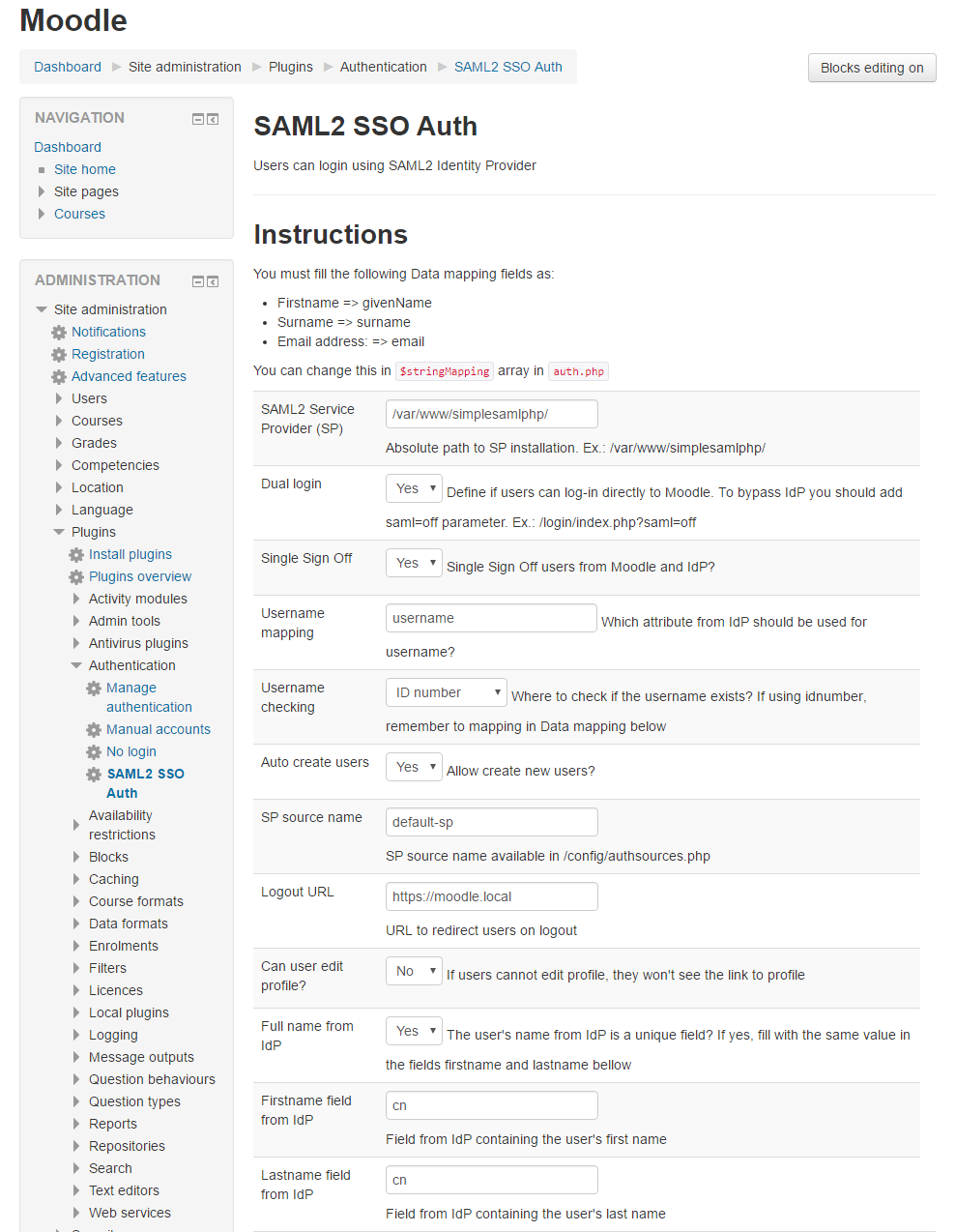
I've removed and then reset all the mappings in the SAML2 SSO Auth plugin configuration page. The current settings are:
Username = uid
First name = givenname
Last name = sn
Thanks for all your help Daniel
There is no mapped fields for name and last name (mandatory fields in Moodle) and the fields for email and username are not correctly.
I have never used ADFS. I use LDAP module in SimpleSAMLphp to authenticate users in a Microsoft Active Directory.
My AD returns the below fields:
'attributes' => array('sAMAccountName', 'cn', 'mail', 'brPersonCPF')
Check in your ADFS IdP config if is it possible to define the fields' name and then adjust the plugin config page with the proper names
So ADFS does respond with attributes and this what I see right now on module.php/core/authenticate.php?as=wcchc-cloud:
Your attributes
http://schemas.xmlsoap.org/ws/2005/05/identity/claims/emailaddress jwilliams@wcchc.com
http://schemas.microsoft.com/ws/2013/11/alternateloginid jwilliams
SAML Subject
NameId jwilliams
Format urn:oasis:names:tc:SAML:2.0:nameid-format:transient
But as I mentioned, the plugin repeatedly calls the IdP.
Not sure if this is what you're asking for but in the event viewer log entry in ADFS:
Encountered error during federation passive request.
Additional Data
Protocol Name:
Saml
Relying Party:
https://wcchc-cloud.com/
Exception details:
Microsoft.IdentityServer.Web.InvalidRequestException: MSIS7042: The same client browser session has made '6' requests in the last '15' seconds. Contact your administrator for details.
at Microsoft.IdentityServer.Web.Protocols.PassiveProtocolHandler.UpdateLoopDetectionCookie(WrappedHttpListenerContext context)
at Microsoft.IdentityServer.Web.Protocols.Saml.SamlProtocolHandler.SendSignInResponse(SamlContext context, MSISSignInResponse response)
at Microsoft.IdentityServer.Web.PassiveProtocolListener.ProcessProtocolRequest(ProtocolContext protocolContext, PassiveProtocolHandler protocolHandler)
at Microsoft.IdentityServer.Web.PassiveProtocolListener.OnGetContext(WrappedHttpListenerContext context)
Can you please submit the response error from ADFS?
We currently have moodle 3.3.1 and SimpleSAMLphp 1.14.15.
SimpleSAMLphp is configured with an SP source name (wcchc-cloud) and the IdP is Microsoft ADFS.
The SimpleSAMLphp test authentication works fine.
When I attempt to log in to moodle using the plugin, it repeatedly authenticates against the IdP and after 6 tries Microsoft ADFS simply returns a responder error.
And it doesn't seem to matter what combination of settings I try either in the SAML2 SSO Auth page or on the IdP side.
Any assistance would be greatly appreciated it.
Thank you, John Willams