Multi-Language Content (v2)
Maintained by
Iñigo Zendegi Urzelai, Iñaki Arenaza, Kepa Urzelai
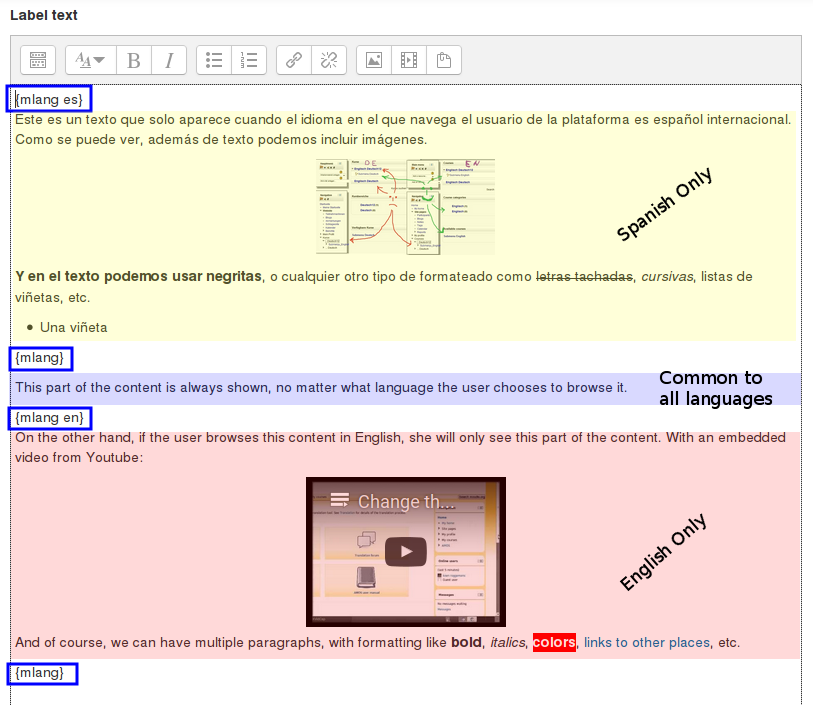
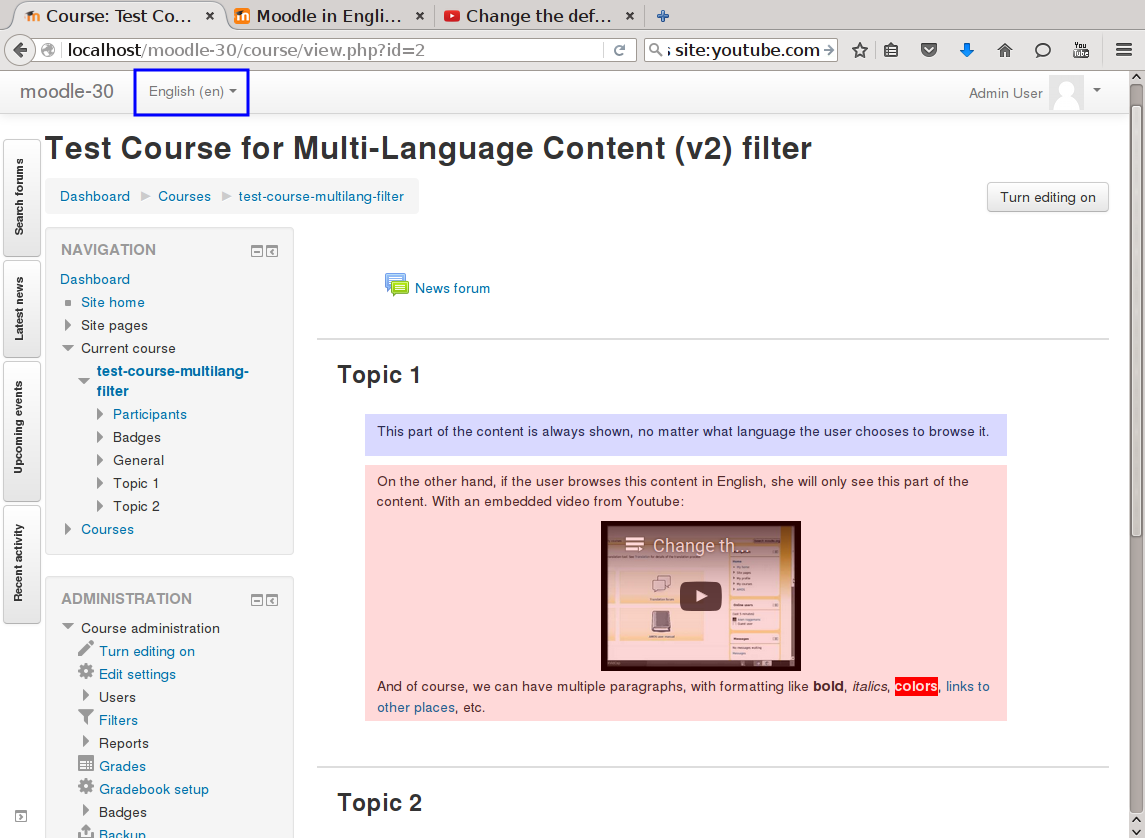
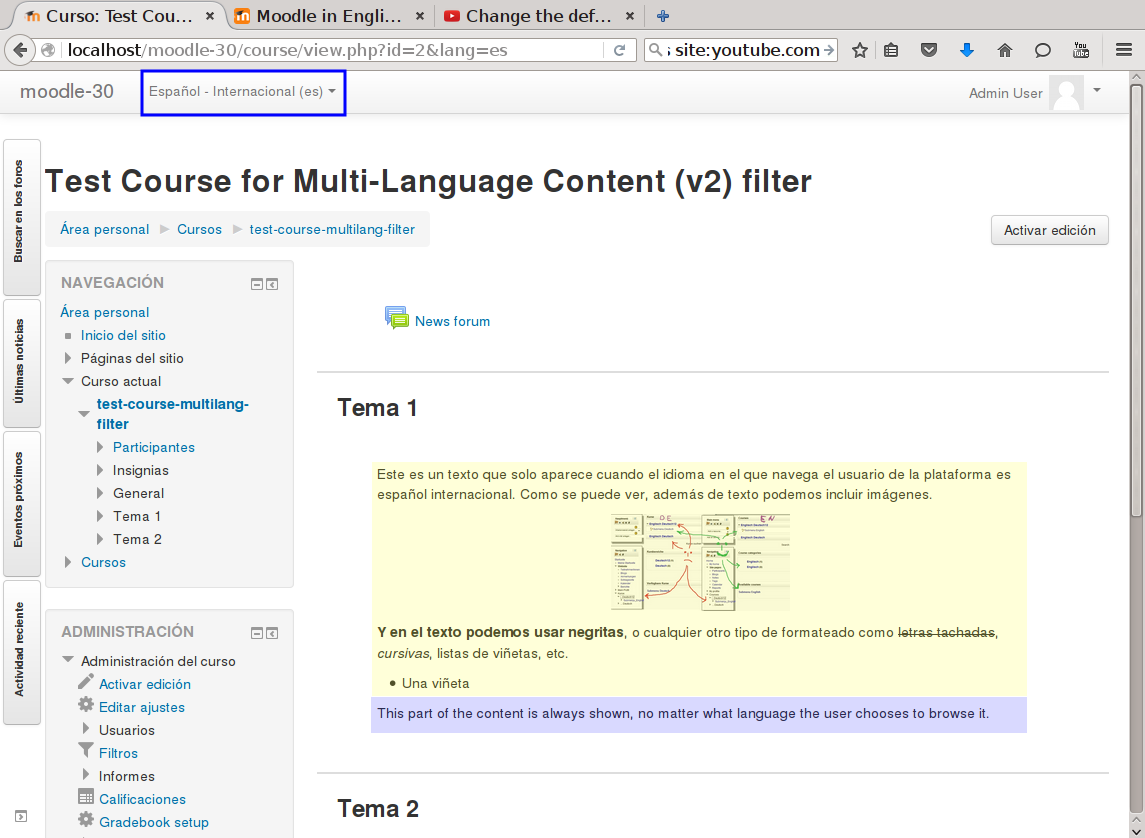
This filter is a greatly simplified multi-language filter. It uses very simple non-HTML tags to mark multi-language blocks. Namely {mlang XX} {mlang} pairs, where XX is the Moodle short name for the language pack (i.e., en, fr, eu, es, es_mx, etc.)
It uses the same tags as the filter_multilangsecond plugin (to be compatible with it), but there is one difference between the two. This filter allows standalone {mlang} tags that don't require adjoining alternative language tags. This makes the filter more flexible at the cost of potentially producing empty sets of tags.
Comments
Product ratings and reviews are coming to Moodle Marketplace. Until then, existing comments remain available to read, but new posts have been disabled.
Just a quick note to let you know that I have opened an issue in Jira for the problem with Lessons activity not working with Matching questions with the Multilang content 2. It has been identified by others as well. For those of you interested in following this issue or voting on it, the tracking is:
https://tracker.moodle.org/browse/MDL-78481
Hoping for a prompt resolution. Regards and thank you!
José Balcells
If a filter works in one place in Moodle but not another, there is usually one of two reasons.
1) there is a typo in the tag (check the HTML view for invisible characters if using Atto or TinyMCE); or
2) The component you are using does not support filters yet. This is not a problem with the filter. In your case, try changing question type to one that does support filters.
Filters are supported in most but unfortunately not all of Moodle yet. For example, I know for a fact that they are not supported in some types of quiz questions and not supported in H5P activities either. If it really doesn't work in a particular place in Moodle, it may be possible to get it fixed. You will need to determine who the owner is of the component and request that the filter functionality be added. If this is a core Moodle question type (i.e. it came with Moodle), you can report this as a bug at https://tracker.moodle.org or fix it yourself and submit the fix for integration into Moodle core. For 3rd party question types, you will need to contact the developer using the link on the plugin's page.
Alternatively, create a unilingual quiz for each language and use the Restriction by Language plugin found at https://moodle.org/plugins/availability_language . This will enable you to display language-specific quiz activities based on the current UI language. It works with all types of activities and resources. One of the down sides to this is that learners will not be able to switch language within the activity.
You might want to consider following up with quiz-related questions in the Moodle Quiz Discussion forum at https://moodle.org/mod/forum/view.php?id=737
Hope you found this information helpful.
Best regards,
Michael Milette
Thanks for replying.
Now i am trying to use the same in quiz, however it is not getting applied. any specific setting other than filter content and heading.
pls advise
I can assure you this plugin doesn't add any tags whatsoever to the content that you yourself enter. It simply selects the portion of the content you specified for the language that Moodle is using to display that page at that moment.
So whatever is painted there, it's either you who put it there, or some other code: either Moodle's core code, or another plugin's code.
Thank you for responding so promptly. I will do as you suggest and find out where the issue resides.
Un saludo cordial y muchas gracias,
José
with a 99.999% probability, this is a bug in the lesson module. Unfortunately, multi-language filter support (not just for our plugin, but for the standard official Moodle one) is not 100% functional even in Moodle "core" code (not to speak about 3rd party plugins). Just as an example, the various issues already mentioned in this thread (drag and drop questions, course menu, resource tags, etc.)
To verify that is is not the 0.001% case, you can enable the standard multi-lang plugin and use its syntax in that particular lesson. If you still get the original HTML (and not the filtered result), then the problem is in the Moodle lesson module. If you get the correctly filtered result, then it's a bug in our plugin.
Recibe un saludo cordial.
Iñaki.
Thank you for the great work here. I am running version 4.1 (Build: 20221128). I am having trouble with a translation working in a lesson. In specific, it is a matching page. The "Matches with answer" field appears as it is written in the drop down menu options.
{mlang en}Torah{mlang} {mlang es}Torá{mlang}
I read in this thread that drag and drop questions had issues. Is this also the case for matching questions page?
Any ideas for a solution?
Muchas gracias y saludos,
José
The plugin does support any content or resource type that calls format_string() or format_text() to render itself on the final page. The plugin doesn't do anything special to support each different type or content or resource type.
As a proof of concept, you can check the standard Moodle language filter. If the standard filter works with tags, then this plugin should work (it it doesn't, then it's clearly a bug in the multilang2 plugin). If it doesn't work with the standard filter, there is no way multilang2 can work.
Saludos.
Iñaki.
Is there a way to support tags with this plugin? It does not seem to work...
BR
David
Regarding the issue with the course index: we knew about it (https://github.com/iarenaza/moodle-filter_multilang2/issues/34) but weren't 100% sure it was a core issue, now that it has been confirmed we've directed it to the Moodle Tracker.
Thank you!
I tested the plugin in Moodle 4.1 and, as Michael has said, it works and behaves just like with previous versions. Therefore, I pointed 4.1 as a supported Moodle version for the filter_multilang2 plugin.
Greetings,
Kepa Urzelai
I was wondering when you might have a chance to bump the compatibility of this plugin to Moodle 4.1? With the exception of the issue described by James above, which I do not believe is related to your plugin, I use this plugin on Moodle 4.1 and it seems to work as well as it did with previous versions of Moodle.
Best regards,
Michael Milette
I tested this plugin with Moodle 4.1.1. This plugin is working, otherwise you would see {mlang} tags. However, switching the Moodle UI language does not cause the course-index side menu to also change language.
This is not limited to just menu items containing {mlang} tags but all menu items. This issue is easily reproduced by creating a blank course. By default, there will be a General section at the top of the course. As long as you do not touch this label, it should automatically be translated. However, it is not, even after fully refreshing the page.
For this reason, I would conclude that this is a Moodle core issue, not a problem with the filter.
A ticket relating to this issue has already been created:
https://tracker.moodle.org/browse/MDL-77037
I would encourage you to go to that ticket, vote for it and contribute any thoughts you might want to share.
Best regards,
Michael Milette