
Checklist
Maintained by
Davo Smith
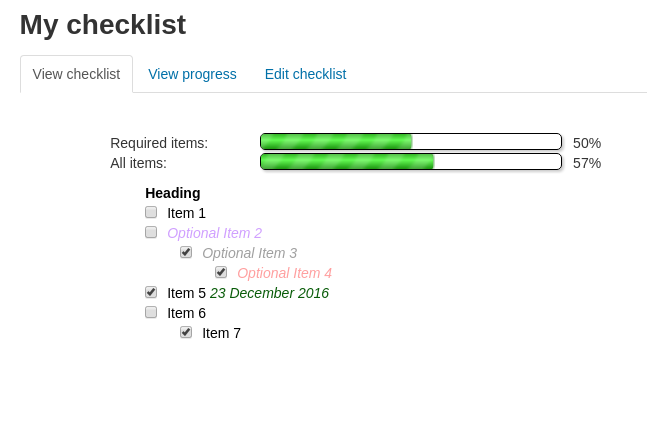
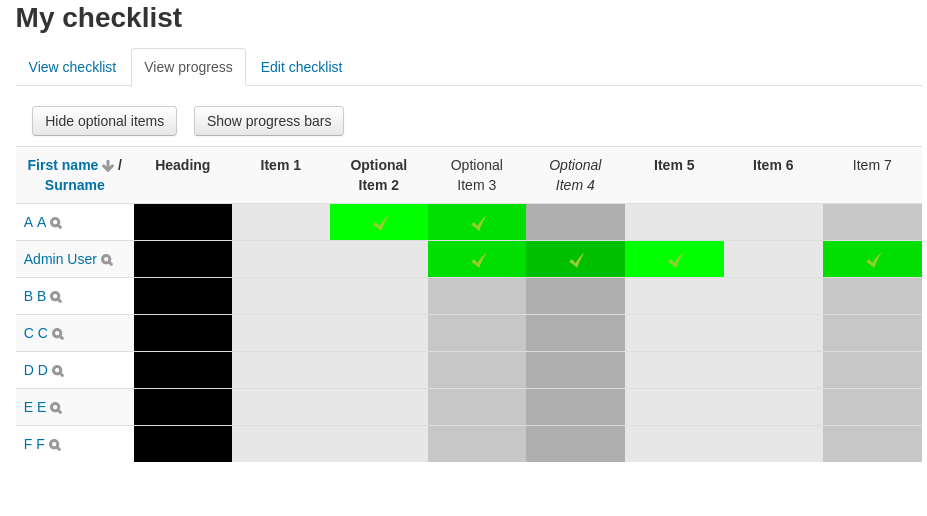
A checklist can be created by a teacher (or generated from the activities in a course) and then the students or teachers can check-off each item as they are completed.
Comments
Comments are no longer open for new posts. Existing comments remain available to read.
There isn't currently any support for filtering the list of students by checklist completion status. It sounds like a sensible thing to add, but I'm unlikely to get around to doing it in my spare time. If you know a developer who can work on it, then I'd be happy to review a patch to integrate it back into the official release.
Juste a question, I'm looking tu filter my list of students. Is it possible tu hide the students that have made all the tasks ?
Thank's a lot.
I have had problems when saving changes in the activity edition with the following message:
"You do not have permission to view this checklist
Would you like to log in now with a full user account?"
I am from an admin account and I have validated from different roles or courses and it does not allow. Does anyone know the cause or have had the same problem? Thank you
Thanks for the reply and information. As referred by you and as suggested in the documentation, I did find a way to configure the 'Grade to pass' from the grade book setup for the checklist activity but when trying to configure Receive Grade -> Grade to pass as part of Activity completion criteria it still gives me the same error message (This activity does not have a valid grade to pass set. It may be set in the Grade section of the activity settings.) preventing from using 'Pass Grade' as a criteria. Please let me know if I am missing something.
Regards
The 'grade to pass' can be configured for a grade within the gradebook - see https://docs.moodle.org/en/Grade_items
For some activities, it is possible to set the grade to pass on the activity settings page, but the checklist activity does not support general 'grade settings' (as it doesn't work with anything other than 'point' grading), so it doesn't include the code to show the 'pass grade' on its own settings page.
For this activity as part of its completion criteria, I could see an option called 'Required Pass Grade'. When trying to use this option, I see an error saying "This activity does not have a valid grade to pass set. It may be set in the Grade section of the activity settings.". But I don't see a section for grade where I can configure a grade to pass. Am I missing something. Any inputs or suggestions will be really appreciated.
It is possible to set the checklist to be marked as complete once 3 items are checked-off. It is also possible to have a certificate that is only available once the checklist is complete.
Unfortunately, you'd need some custom development to get the last part of that (probably a custom certificate display element that was populated by the checklist).
If you have a budget for development and want to get a quote on this last part, then send me a private message and I can put you in touch with my employers at Synergy Learning
is this possible?
Thanks
Aaron Cauchi
File: filter/checklist/filter.php
Function: function filter()
----------------------------------------------------------------------------------
if (empty($COURSE->id) || $COURSE->id == 0) {
return $text;
}
// ifnotinactivity
if (substr($PAGE->pagetype, 0, 4) == 'mod-') {
return $text;
}
if (stripos($text, '{checklist:') !== false) {
----------------------------------------------------------------
When editing a checklist, and using the filter, the arrow keys to move around checklist items do not work. So code just tells the filter to not filter the checklist in the description when editing the checklist.
I know this is not a fix to this plugin, but the filter for checklist is not even on stored on the moodle website, and I thought it would just save people time and frustration.
That's not something that the code currently supports. The 'completion percentage' is only used for calculating whether or not the student has ticked-off enough items to be counted as 'complete'. It is not used to calculate the progress bar or to calculate the grade sent to the gradebook.
It might be possible to add some sort of 'target number of items' (or something like that), but I'm unlikely to be undertaking any specific development work in the near future.