
Checklist
Maintained by
Davo Smith
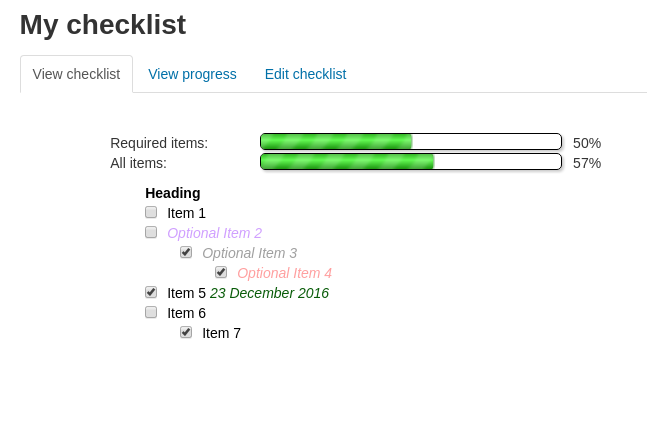
A checklist can be created by a teacher (or generated from the activities in a course) and then the students or teachers can check-off each item as they are completed.
Comments
Comments are no longer open for new posts. Existing comments remain available to read.
There isn't any specific documentation for getting the block working - it works more or less like any block in Moodle.
I assume that you (or your site administrator), have installed the block on your site (available at: https://moodle.org/plugins/block_checklist ) - it is a separate plugin from the activity itself.
Once the block plugin is installed, then anyone with the correct permissions (editing teachers / site admins, by default) should be able to add the block to a course.
You can configure a checklist to link items to courses and they will then be checked-off automatically when those courses are complete.
However, there is no way to link a checklist item to a specific section in another course or to a specific checklist in another course, so that it would be automatically updated when that section/checklist was completed (you can link to a checklist in the _same_ course, without too much difficulty).
We are looking to have a programme with around 10 Moodle courses, which have the activities such as Assignments (with conditions set) added to the Checklist activity within each course. With these 10 Moodle courses, we want an single Moodle course to hold programme information etc and a single checklist activity with linking to the 10 Moodle course areas. With the students completing these course areas, can the Checklist within the programme information course be automatically check off the linked 10 Moodle course areas? Hopefully I have made sense.
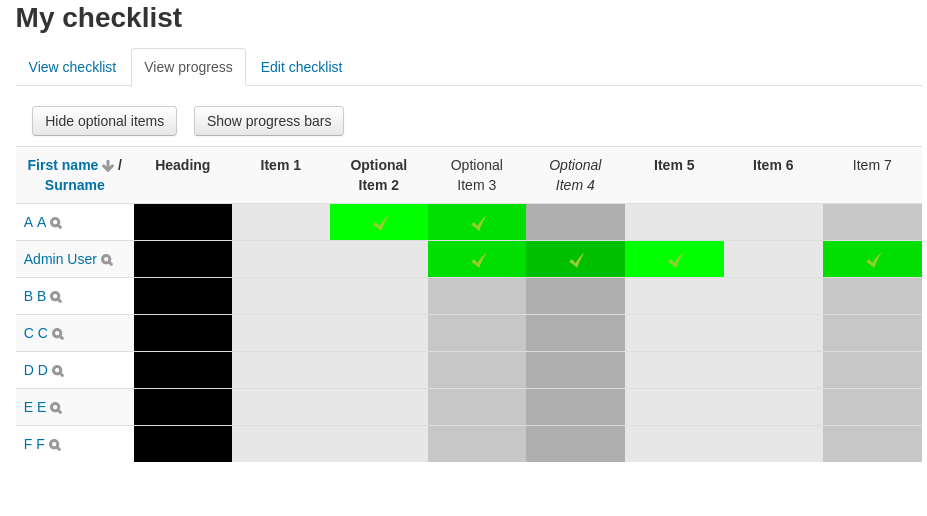
I'm not quite sure what you mean by "the grid where you could validate the activities" - do you mean the "View progress" page where the teacher can update the checklist?
If you are using Moodle 4.0, then the custom tabs have been replaced by the secondary navigation tabs across the top of the page. If you're using the default "Boost" theme (or another theme that follows the new layout in Moodle 4.0), then you'll see navigation items "Checklist" "Settings" "View progress" "Edit checklist" across the top of the page.
If you are using an older theme, that doesn't properly support Moodle 4.0, then you may have to look for these entries in the "Settings block" down the side of the page.
Thank you.
Theoretically, it would be possible to do this. But, that wouldn't fit with the rest of the Moodle code, which uses 'groupings' as the way of handling this sort of thing - it would be confusing to have two different methods of hiding items, both related to groups.
Even if I thought this was a good idea, I'm unlikely to have the spare time to look at modifying the code. I would suggest that creating a grouping for each of the groups that you want to hide items from should solve the problem for you?
I'm afraid I'm a little confused about exactly what you are doing here.
Are you using the checklist feature that links a checklist item to a course (and marks it as complete when that course is complete), or are you linking the checklist item to the subcourse activity (so it is marked as complete when the particular subcourse activity is marked as complete)?
You are saying that marking a course as complete is causing it to be marked as complete in checklists that they are not enrolled on (as you can't be "enrolled" on a checklist, I assume you mean a checklist on a course that the user is not currently enrolled on)?
The checklist code deliberately checks-off course-linked items for the user, even on checklists in courses the user is not enrolled on, for a number of reasons:
a) it would be a lot more complicated to check and exclude items in checklists that the user is not enrolled on (not impossible, but messy to do)
b) (more importantly) if the user later enrols on the relevant course, they would expect to have the items linked to the courses already completed to be marked as complete (which is more difficult to calculate retrospectively)
c) I can't think of any situation in which it would matter - the user won't show up in the list of users when the teacher views the report and the user won't be able to see their own progress on that checklist either (unless I'm missing something important?)
Does that answer your question?
Is there something we can do to fix this?
A setting to automatically number checkboxes sounds like a fairly straightforward, but helpful addition to the checklist plugin. I don't want to make a firm promise, but it is something that sounds like a small enough project that I might be willing to put aside a bit of spare time to have a go at it.
I've looked (briefly) in the past at producing a mobile version of my checklist plugin. I've never written a mobile version of a Moodle plugin before and, as a rough estimate, I'd expect it to take a few days work for me to produce this.
As I spend my working days writing Moodle code, I'm very unlikely to take on such a project in my spare time. If, however, there was funding available, then I'd be very happy to talk to my employers (Synergy Learning) to see if it could be scheduled into my work.