
Microsoft Word file Import/Export (Lesson) icon

Microsoft Word file Import/Export (Lesson)

Maintained by Eoin Campbell
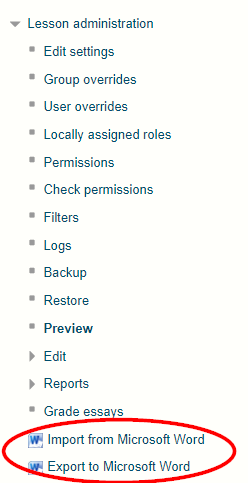
Import the contents of a Word file in '.docx' format file into a Lesson, splitting it into pages based on the "Heading 1" style. Also supports exporting lessons to Word format, for round-trip editing.
Price option: Free

Supports Moodle 3.5-5.0 See all versions
Latest release: 1 year ago
Installations: 629
Downloads (last 90 days): 65

Frankenstyle name: local_lesson_wordimport
Local plugins

Comments

Comments are no longer open for new posts. Existing comments remain available to read.

Moodle 4.5.6+ (15 August version) - When I try to visit the plugin privacy registry /admin/tool/dataprivacy/pluginregistry.php ,
I get this fatal error:
Fatal error: Trait "local_lesson_wordimport\privacy\core_privacy\local\legacy_polyfill" not found in /var/www/html/moodle/local/lesson_wordimport/classes/privacy/provider.php on line 33
and the report page completely fails to load.
I believe the right fix is here https://github.com/ecampbell/moodle-local_lesson_wordimport/issues/3 , and should be merged and released.
Thanks, Eoin ! All good now - Microsoft Word file Import/Export (Lesson) 1.0.4 (Build: 2025042500) upgraded successfully smile .
Hi Przemek, Apologies for the mishap, I think I have fixed this issue now, please try again.
Upgrade on Moodle 4.5 stumbles over "Microsoft Word file Import/Export (Lesson) (2025042400)" requiring "qformat_wordtable (2025042400)", which is not available ? Cf. https://moodle.org/plugins/qformat_wordtable , where the latest version is "3.9.7 (Build: 2025042300) (2025042300)". Maybe this is a mistake in the declaration of the dependency's version?
By comparison, the upgrade to "Microsoft Word file Import/Export (Book) booktool_wordimport 1.4.14 (Build: 2025042300)" did not complain about the qformat_wordtable's 3.9.7 (Build: 2025042300) version.
Hi Cathy, do you mean the Upload enrolment methods plugin at https://moodle.org/plugins/tool_uploadenrolmentmethods? This Lesson plugin doesn’t affect users or groups
Hi, I just installed and used your new version. It works, but there are two things I find disconcerting. The first is that there is no onscreen confirmation that the upload has worked - I have to wait until I get the email to see what happened. The second is that neither email/screen confirm how many new users were enrolled or how many groups were created, both of which I found useful. It used to say people were already enrolled if they were, then list how many were enrolled for the first time. I miss that. Are these features returning? Thanks very much smile
The Word document you import must be structured to use heading styles, in particular, the "Heading 1" style. Also, it shouldn't contain non-Unicode compatible fonts, or Microsoft Draw objects. A database error is likely caused by a character in a font that isn't supported in the database character set. Send the file to help@moodle2word.net and I can take a look. On export, content in Lesson pages must be well-formatted HTML. One way to achieve this is to open and save each page in the Atto editor, which always cleans up some markup issues when saving. IF that doesn't work, backup the lesson to a file and send it on, and I can take a look.
Hi,
thanks for providing this plugin.
I'm not really able to get it working. I can see the import and Export to Word Option, but when I try to import a Word document, I get a database error ans when I try to export an existing Lesson, I get an "XSLT transformation failed".
Any hints what's wrong?
Thank you and appreciate your support!
Hi Garrett, the export only includes content pages, so that might be a reason. If you tried to export the same lesson you imported, send me the Word file and I'll take a look.
Hi Eoin, we've installed the plugin on our Moodle test site (3.11.12). The import feature seems to be working okay, but when we export, we get a downloaded word document (with the name of the lesson as the title) but nothing within the document. Any ideas on what might be going on there?
Thank you and appreciate your support!
You can use the plugin with Moodle 4.1 now
Is there planned support for Moodle 4.1 or the upcoming 4.2?
Ok Eion, thanks for the reply. Loving all of your work. Thank you so much, it really speeds up quiz making in moodle!
This initial version of the plugin doesn't yet support importing questions, just content pages.
Hey so would love to use this and just want to check that I use a heading and then whatever I choose for a content page, then I can use your word table format questions in subsequent pages to add questions?