
FilterCodes
Maintained by
Michael Milette
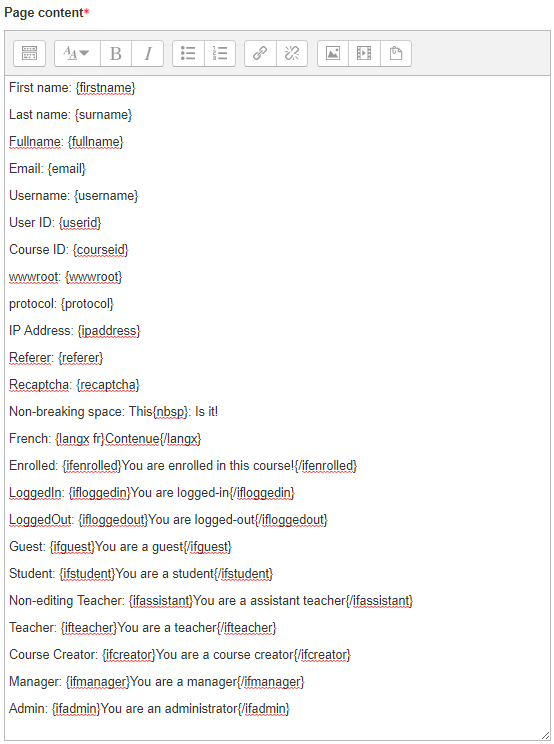
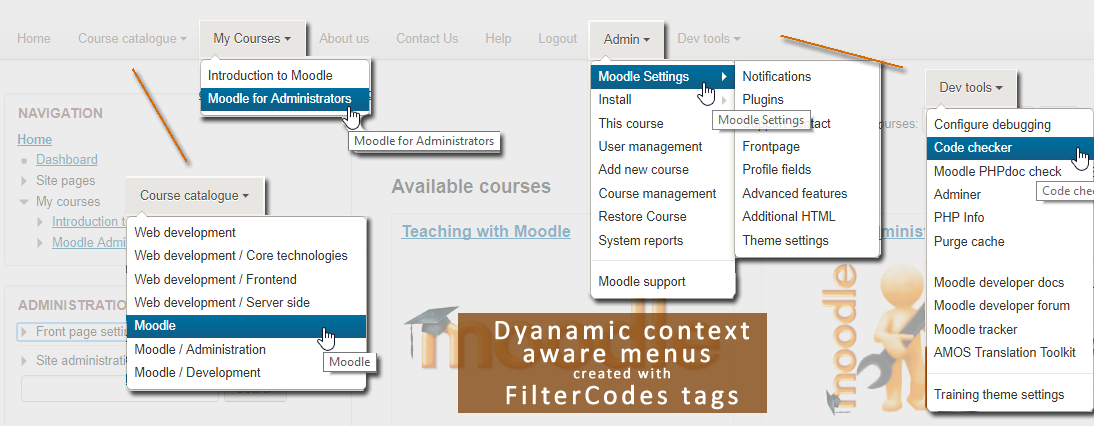
Transform your Moodle site with the FilterCodes Plugin! Elevate engagement by inserting about 200 dynamic plain-text tags like {firstname} to create personalized learning experiences, customize your site and course content, display progress bars, simplify Contact Form customization effortlessly and much more. FilterCodes empowers educators to revolutionize Moodle into a dynamic, personalized platform. Join the community of FilterCodes enthusiasts to unlock the potential of your Moodle LMS site.

Comments
Comments are no longer open for new posts. Existing comments remain available to read.
Hola sergio,
Definitivamente funciona con el tema Moove, pero podría depender de dónde coloque el código. Lo probé en la etiqueta {categorycards} en la página de inicio. Es más probable que el complemento no esté habilitado y configurado en "Contenido y encabezados" en la página Administrar filtros. Si necesita más ayuda, utilice el enlace de Discusión en esta página y publique su pregunta allí.
Atentamente,
Miguel
----------
Hello Sergio,
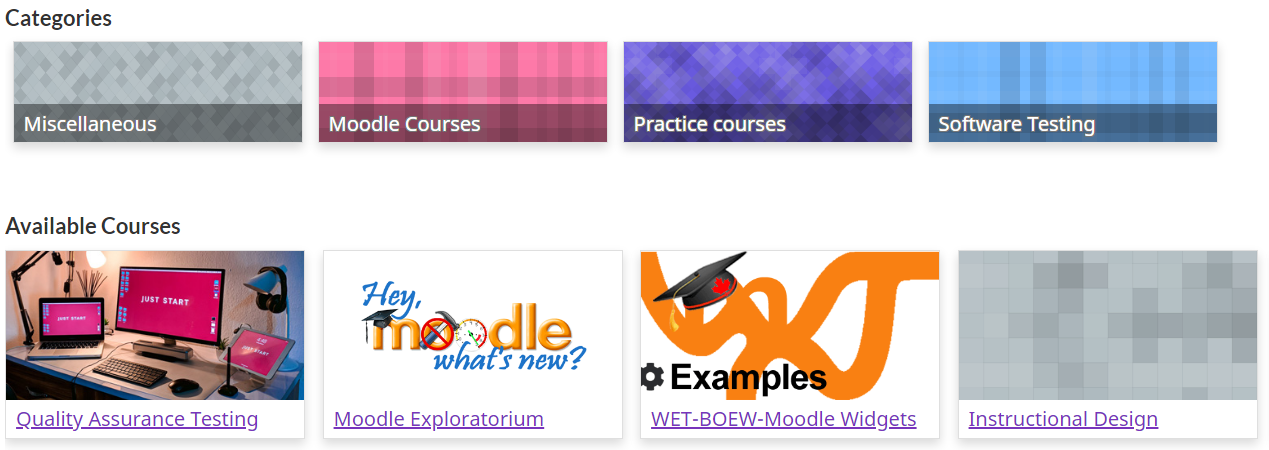
It definitely works with the Moove theme but it could depend on where you are putting the code. I tried it on the {categorycards} tag on the home page. It is more likely that the plugin is not enabled and set to "Content and Headings" in the Manage Filters page. If you need any further help, please use the Discussion link on this page and post your question there.
Best regards,
Michael
Instalé el plugin y en uno de mis moodles funciona y en otro no. Quiero usar {categorycards} y no lo intepreta (solo me muestra el texto). Uso el tema move puede ser por ello? Muchas gracias. Saludos
Thank you for your wonderful plugin that brings interaction and real enrichment to Moodle.
At the moment I only use formcheckin but I will probably use a lot more in the future.
Thanks again and well done!
Sincerely
Daniel
E-Learning Facile
It might be beneficial if you ask your question in the discussion forum at https://moodle.org/mod/forum/discuss.php?d=359252 . I recommend you split up your requirements into separate questions as there is not single answer to all of them. It will also make it easier to discuss.
You can see a list of all courses by going to your Dashboard and them replacing "my" in the URL with "course". This will take you to the All Courses page. Tip: Add a link to this page on the dashboard for your learners.
To display a list of courses in which the learner is currently enrolled, see the {mycourses} FilterCode.
It sounds like you might be looking for custom reports. See if there might be anything useful to you by going to https://docs.moodle.org/39/en/ad-hoc_contributed_reports
As for the showcase link, you might be thinking of Generico, another really useful Moodle filter plugin which you may find helpful in achieving your desired outcomes.
Hope you find something useful in all of this.
Best regards,
Michael
Hello,
Is it possible to use these filter codes to create a dynamic list of courses by enrolment attribute? I have many courses, some are openly available to anyone registered on my site and some are available only to registered students / members. Some are available to every one simply because I have not set the correct enrolment options!!
It would be great if the list was automatically updated each time I added a new course.
I would use the list to show students which courses could be available to them if they registered
I would use the list to show students which courses are only available if they have not registered
I would use the list as an admin check to make sure I have put the correct enrolment options against each course
I can see {categoryid} {categoriesmenu}{ifcustomrole roleshortname}{/ifcustomrole} : {ifnotcustomrole roleshortname}{/ifnotcustomrole} would all be useful but am clueless as to how to put them together to create the functionality I need.
Has anyone created a similar function and be willing to share the code for it? I am not a coder but am getting pretty good at copy and past others HTML
ps...am I imagining it or was there a thread where people shared their use cases and examples? If you could let me know the link that would be great - thank you.
Many thanks in advance
Marie
But seriously, no worries. I updated the documentation on GitHub last time you asked but that change will only be included here on moodle.org with the next release in December 2021.
Best regards,
Michael
Give {ifprofile_field_shortname}{/ifprofile_field_shortname} a try. It will display the enclosed content if the custom profile field is not blank/zero.
Best regards,
Michael
{ifuser_profile_field_shortname}{/ifuser_profile_field_shortname}
FilterCodes does work in blocks. You see this yourself by trying something like {firstname} in the HTML block. However, if you are creating your own block plugin, you must process all output through the Output API functions format_text() or format_string() in order for filters to be applied. You can lean more about these by going to https://docs.moodle.org/dev/Output_functions
If it is not working in an existing plugin, you will need to contact the developer / maintainer of the plugin and ask them to fix it using this information.
To easily use Moodle strings, take a look at the {getstring} tag.
Hope you find this information helpful.
Best regards,
Michael
Hop
Hola Mariuxi,
No hablo español, así que espero que Google Translate funcione bien. Filtrar los cursos ocultos y los cursos cuya fecha de finalización haya pasado son excelentes sugerencias. Utilice el enlace Bug Tracker (seguimiento de errores) en la página del complemento para hacer estas sugerencias y me aseguraré de implementarlas.
En cuanto al número de cartas seguidas, este cambia automáticamente en función del ancho del espacio disponible. Intente cambiar el tamaño de su navegador web para ver que esto suceda. De lo contrario, es probable que su tema no responda y tendrá que pedirle al desarrollador que lo solucione. Pruébelo con el tema Boost o Classic incluido con Moodle para ver a qué me refiero.
English
Filtering out hidden courses and courses whose end-date has passed are great suggestions. Please use the Bug Tracker link on the plugin's page to make these suggestions and I'll be sure to implement them.
With regards to controlling the number of cards in a row, this changes automatically depending on the width of the available space. Try resizing your web browser to see this happen. If it does not, your theme is probably not responsive and you will need to get the developer to fix this. Try it out with the Boost or Classic theme included with Moodle to see what I mean.
Saludos cordiales,
Michael