
FilterCodes
Maintained by
Michael Milette
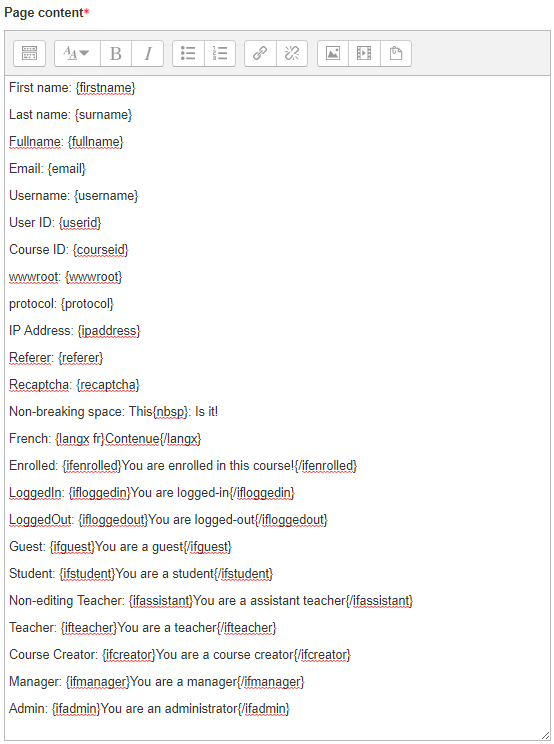
Transform your Moodle site with the FilterCodes Plugin! Elevate engagement by inserting about 200 dynamic plain-text tags like {firstname} to create personalized learning experiences, customize your site and course content, display progress bars, simplify Contact Form customization effortlessly and much more. FilterCodes empowers educators to revolutionize Moodle into a dynamic, personalized platform. Join the community of FilterCodes enthusiasts to unlock the potential of your Moodle LMS site.


Comments
Comments are no longer open for new posts. Existing comments remain available to read.
J'essaye d'utiliser la balise {ifactivitycompleted id}{/ifactivitycompleted} avec l'id 2740 de l'activité "page" mais cela ne fonctionne pas. Je voudrais afficher un message différents si l'activité 2740 est terminée. Je suis sous Moodle 3.11.6. Cela fonctionne dans une étiquette.
Merci pour votre aide.
I'm trying to use the {ifactivitycompleted id}{/ifactivitycompleted} tag with the id 2740 in a "page" activity but it does not work. I would like to display a different message if the 2740 activity is complete. I use Moodle 3.11.6. This works in a label.
Thanks for your help.
Cordialement,
Thierry VINCENT
Since the link works in other places on your Moodle site, I would say that you have determined that the problem is with the Game plugin. In order to get the issue resolved, you will need to report the issue to its developer using the Bug Tracker link on that plugin's page. Provide as much information as you can. It may be helpful to point them to the Moodle Output API documentation, specifically the format_text() and format_string() functions.
In order for FilterCodes tags to work, non-student generated output should always be processed through one of these two functions in order to process through any filters in Moodle. If you have any further questions, I invite you to ask it in the Discussion forum at https://moodle.org/mod/forum/discuss.php?d=359252
If the developer of the Game plugin does not want to fix it, I would be happy to offer my service to fix the problem. Just contact me through my website (the link is in my profile).
Best regards,
Michael Milette
The plugin is brillian, congratulations. I have installed the plugin, and it is enabled and set to "Content and Headings" in the Manage Filters page. I have used the code for "Back to course" in any activities and it works fine, but when I put the code in the mod_game (example: millionaire, crossword) in the description, header or foother, it does not direct me to the course page, instead it directs to a page that doesn´t exist with this error message "Not Found The requested URL /mod/game/{wwwroot}/course/view.php was not found on this server". Please can you help me?
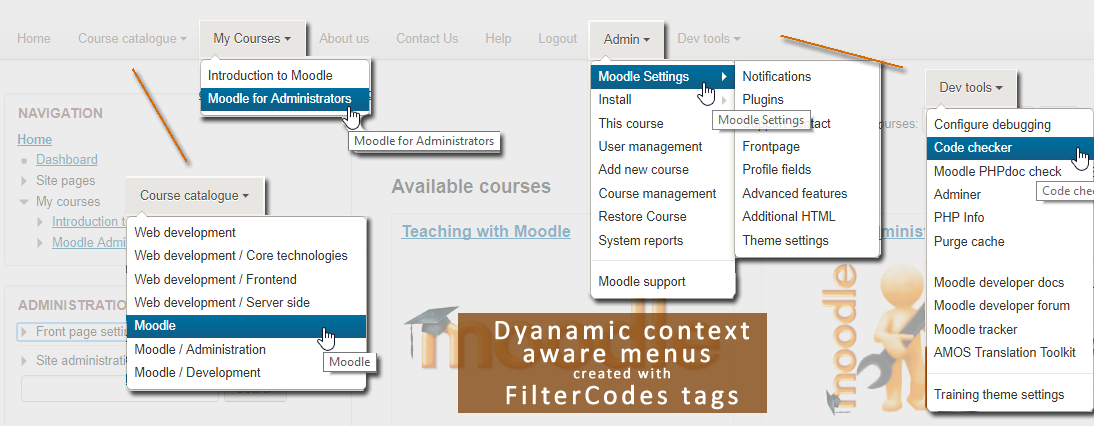
In order to make FilterCodes work in in the custom menu, you will either need to patch the theme or Moodle. Instructions for patching most themes based on Boost since Moodle 3.2 can be found at:
https://github.com/michael-milette/moodle-filter_filtercodes/blob/master/README.md#for-themes-based-on-boost-moodle-32-and-later
To patch Moodle 3.8, use Git to cherry-pick the following patch:
https://github.com/michael-milette/moodle/tree/MDL-63219-M38
If you want to see support for filters like FilterCodes integrated into Moodle's custom menu, please show your support by voting for the following issue:
https://tracker.moodle.org/browse/MDL-63219
If you have any further questions, please join the conversation at https://moodle.org/mod/forum/discuss.php?d=359252
Best regards,
Michael
Andrew
Looking forward to working in this with you.
Best regards,
Michael
Thanks Michael. I installed plugin version 2.2.6 2021052506.
Unfortunately, {coursecontacts} has the same formatting as {courseteachers}. The line feed before each name and one blank line after each name. Here is a screenshot: https://www.screenpresso.com/=6Z6Qe
Is it possible to at least remove blank lines?
Best regards,
Alexandre
Hope you find this helpful.
Best regards,
Michael
Unfortunately, {courseteachers} adds a line feed before each teacher's name and one blank line after each name. For me, this formatting is unacceptable. Is it possible to display the list of teachers on one line, separated by commas? Or at least remove blank lines between names?
Thanks!