
Jitsi
Maintained by
Sergio Comerón
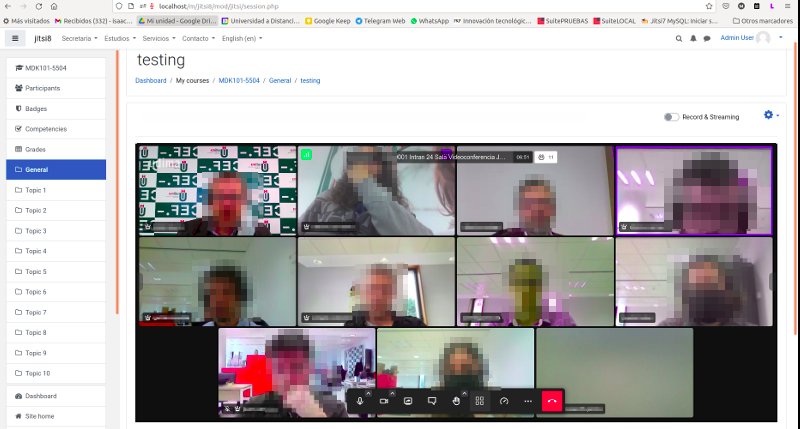
This module allows creating jitsi-meet videoconference sessions.
Comments
Product ratings and reviews are coming to Moodle Marketplace. Until then, existing comments remain available to read, but new posts have been disabled.
Muchas Gracias for making this awesome plugin.
I've been using your plugin on 3.11.4 and it's been working perfectly.
I just upgraded my site to moodle 3.11.5 today and Jitsit is not working anymore.
I uninstalled and reinstalled and still didn't fix the problem.
Do you or anyone else know what the problem could be.
Cheers.
Tien
In the previous versions of mod_jitsi the Jitsi frame appeared on its own inside the moodle browser window. Now it contains the moodle website headers and footers too, making it rather difficult to handle. Is there a way to disable this? Even more important, is there a way to run Jitsi in a new window and not in a frame within moodle? That would make it much much easier to handle.
Thanks
Here's a summary of the steps I took, suitable for newbies like me:
1) On Ubuntu 20.04 use this guide, but: - Do not do "setup issuers and audiences". - Do not bother with "setup guest domain". - Do not bother with anything below the "guest domain settings"
https://github.com/christiancuri/Docs/blob/master/Jitsi%20Meet%20Install%20(Ubuntu%2020).md
2) Install the Jitsi moderation plugin, which is basicaly just copying the lua file from the page below to your server and writing one or two lines on the config file.
https://github.com/nvonahsen/jitsi-token-moderation-plugin
It all worked perfect from there. Be careful of spellings when you enter hostnames, app ids, keys, etc.
I hope this saves all of my fellow newbies some precious time
I reinstalled Jitsi on my Ubuntu 20.04 server, with token, this time not using the ansible. It's working alright, with one big problem: everybody who joins becomes a moderator, regardless of their role in Moodle (Administrator, Teacher, Student). Do I need to manually change any config files for that? Thank you
sorry for the error. From what I see the problem is that a service is declared but it is not implemented. I must have forgotten to remove it from the production code. A new version of the plugin is required to fix it. Next week I calculate that I will be able to have a new version with improvements and solving the error.
We are using the Jitsi plugin on our Moodle server.
Moodle 3.10.6 Build: 20210820
mod_jitsi - v3.1.2 2021090100
When activating the Mobile function for the MoodleApp, the following error occurred.
In the menu "External service / Moodle mobile web service" there is an error when opening the "Functions":
Add functions to the service 'Moodle mobile web service
Error found in coding that only programmers can fix: Missing implementation method mod_jitsi_external::create_link
Without the Jitsi plugin the error does not exist.
Can we maybe fix the problem ourselves or is a correction in the plugin necessary?
Many greetings
Marco
¿Con que cumplan los requisitos básicos para ser SSL es suficiente, o debe ser de un nivel superior?
Gracias de antemano
I use tokenless server. I have found a disision for that case.
I have added to lib.php to str.383
+++++
if (!$teacher) {
echo "disableRemoteMute: true,\n";
echo "disableRemoteVideo: true,\n";
echo "remoteVideoMenu: {\n";
echo "disableKick: true,\n";
echo "},\n";
}
+++++
this code
In principle, if you have a jitsi server configured with tokens, that button should not appear to students. If you don't have a server with tokens (for example if you use meet.jit.si) the plugin is not configured to be able to hide this button to students. I will keep it in mind for future releases if I can hide it for tokenless servers.
// Options related to the remote participant menu.
// remoteVideoMenu: {
// // If set to true the 'Kick out' button will be disabled.
// disableKick: true,
// // If set to true the 'Grant moderator' button will be disabled.
// disableGrantModerator: true
// },
It is a private room that users can have in Moodle. It is still an initial idea and the intention is that it progresses to become a method of communication between users. Now, for example, it incorporates a notification when someone enters your private session, little by little it will come closer to a networking component.
It would be great, if this could be enhanced as a networking component?
What browser are you using? Your Moodle site is securized with SSL?
I tried plugin with public server meet.jit.si. It failed to access microphone with bellow message. What is the issue? How to fix it?
Also camera button is disabled.
Failed to access your microphone
Cannot use microphone for an unknown reason. Cannot read property 'getUserMedia' or undefined.