
Gapfill
Maintained by
Marcus Green
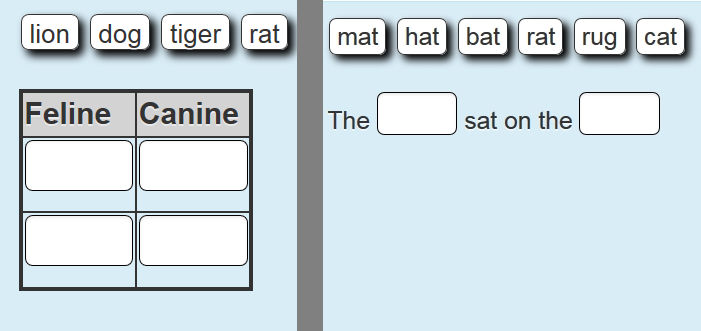
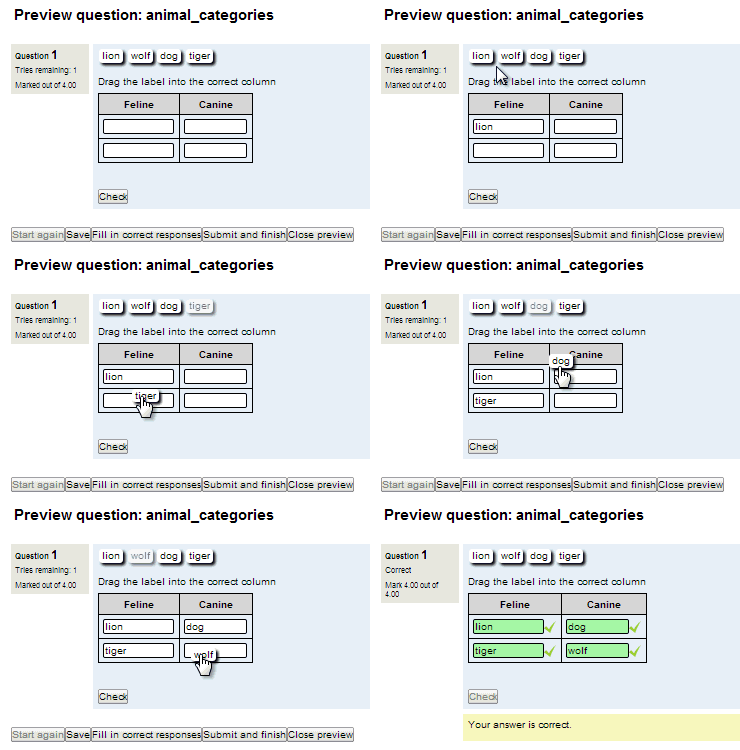
Cloze (fill in the blanks) question type with VERY simple question creation syntax. Can do drag drop, dropdowns or gapfill questions
Comments
Comments are no longer open for new posts. Existing comments remain available to read.
For example I'd like to write : M = [N * 2] but I cannot put the asterisk * into the answer.
* I know I can disable Regex but if do that, then, it will not ignore spaces.
** HTML also doesn't help cuz I work with asterisks for multiplication instead of "x"
Thanks.
You can see a video of it here
In the video I am using dropdowns but I get similar results when using drag and drop. The video is when
using the Moodle desktop app which is built from the same source as the Mobile app and is running the same
code as for mobile. I have also tested on the mobile app as well. Email me directly at marcusavgreen at gmail dot com if you want to follow up.
Debug info: SQLState: 42000
Error Code: 8147
Message: [Microsoft][ODBC Driver 11 for SQL Server][SQL Server]Could not create IDENTITY attribute on nullable column 'id', table 'mdl_question_gapfill_settings'.
SQLState: 42000
Error Code: 8111
Message: [Microsoft][ODBC Driver 11 for SQL Server][SQL Server]Cannot define PRIMARY KEY constraint on nullable column in table 'mdl_question_gapfill_settings'.
SQLState: 42000
Error Code: 1750
Message: [Microsoft][ODBC Driver 11 for SQL Server][SQL Server]Could not create constraint. See previous errors.
CREATE TABLE mdl_question_gapfill_settings (
id SMALLINT NULL IDENTITY(1,1),
question NVARCHAR(10) COLLATE database_default NOT NULL DEFAULT '',
itemid NVARCHAR(10) COLLATE database_default NOT NULL DEFAULT '',
gaptext NVARCHAR(255) COLLATE database_default NOT NULL DEFAULT '',
correctfeedback NVARCHAR(MAX) COLLATE database_default NOT NULL,
incorrectfeedback NVARCHAR(MAX) COLLATE database_default NOT NULL,
CONSTRAINT mdl_quesgapfsett_id_pk PRIMARY KEY (id)
)
Error code: ddlexecuteerror
× Stack trace: •line 492 of \lib\dml\moodle_database.php: ddl_change_structure_exception thrown
•line 324 of \lib\dml\sqlsrv_native_moodle_database.php: call to moodle_database->query_end()
•line 772 of \lib\dml\sqlsrv_native_moodle_database.php: call to sqlsrv_native_moodle_database->query_end()
•line 77 of \lib\ddl\database_manager.php: call to sqlsrv_native_moodle_database->change_database_structure()
•line 444 of \lib\ddl\database_manager.php: call to database_manager->execute_sql_arr()
•line 93 of \question\type\gapfill\db\upgrade.php: call to database_manager->create_table()
•line 564 of \lib\upgradelib.php: call to xmldb_qtype_gapfill_upgrade()
•line 1754 of \lib\upgradelib.php: call to upgrade_plugins()
•line 699 of \admin\index.php: call to upgrade_noncore()
Example, you might ask the student to select a healthy snack option and in the cloze question type you could write {1:MULTICHOICE:%50%Orange Juice~%50%Apple Juice~%100%Strawberries~%0%soda} And the result is the student earns half points possible if they choose orange juice or apple choice, all points possible if they choose strawberries, and zero points if they choose soda.
Thanks!
THANK you so much for your attention!
But I have an issue with it. And I hope you can help me. So here's the situation:
I'm using a series of gapfill questions (drag & drop mode) in a quiz with immediate feedback. This way the learner can see feedback after each question and adjust, improving his/her performance ot he way. But after having hit the first "Check" button, the learner can't move any other choices (the words given to fill in the gaps). I've tested it on Chrome, on Mobile Chrome and on Microsoft Edge, but got the same result.
If there's a cure for it I would apreciate it very much!
If you need more details, please ask.
Looking forward to hearing from you, and again thanks for the plugin!