Gapfill icon

Gapfill

Maintained by Marcus Green
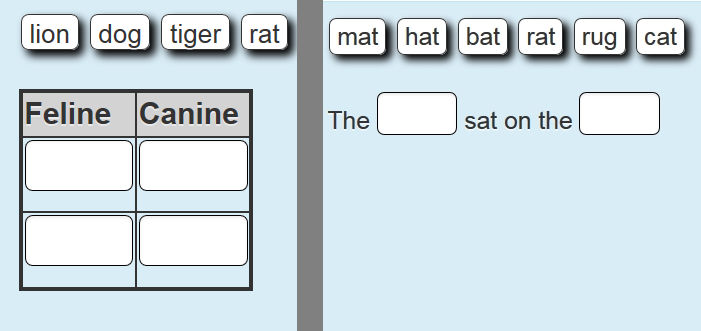
Cloze (fill in the blanks) question type with VERY simple question creation syntax. Can do drag drop, dropdowns or gapfill questions
Price option: Free

Supports Moodle 2.1-5.2 See all versions
Latest release: 3 months ago
Installations: 4370
Downloads (last 90 days): 980

Frankenstyle name: qtype_gapfill
Question types

Comments

Comments are no longer open for new posts. Existing comments remain available to read.

Thanks Chris, I will look into that
Hello Marcus, Longtime user of your awesome questiontype! I found an issue with the current version. We updated to the latest version today and I discovered an issue with your CSS which left an open :focus selector. Here is the fixed CSS for styles.css starting at line 12 ========
/* glow a little around the border */
.que.gapfill input.droptarget:hover, .que.gapfill input.droptarget:focus {
border: 1px solid #7bc1f7;
box-shadow: 0px 0px 8px #7bc1f7;
-moz-box-shadow: 0px 0px 8px #7bc1f7;
-webkit-box-shadow: 0px 0px 8px #7bc1f7;
}
Without ( .que.gapfill input.droptarget:focus ) that it was putting glow all over my site! currently you have a comma and then :focus { which puts your glow everywhere that has focus.
Chris
Hi Dave, the short answer is no, but I have emailed you directly for more information.
I have just noticed a problem across multiple Moodle's (which are indpendent of each other) that I work on where, for the gapfill questions that I have created, in the Combined Feedback area, any feedback that was present for 'For any correct response' - has now been made blank. Do you have any idea what would have caused this, and more to the point a solution?
Thanks in advance.
Hi Freddie, the short answer is no and you can read a longer answer here
https://github.com/marcusgreen/moodle-qtype_gapfill/wiki/Mobile-Testing
Any concrete plans for making compatible with Moodle for Mobile app?
Hi Nicholas Ndalpe, thank you for your interest. I recently tested it with the built in (core) MultiLang filter which seemed to work as I expected, but I have not tested it with multilang2. Email me at marcusavgreen at gmail.com to discuss further.
Hi Marcus, Thank you for your plugin. I noticed your plugin is not compatible with "Filter Multi-lang" plugin. Is it in your dev roadmap to add a feature to support multiple languages in question types? If you have any plan, please share. I am new to Moodle but not PHP. I can contribute some code if it can help.
FYI Filter Multi-lang: https://moodle.org/plugins/filter_multilang2
Looking forward hearing from you soon
Thank you
Nicolas Dalpe
Thank you for your feedback Yezi. I don't have any current timetable for creating a version that will work with Moodle mobile, though as you could see from my post, it is something I am interested in. In the meantime I am interested in making sure that it works on mobile devices in standard mobile browsers. What percentage of your users use the Mobile app?
Hi,
I saw that you have posted a message in Moodle forum asking about how gapfill question type can be integrated with quizzes in the Moodle mobile. https://moodle.org/mod/forum/discuss.php?d=334322. Could I know when you will release an updated version that can be integrated with the mobile app, please? Gapfill is a very useful question type and we have more than 4500 students using the Moodle mobile app in my institution. I am really looking forward to seeing gapfill can be used in Moodle mobile app.
Hi I saw a small bug kind of a thing, when I creating a custom theme. in common rendering, there is no wrapper for draggables and question texts. So there are some complications in doing some CSS styling works on these things. So I put divs with "draggables" and "questiontxt" classes in it on "formulation_and_controls" function. So I suggest to put these kind of wrapper to this plugins newer versions. That will be lot help to people like me who creating Moodle Themes.
Hi Chris, I remembered there may be a way of doing what you want. In the sample questions that come with the question type (sample_questions.xml) there is one called Regular Expressions. That has a field where the gap is set to [black\s+and\s+white]. That should require the words black and white but ignore the size of white space added between the words. Let me know if that addresses the issue.
Can create an issue here https://github.com/marcusgreen/moodle-qtype_gapfill/issues with a full description so when I do my next round of updates I will see if it is something I can address.
I think I understand your issue Chris, and I suspect that a programmer would be able to address it by normalising the spaces (i.e. making them all to a single space). I'm not in a position to work on that right now however.
Well my problem is that i give as right answer 'black cat'. Sometimes the student though types 'black cat ' and it gets it wrong. or ' black cat ' or 'black_ _ cat'. I am trying a way to fix it and have the system ingore if first char is space or last char is space or if i have more than on spaces then change it to one space. Thats my issue.