Windows Share access (AKA Network Drive Access, SMB Web Client)

Maintained by Guy Thomas
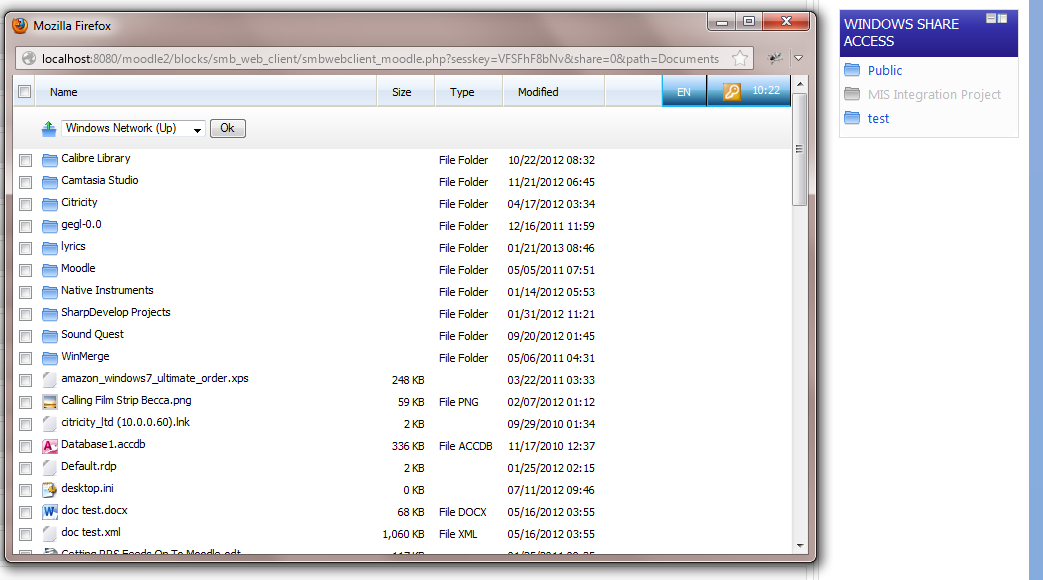
Access windows shares via a Moodle web interface.
Price option: Free

Supports Moodle 2.2-2.7 See all versions
Latest release: 11 years ago
Installations: 14
Downloads (last 90 days): 16

Frankenstyle name: block_smb_web_client
Blocks

Comments

Comments are no longer open for new posts. Existing comments remain available to read.

New version 2013060601 added today
It has been reported today that version 201304300 downloads as a corrupted zip file. An alternative download is available from:
http://www.citricity.com/moodlegpl/windowssharewebclient/smb_web_client-2013043000.tar.gz
Doing OK thanks. With regards to the issue at hand, the filtering work fine when JS is off - and the correct string following the syntax listed in the help string is entered, evidently the YUI table is not handling the comma correctly, it stores it colon separated. Thanks for the heads up.
BTW - Niall, I am being very nice by helping out the competition - really I should leave you to struggle but then I wouldn't be operating in the spirit of open source software.
Hi Niall. Long time no speak, hope you are doing well. Its not a documented feature in the table view yet because the block is still in BETA. If you turn javascript off and then reload the config page I think you will get the help icon for filters. If you take a look at the language string 'shareformats' you will see how to do it.
OK I got roles working with R[role_short_name], but what about specifying multiple roles?
We've been trying to have a go with the filters, but don't seem to be able to get them working properly. There is no documentation or guidance as to how they should be specified in the YUI table, but a dig through the code appeared to suggest the "role_short_name,R" should be correct, but what about specifying multiple roles? Also does admin automatically have no rights if any filter is set? If they have the right role they should be able to access though, right?
I've done some work on this block today. Version 2012043000 now works with the yui table for configuring shares. This is still in BETA as I haven't had much time to do intensive testing.
Hi Colin, hope you are doing well. I recommend that you have a go with the latest block in a test environment. If you like I'm quite happy to do a remote session for free to help you set it up. You can email me at guy.thomas@overnetdata.com
Using v2012030712 we have the client working and can browse shares fine. There are a couple.of snags however, zip folders download as 0Kb and it takes an age for the folders to appear in the pop up window. We don't want to change the block version for gear that the whole plugin which was a bit of a pain to configure will not work at all. Any suggestions? We are using Moodle 2.3
Please note, as reported by Peter Carey: In the latest BETA version the shares table does not always display. When this happens, you need to enter the sharename followed by a pipe symbol (|) followed by the share in standard format - e.g.
Staff Share|\\server1\staffshared$
Thanks for letting me know Peter, I'll take a look at this today
Hi Guy,
BETA Version 2013021900 doesn't show the 'new' config of shares buttons and table etc, its just the normal textarea box. Moodle 2.4.1 and 2.5 dev Firefox v19. JS console reports the following but not sure if its related :
[10:06:17.766] yui: NOT loaded: array
BETA version 2013021900 released today - fixes bug where files couldn't be downloaded if using new windows share format
BETA version 2013021300 released today with new configuration of shares