Level Up XP - Gamification 🏅 icon

Level Up XP - Gamification 🏅

Maintained by Frédéric Massart ⭐
🔥 🤩 The easiest way to add gamification to your Moodle site! Engage your learners! Gamify their learning experience to increase participation and completion rates. #gamification #engagement
Price option: Free

Supports Moodle 2.7-5.2 See all versions
Latest release: 3 months ago
Installations: 11249
Downloads (last 90 days): 2405

Frankenstyle name: block_xp
Blocks

Comments

Comments are no longer open for new posts. Existing comments remain available to read.

Hi, I want to send points to other users. Is there any way we can devise a way to do this? Ideas are fine, even if they don't have a function. thanks!
I meant using the same APIs as Moodle does for its normal rendering. I am not familiar with them, but I imagine you could make use of them.
Oh ok, thanks @Frédéric Massart ! But can you explain what do you mean by render the block normally?
Hi @Mayara, there is no specific way to obtain the content displayed in the block. You probably want to render it as it would normally, or look into mobile support for blocks which is capable of rendering the blocks for the mobile app as far as I'm aware. Good luck!
Hello @Frédéric Massart, I'm developing a local plugin that is basically a dashboard for students, and I want to display the XP block inside my plugin. Is that possible? Btw, my plugin is configured with the $PAGE API.
So my question is: can I add your block into a page that it's not a course? If yes, is there a specific function or method for that?
I'm waiting for your anwser, thanks!
@Khoirul Umam, yes the setting works for all types of activities, including quizzes. However, students can find ways to bypass the cheat guard, so with XP (free) we cannot guarantee that the action will not be repeated within a short time.
Hi @Frédéric Massart, thank you for your explanation. But why doesn't Time required between identical actions work for repeated quiz activities? Can you explain?
Hi @Khoirul Umam, in some cases, it is possible for students to circumvent the cheat guard with the free version of XP. For a more robust approach we recommend using XP+.
Hi @Scott Wilson, this is definitely possible. The best option to "hide" XP from an individual is to take away their permission to view the block, and earn XP. This can be done by creating a custom role and assigning it t the person who requests to opt out. More information about the permissions can be found here: https://docs.levelup.plus/xp/docs/getting-started/permissions
Hi folks,
Just wondering, can a student opt out of Level up. I am about to run a course with the level up plugin but if a student decided they didn't want to partake, can they be removed from level up?
Hi, I'm using Moodle 4.0.1 and Level Up 3.15.2. I want when someone has done a quiz, they don't get points when they do the next quiz. Then I tried setting the Time required between identical actions to 360 minutes. But it turned out that when the experiment was carried out again, users who had already done the quiz still got points when they did the same quiz again. Please explain whether there are settings that are not appropriate?
Thank You
Hi @Carex. Thank you for your suggestion. That's an interesting idea. We'll definitely make a note of it, and consider this in future release.
Greetings!
May I suggest if it is possible for LevelUP to provide a feature that gives students the option to disable it during a course? Or is this feature already available?
Such a feature would allow users to tailor their learning experience according to their preferences and needs, e.g., turn it off if "competition" feels too exhausting.
Hi @Sadaf, XP has never supported the Mobile app out of the box. Mobile support is silently supported in XP+ Multi.
in the past, block xp support in the moodle mobile app. is it work now in the 3.15.2 version of block xp work with moodle mobile 4.3? if no, is there any plan for that?
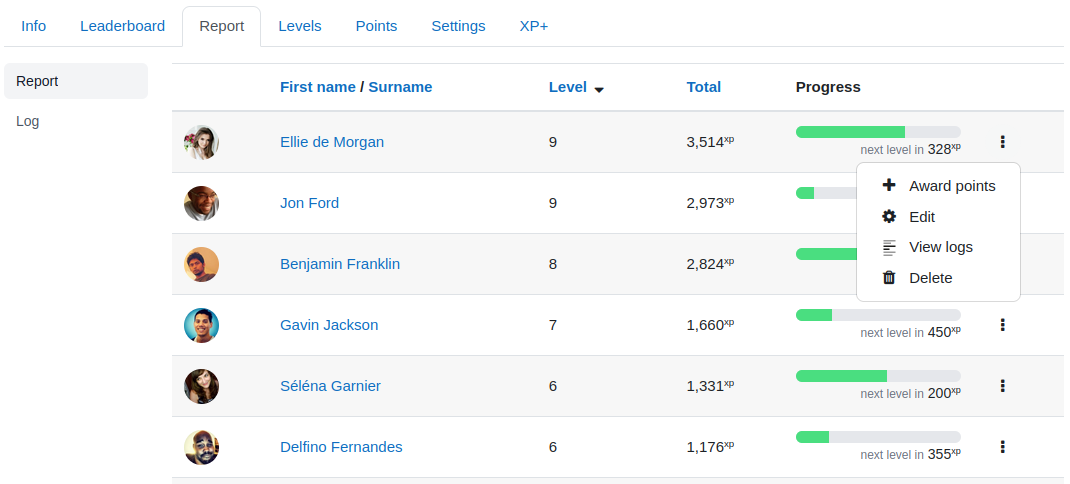
Hi @Jason, good question. You can manually edit the points of learners to take some away, and with XP+ you can do the same in bulk by importing a CSV. There is no automatic system for taking points away as we believe that a "penalty" in the form of loss of points could lead to a negative experience for individual learners. Note that resetting the points of everyone is also possible (see https://docs.levelup.plus/xp/docs/how-to/reset-learners-points).