
StudentQuiz
Maintained by
Frank Koch, Tim Hunt, Hieu Vu Van, Mahmoud Kassaei
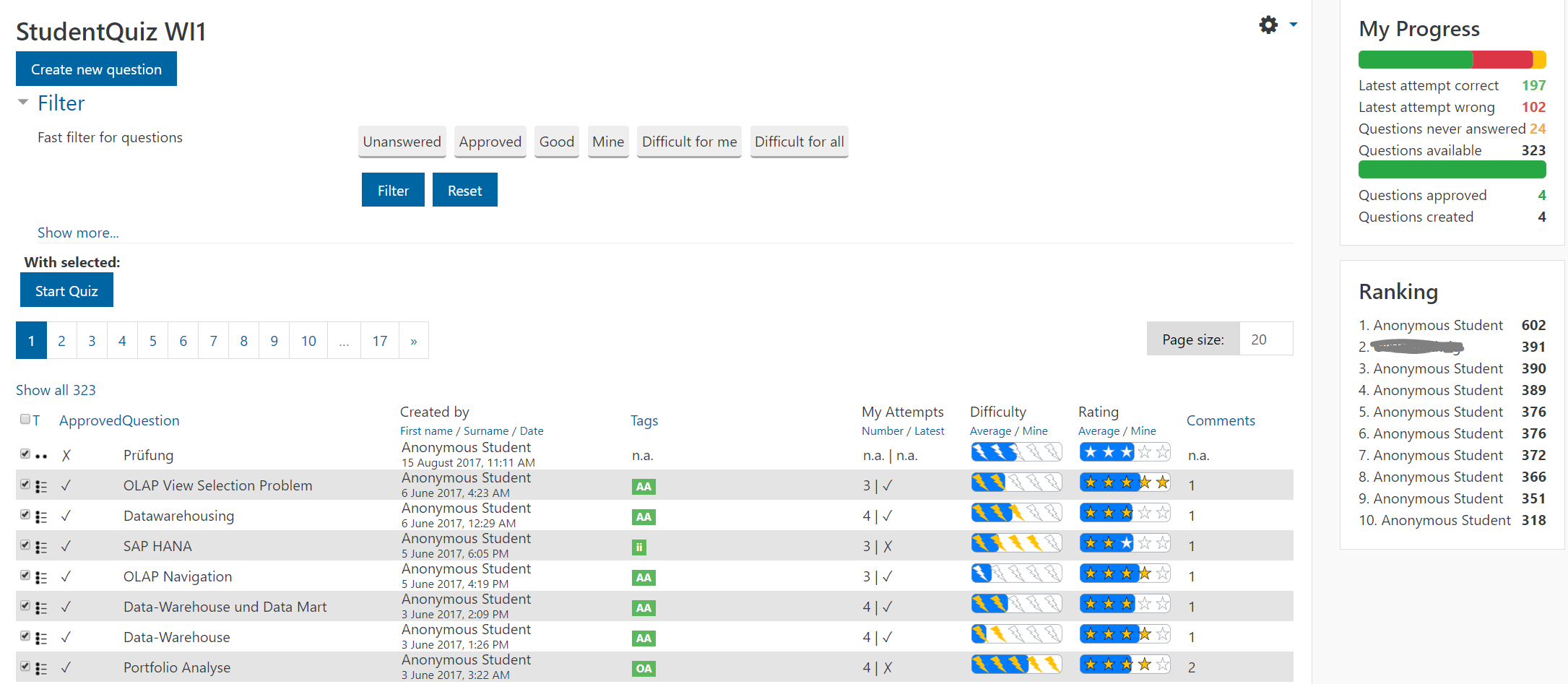
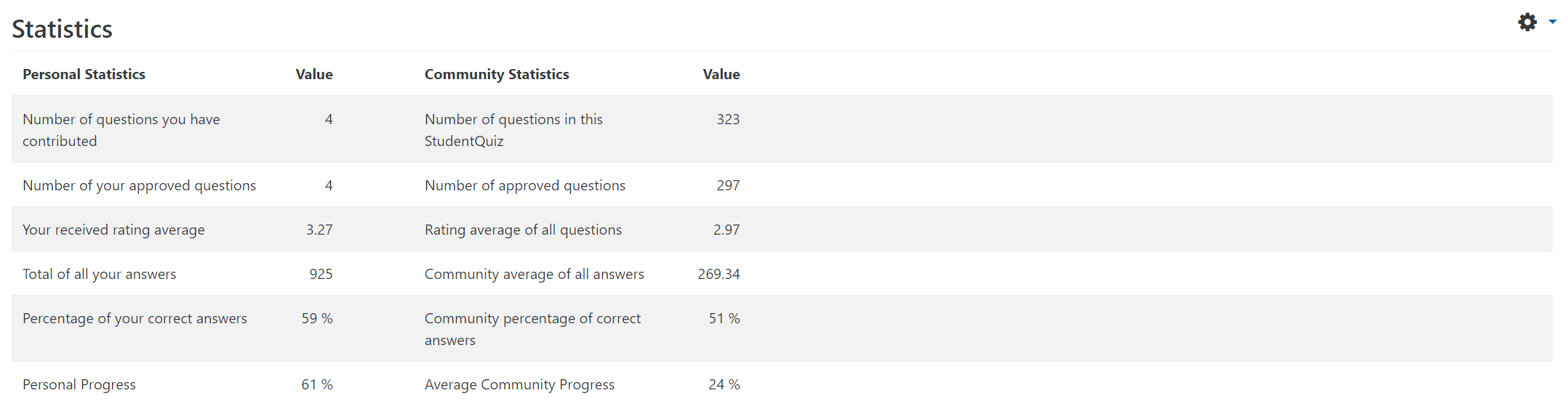
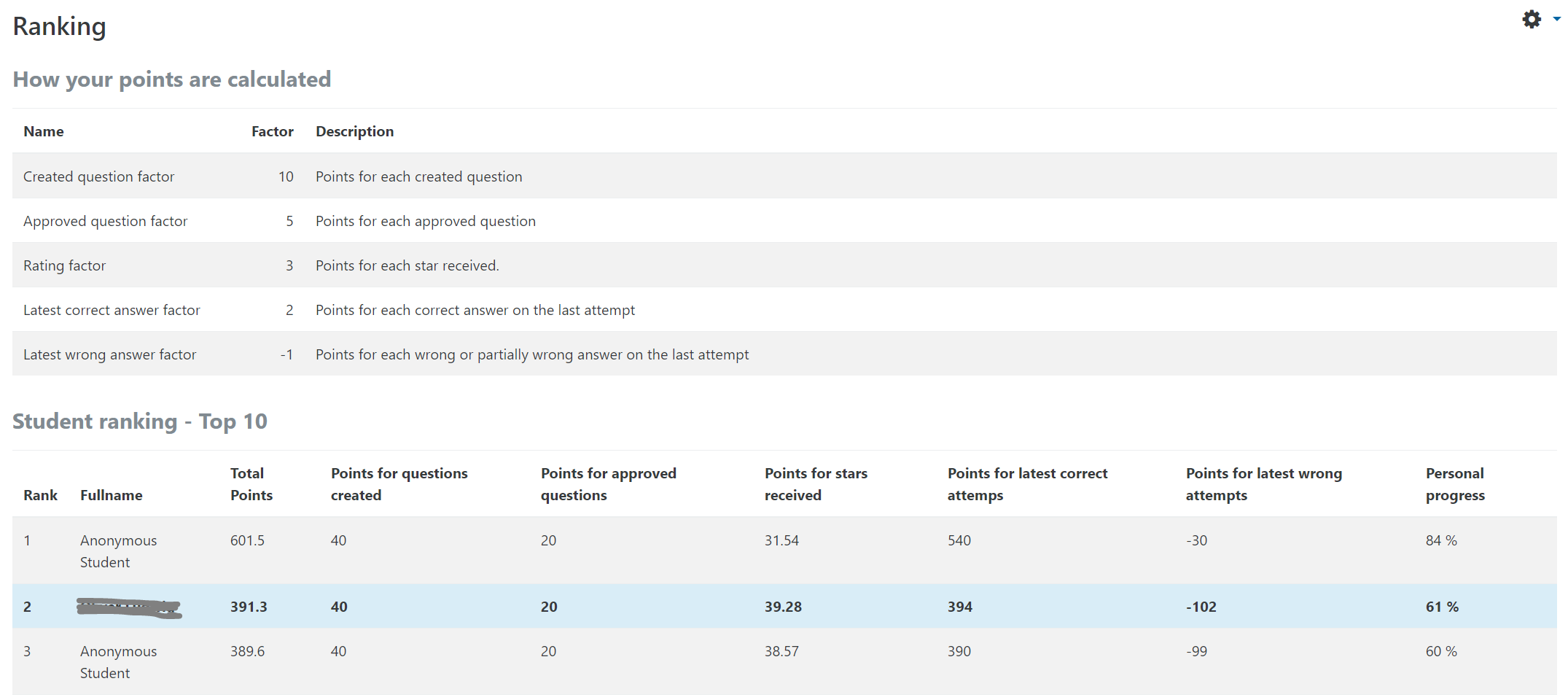
StudentQuiz enables students to collaboratively create their own question pools in Moodle. Students can filter these questions into quizzes, and they can rate and comment questions while working through the quizzes. StudentQuiz computes each students contribution and learning progress and compares this with the community. The created questions become part of the Moodle question bank and can be reused in other Moodle quizzes. The video "StudentQuiz in a minute" tube.switch.ch/videos/d0e37788 provides a quick introduction.
Comments
Comments are no longer open for new posts. Existing comments remain available to read.
1. Ah, yes, when there is >20 questions and you do as you say, it resets. I will add that defect to our backlog (probably to be fixed in the M4.0 compatible version).
2. Could you confirm the theme, please? I cannot replicate in the OU theme or on our vanilla Moodle test server (Boost). Could you open an issue on https://github.com/studentquiz/moodle-mod_studentquiz/issues as that allows screenshots.
3. The question history, and the 'Ready for review' status, were introduced in recent versions of StudentQuiz. I believe that we've also improved notifications, though that may be coming in the M4.0-compatible version. We were also planning on question versioning, but then that appeared in Moodle 4.0 and saved us a tonne of work
4. If you are using the "teacher approval required for publishing to cohort/group" mode, a question is only deemed published once approved.
I believe I've found a bug. When you look under ranking it seems that the "published question factor" doesn't get applied or rather only once the questions are approved. I understood that any question created would be considered a published question and trigger than score.
Thanks for your help.
1. setting the number of shown questions aka page size (default=20) to e.g. 100 doesn't get remembered when you edit a question and save. the same is true when using the filters in the question overview.
2. the sizing of the questions seems to not be limited resulting in the preview, edit question, delete, and show buttons (and all other content on that row after it) to be off screen. So you have to scroll side ways. many students cannot find these controls.
I'd be happy to supply a screen shot but cannot add that here.
3. how do we see whether students have made changes to a question after we have put them into "changed" state. The documentation doesn't explain this workflow. For example, a student submits a questions. We ask them to make changes. Set the state to "changed", they get informed by email, edit the question to fix the problems, ....
How do we find these questions that have undergone fixing?
I like your suggestion of an admin setting (a bit like the one to let admins control which roles teachers can change the settings for).
In this context a restriction setting would be useful, which allows the administrator to restrict the question type plugins that are activated for use with StudentQuiz Plugin. For example, only core plugins could be enabled, as they may be more thoroughly tested interacting with the StudentQuiz Plugin (than external plugins). Also for performance reasons, the administrator could have the requirement to restrict users from using certain question types, e.g. STACK.
Currently, only teachers can set these restrictions in their courses, but not the administrators globally.
But my question was more about the possibility of a random selection of questions than about the spliting of the question bank into different categories.
Let's say that there are100 questions in a StudentQuiz session. I dont want the students to see the whole bank of question, but I want them to perform quizzes made of 20 questions randomly chosen among the 100 of the whole bank. My question is : is there a possibility construct the quizz based on 20 questions randomly chosen (instead of chosen by the students) ?
In fact, I would like to combine the features of the regular moodle quiz (build a quizz with limited number and randomly chosen questions) and the features of studentquiz (rating, commenting, etc...)
Is there a way to reach this ?
V
I will rapidly use it in my coming courses.
Before that I am interested in using it in an ongoing course in order to use the crowd intelligence aspect of the plugin. But I was wondering if there are any possibility to use this plugin in the following conditions:
- a course divided in different chapters
- questions (already made) are associated with each chapter (several hundred for each chapter), the questions are available for the students, for auto evaluation purpose.
- students can take a quiz whenever they want. They choose a chapter and perform a quiz made of 20 randomly chosen questions among the questions of the chapter.
The questions need to be improved by the students' comments and, for this purpose, the puglin is perfect. But I do not want the students to have direct access to the whole lot of questions associated with each chapter. Is there any possibility to build a quiz with a limited number of questions randomly chosen among the SQ category?
If the answer is no, does anyone have an idea on how to give the possibility to the students to comment/rate a question within a "classic" moodle quiz ?
Many thanks again for the plugin (and the answer !)
Vincent
However, I think it could even be better. Here are some aspects that I think could be improved:
1. Students should not be able to rate their own questions.
2. Students should not get points for answering their own questions.
3. The question creation pages are intimidating for non-tech-savvy students and should be simplified. For example, there's no need for "Multiple Tries" to be displayed when it does not work with StudentQuiz.
4. It could also be a plus to be able to set limits on the number of questions a student can create within a time period, e.g. one per day. This will firstly prevent the activity to be dominated by students who are faster or have more time available and secondly would also help quality over quantity.
5. Also, being able to set a certain number of approved questions for the activity to be automatically marked as complete would be welcome.
Thanks again for your wonderful plugin.