
StudentQuiz
Maintained by
Frank Koch, Tim Hunt, Hieu Vu Van, Mahmoud Kassaei
StudentQuiz enables students to collaboratively create their own question pools in Moodle. Students can filter these questions into quizzes, and they can rate and comment questions while working through the quizzes. StudentQuiz computes each students contribution and learning progress and compares this with the community. The created questions become part of the Moodle question bank and can be reused in other Moodle quizzes. The video "StudentQuiz in a minute" tube.switch.ch/videos/d0e37788 provides a quick introduction.
Comments
Comments are no longer open for new posts. Existing comments remain available to read.
Moodle Headquarter has to implement the required webservices first to allow the mobile app to support StudentQuiz. Moodle HQ will do this as soon as they integrated StudentQuiz into Moodle core. Please vote on https://tracker.moodle.org/browse/MDL-62822 to make this happen as soon as possible.
Best regards,
Frank
This is indeed a very nice plugin and I understand why it is on the roadmap to be included in Moodle Core.
**Have you a schedule a date to make it work with Moodle Mobile?**
My student spend there time on their phone and it would be great if at least "taking the quiz" was available from their mobile device.
(for now, I get the "Uh oh, your organisation installed a plugin that is not yet supported" message.
But maybe I just didn't set it up correctly...)
Thank you for your answer.
Regards
François
The first can play well.
Others don't work .
Can you test in my Private server ?
Best to you !
Best Frank
Does anyone know how to solve it?
moodel3.5 / centos7 / php7.0 / mariadb
-----------------------------------------------------
Coding error detected, it must be fixed by a programmer: moodle_database::update_record_raw() id field must be specified.
이 오류에 대한 추가 정보
×Debug info:
Error code: codingerror
×Stack trace:
line 1533 of /lib/dml/mysqli_native_moodle_database.php: coding_exception thrown
line 1589 of /lib/dml/mysqli_native_moodle_database.php: call to mysqli_native_moodle_database->update_record_raw()
line 166 of /mod/studentquiz/locallib.php: call to mysqli_native_moodle_database->update_record()
line 52 of /mod/studentquiz/view.php: call to mod_studentquiz_migrate_single_studentquiz_instances_to_aggregated_state()
×Output buffer:
Notice: Trying to get property of non-object in /var/www/html/moodle/mod/studentquiz/view.php on line 51
Notice: Trying to get property of non-object in /var/www/html/moodle/mod/studentquiz/locallib.php on line 160
Warning: Creating default object from empty value in /var/www/html/moodle/mod/studentquiz/locallib.php on line 164
On our site, question are still randomly deleted. But I'm still testing and trying to find a solution. I hope to be solved someday.
Again, I cannot reproduce this situation and it might be a certain setting that causes this problem. It might help you to export the questions from StudentQuiz. Such an export file could serve as a backup.
https://www.dropbox.com/s/0m9lkln6ju67gcg/StudentQuiz1.png?dl=0
https://www.dropbox.com/s/a3j4ukmlwo1kz71/StudentQuiz2.png?dl=0
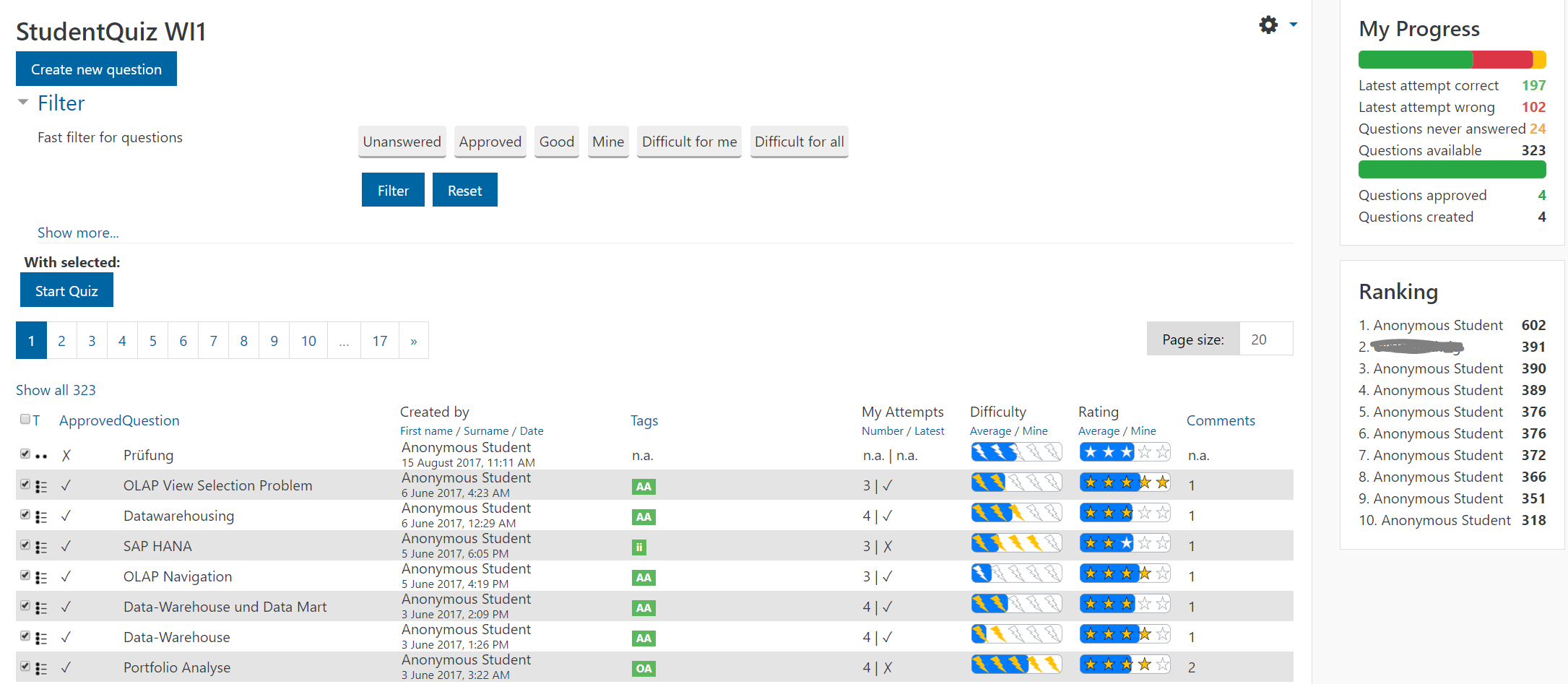
StudentQuiz distinguishes four kinds of question quality measures.
1) The "approval" by the teacher simply tells that the question is correct, such that students cannot go wrong learning it. However, it doesn't say anything about how good or how difficult the question is.
2) The "ranking", which is done by those answering the question, is telling about how good the question is. It's the mean of everbodies rating.
3) On top users have the option to comment on questions which hopefully triggers needed corrections.
4) And the "difficulty" is just the relation between correct and incorrect answers measured by Studentquiz.
We decided on purpose to publish whatever question right after submission. This hopefully motivates the teacher to quickly add his/her approvals to certify the questions he/she wants students to learn. We also did ot want a teacher to block StudentQuiz simply because he/she neglects the approvals.
Well, that hopefully makes is a "crowd-intelligence" system.
Best, Frank