
FilterCodes
Maintained by
Michael Milette
Transform your Moodle site with the FilterCodes Plugin! Elevate engagement by inserting about 200 dynamic plain-text tags like {firstname} to create personalized learning experiences, customize your site and course content, display progress bars, simplify Contact Form customization effortlessly and much more. FilterCodes empowers educators to revolutionize Moodle into a dynamic, personalized platform. Join the community of FilterCodes enthusiasts to unlock the potential of your Moodle LMS site.

Comments
Comments are no longer open for new posts. Existing comments remain available to read.
Anyway, if this has not already been solved, an alternate way to what Michael suggested is that to browse the files to remove the plugin directory then at the admin interface you will need to update the database.
Good luck
I can't imagine how this plugin would break your Site Administration menu. This plugin is literally in use on thousands of Moodle sites around the world since several years. Did you complete the database upgrade after the installation and then activate the filter in Filter Management as a site administrator? Unless you completed all of these steps, the plugin is not yet active.
Anyway, you can uninstall the plugin using the following command line:
php admin/cli/uninstall_plugins.php --plugins=filter_filtercodes
If you are on a Windows server, replace the 2 forward slashes with backslashes.
Once done, you will also need to manually remove the filter/filtercodes directory.
If that doesn't fix your issue, then your problem isn't the plugin.
Is this the only plugin that you can not uninstall? If you are unable to uninstall any plugin it is possible that your web host has a Web Application Firewall installed. Check your cPanel or Plesk to temporarily deactivate the WAF while you uninstall the plugin. Then reactivate it when done.
Thanks for the update and the alternate solution.
Keep up the great work!
Joe
Michael
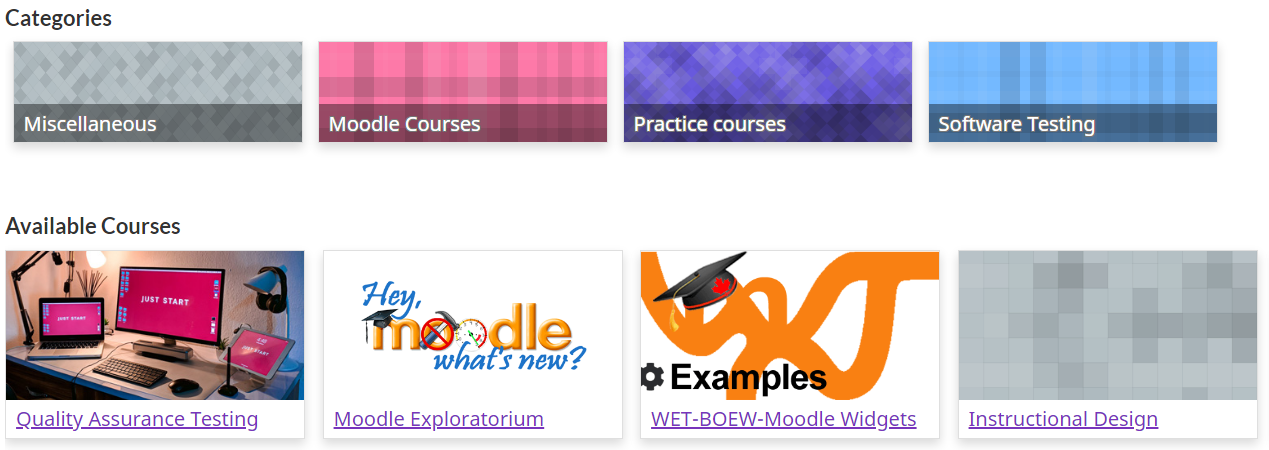
Thanks for the quick response. I have enabled the Show {categorycards} background option in the FilterCodes settings but still I only see patterns as the background behind my category cards not the images that are part of the category description. Is there another setting I need to enable?
Thanks,
Joe
Check the FilterCodes settings. There is a setting for that.
Best regards,
Michael Milette
Thanks for this amazing plugin! The Show {categorycards} background option states that if enabled, will display a background colour/pattern for {categorycards} tag similar to the course images when no image was specified. I have several categories that have images however all that is displayed when I insert the tag is the category cards with the names and a pattern - no category image. What am I missing?
Unfortunately FilterCodes can only substitute text tags for content. The user picture is not a text field so you cannot add a filter code tag to it.
That said, what you are trying to do is possible however, it requires making a change to the code of your theme. I recommend that you contact a developer, like me, to see if they can customize your theme for your needs.
Best regards,
Michael
Best regards,
Michael
THIS IS ABSOLUTELY AWESOME! The functionality/customization this adds is simply mindblowing!
I was wondering if it were possible to use filtercodes to display user pictures based on a variable.
We have a custom user field "Organization" and would like for the user picture to be based on what organization they are in.
ex: Steve is in X, so his user picture is X's logo. Jane is in Y, so her user picture is Y's logo.
Can something like this be done through FilterCodes?