
FilterCodes
Maintained by
Michael Milette
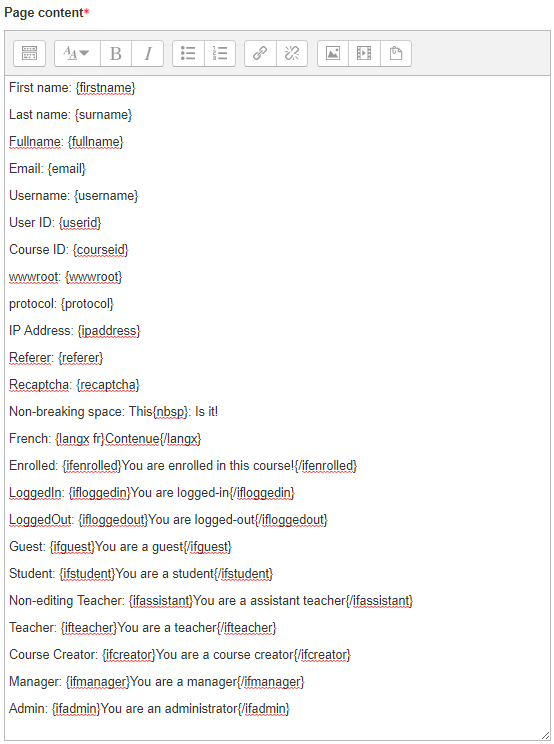
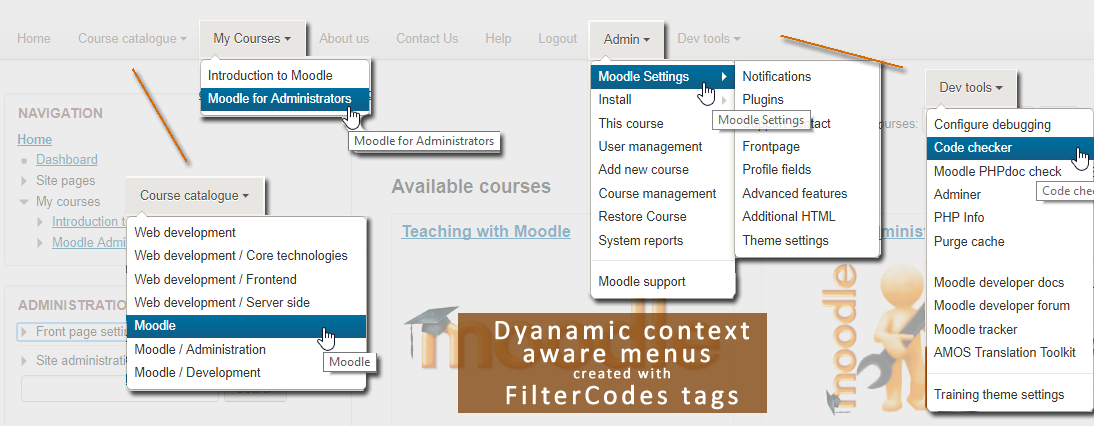
Transform your Moodle site with the FilterCodes Plugin! Elevate engagement by inserting about 200 dynamic plain-text tags like {firstname} to create personalized learning experiences, customize your site and course content, display progress bars, simplify Contact Form customization effortlessly and much more. FilterCodes empowers educators to revolutionize Moodle into a dynamic, personalized platform. Join the community of FilterCodes enthusiasts to unlock the potential of your Moodle LMS site.

Comments
Comments are no longer open for new posts. Existing comments remain available to read.
You need to enable and configure Moodle's Recaptcha. You can find it by going to Site Administration and doing a search for "recaptcha".
Contact Form has other anti-spam features. Have you tried it without the recaptcha?
Best regards,
Michael
I have installed the ContactForm and FilterCodes plugins.
Now I am trying to add the ReCAPTCHA to the contact form created and is not shown.
I cannot find the ReCAPTCHA setting to enable it: Local Plugins > Contact Form
image
Found this KBA:
https://moodle.org/plugins/local_contact
moodle-local-contact-settings
I have used {formcontactus} and also {recaptcha}. Unfortunately ReCAPTCHA is not displayed:
Capture
We are using the AlmondB Theme.
Could you please advise how to solve this issue?
Thank you.
Kind regards,
Daniel
But I still feel that creating a cohort for small things would not be nice for me, and I will have to do multiple navigation for a single task. For time being I will use this method as suggested. But still I will put a feature request for the userfields. I hope it will be helpful in some cases.
In terms of filtering by language that is already covered either with this plugin or by using https://moodle.org/plugins/filter_multilang2
Please submit your feature request to https://github.com/michael-milette/moodle-filter_filtercodes/issues
Best regards,
Michael
I would request for a new type of conditional fiter support, based on user fields like country or language etc. Suppose I want to some content to users of a particular country only, then {ifuserfield_country countrycode}{/ifuserfield_country} would be helpful. Please let us know if you have any plans to add support for this kind of conditional filter.
Dorry, I did not realize that you were trying to apply this to the user menu. The patch only enables the primary navigation (a.k.a. custom) menu. I would need to develop the patch to make it work in the user menu as I don'thave a patch for that one. You can reach out to me at https//www.tngconsulting.ca/contact if you want me to do that for you.
Best regards,
Michael
I manually edited the files. The numbering was off in the "outpurenderers.php" file, but there were no obvious changes.
However, it didn't work. I've verified the code, restarted Apache, rebooted the server, and purged the caches. Still doesn't work.
I'm using Moodle 4.1.1+. I added filter codes to the User menu -- doesn't work.
Any suggestions?
At this point, I'm prepared to pay someone to do the configuring. Maybe upgrade to the latest version of Moodle first.
Thanks
I usually patch Moodle too. It is very easy to do it if you installed Moodle using Git and it will fix it for all installed themes. You need just apply the patch. The documentation lists the links for the various versions of Moodle. You just need to apply it to the branch you are using.
If you didn't install Mooe using Git, you can add the .git directory to an existing installation of Moodle. I wrote an article on how to do this a few months back on elearningworld.org. see:
https://www.elearningworld.org/git-enabling-an-existing-moodle-installation-a-step-by-step-guide/
If you are not using Git, you can still apply the changes manually. Just go to the URL for your version of Moodle from the documentation and look at the latest commit in that branch. It will show you the modifications needed in each file. Lines starting with a minus are to be removed, ones starting with a plus are to be added. But don't include the plus or minus symbols.
Regardless of which method you choose, remember to re-apply these changes when you upgrade Moodle down the road.
Note: Some themes, like New Learning, override the core functions. If your theme does that too, you will have no choice but to patch the theme.
Hope this information helps.
Best regards,
Michael
Thank you ... you mean I should read the documentation?? :D
I have now read the documentation, decided it would be easiest to patch Moodle core, and read how to patch on Linux.
I have searched, but cannot find the DIFF file. Do I have to patch M401 and master, or just M401?
Thanks
To get it to work in the menu, you still need to either patch Moodle or your theme so that the menu is passed through Moodle's filters. More information on this is included in the documentation. Hopefully in the future, this will not be necessary but unfortunately it is for now.
Best regards,
Michael
The theme I am using does not have an obvious "Create an account" button.
I am trying to use {ifloggedout}{/ifloggedout} around a menu entry to add "Create an account" to the menu.
I changed it to {firstname} to test, and added {firstname} also to the notice. It works in the notice block, but not the menu.
Suggestions?
Best regards,
Michael
H5P completion --> me too