
FilterCodes
Maintained by
Michael Milette
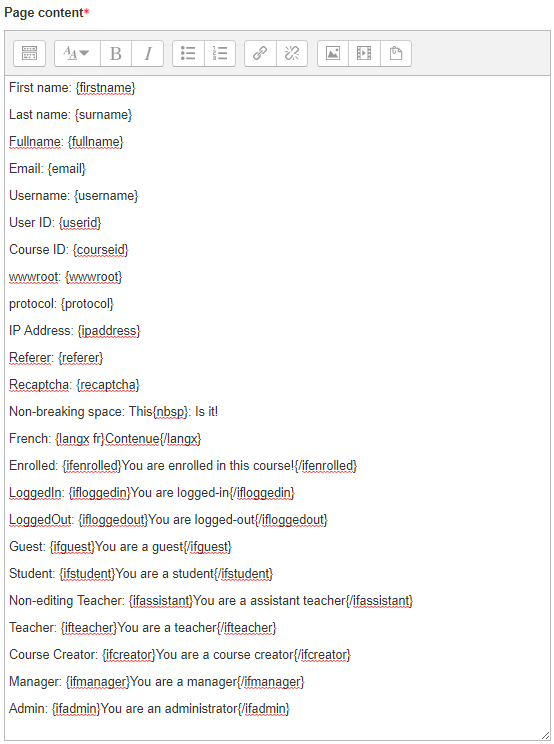
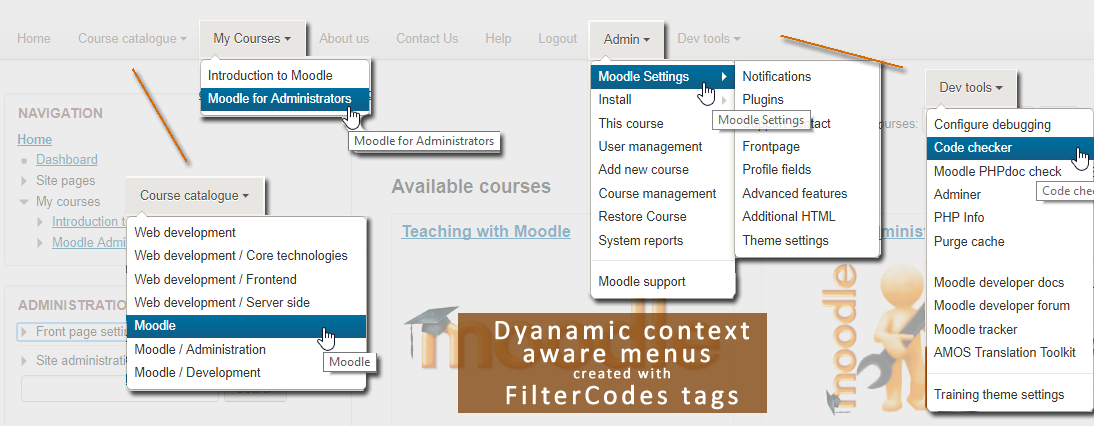
Transform your Moodle site with the FilterCodes Plugin! Elevate engagement by inserting about 200 dynamic plain-text tags like {firstname} to create personalized learning experiences, customize your site and course content, display progress bars, simplify Contact Form customization effortlessly and much more. FilterCodes empowers educators to revolutionize Moodle into a dynamic, personalized platform. Join the community of FilterCodes enthusiasts to unlock the potential of your Moodle LMS site.

Comments
Comments are no longer open for new posts. Existing comments remain available to read.
If I do it with a PAGE that is completed, then it works. Is the completed status of a lesson not being picked up properly?
The cron is running regularly.
{ifnotactivitycompleted 1760}......{/ifnotactivitycompleted} works without troubles.
Best regards,
Michael
"{ifactivitycompleted id}......{/ifactivitycompleted}" create a comment within another page. This will NOT be picked up.
If I want something similar with "{ifnotactivitycompleted id}......{/ifnotactivitycompleted}" (before completing that activity), then it DOES work.
I'm using the latest version of 'Filter Codes' and Moodle 4.1.8 (Build: 20231222).
What am I doing wrong / what is going wrong?
Greetings, Kees Koopman
I downloaded the Plugin, for version 4.3, installed it, the Theme used in Moodle is 'Classic'
everything ok so far
Then I tried to do this within a course that has 5 Groups already created and with students in each group.
HTML Block:
Your name: {fullname}
Class: {mygroups}
|But, nothing changes, it stays the same, no name or group appears here
What am I doing wrong?
I have a question / request.
I can see {ifhasarolename roleshortname}{/ifhasarolename}: Displays enclosed content if the user has been assigned the specified role anywhere in the Moodle site within any context.
Is there a 'not' version of this please? ie
{ifhasnotarolename roleshortname}{/ifhasnotarolename}Displays enclosed content if the user has NOT been assigned the specified role anywhere in the Moodle site within any context.
Thank you for wonderful plug in, it continues to support our use of Moodle, especially useful for supporting the student.
With best wishes, Marie
I am not sure what you are doing but I can assure you that neither of the solutions that I mentioned do any kind of translations on their own.
I suggest that you move this discussion into the Moodle discussion forums as this does not have anything to do with FilterCodes.
Alternatively, feel free to reach out to me through my website for premium support at www.tngconsulting.ca/contact and I will be happy to work one on one with you.
Best regards,
Michael
{iflang en} Brazil {/iflang}, In other words, only what is within the if of the language selected by the user will appear on the screen
In order to do language-based filtering, I believe what you are looking for is a multi-language filter.
I personally use and recommend the excellent multi-language content (v2) {mlang xx}{mlang} tags for this.
If you prefer not to install another 3rd party plugin, you can use the slightly less flexible {multilang xx}{/multilang} tags included with FilterCodes. This is a plain-text substitute for Moodle core's Multi-Language Content filter that uses HTML span tags.
Important: For {multilang} tags to work, the Multi-Language Content filter that comes with Moodle must be enabled as FilterCodes does not do any language filtering itself. It just makes it easier to tag your content using plain text tags instead of having to edit HTML.
If these are not what you are looking for, let me know how your idea of an {iflang xx}{/iflang} would be different.
Hope you find this information helpful.
Best regards,
Michael Milette