
FilterCodes
Maintained by
Michael Milette
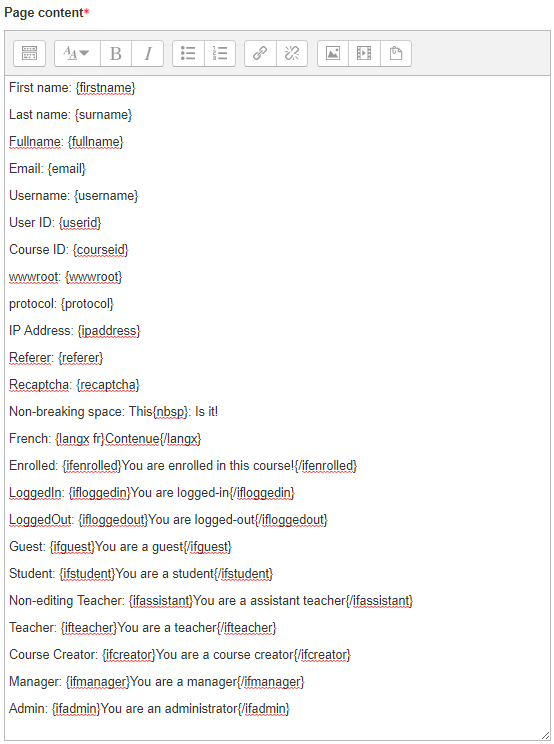
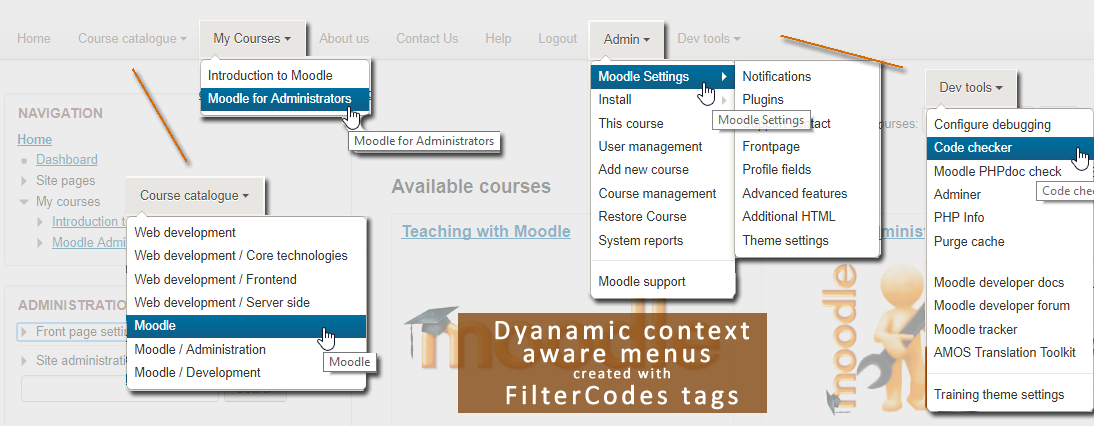
Transform your Moodle site with the FilterCodes Plugin! Elevate engagement by inserting about 200 dynamic plain-text tags like {firstname} to create personalized learning experiences, customize your site and course content, display progress bars, simplify Contact Form customization effortlessly and much more. FilterCodes empowers educators to revolutionize Moodle into a dynamic, personalized platform. Join the community of FilterCodes enthusiasts to unlock the potential of your Moodle LMS site.

Comments
Comments are no longer open for new posts. Existing comments remain available to read.
The author of Simple Certificate contacted me about this 6 years ago. This is an issue with the way that plugin applies its own tags after having applied a other tags instead of before. At the time, I suggested to the author that he address the issue but, if you are using the latest version of it and it still has this issue, then he did not.
For more details, see https://github.com/michael-milette/moodle-filter_filtercodes/issues/8
That said, I am not familiar with that plugin anymore but some Moodle activity modules allow you to enable and disable filters. The option will either be in a gear menu or the secondary menu depending on which version of Moodle you are using. If it has the option just disable FilterCodes for that activity.
Alternatively the author of Simple Certificate won't fix the issue, you can hire a developer like me to do it. You can reach me at www.tngconsulting.ca/contact.
Best regards,
Michael Milette
Try the {profile_field_shortname} tag. Rellace shortname with the shortname of your custom profile field.
Hope you find this helpful.
Best regards
Michael
I made two profile fields using the "User profile fields" in the Users > Accounts section. But I cannot call them using the filter codes.
Is it possible with this plugin?
In the FilterCodes settings, you will find a global setting called "Contact link type" that you can set to either Email, Message, Message, Profile or Phonefor the {coursecontacts} tag. If you need an option to have both the phone number and email info, please submit a feature request at:
https://github.com/michael-milette/moodle-filter_filtercodes/issues
Best regards,
Michael
There is no tag called {studentname}. Try one of the following: {firstname}, {lastname} or {fullname}.
Best regards,
Michael
As my nickname says, I'm just a PE teacher and I have limited knowledge about programming and accessing to some settings in my site, just some basics to "save the day" hahaha
I'll submit your idea to GitHub, and follow the
Thanks again for this awesome plugin!
Dave is correct that you will need to use CSS to limit the width of the QR code. You can add it as some CSS to your theme, which will affect QR Code created by the {qrcode} tag across the whole site. However, if you just want to affect one QR code in a page, you could do something like this... as long as you don't mind doing a little work in the HTML source code view of your editor:
<div style="max-width:200px;">{qrcode}This QR Code is a maximum of 200px wide.{/qrcode}</div> or
<div style="max-width:25%">{qrcode}This QR Code is a maximum of 25% wide.{/qrcode}</div>
This has given me an idea for a new {maxwide width}{/maxwide} tag, where width would be the maximum width of the wrapping div. Not sure about the name just yet. If you think this might be a good idea, please submit it as a Feature Request at https://github.com/michael-milette/moodle-filter_filtercodes/issues
However, if you want to put content beside it, you might need to implement a bootstrap grid. But I don't think I am ready to re-implement that grid system FilterCodes tags.