
FilterCodes
Maintained by
Michael Milette
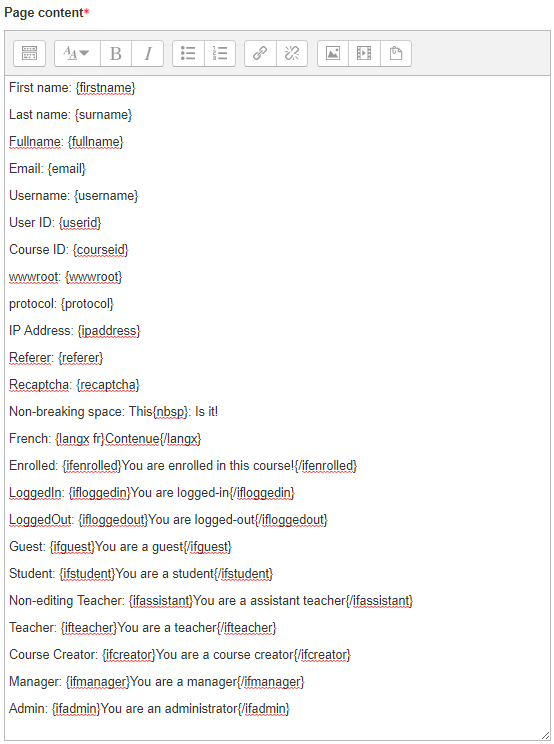
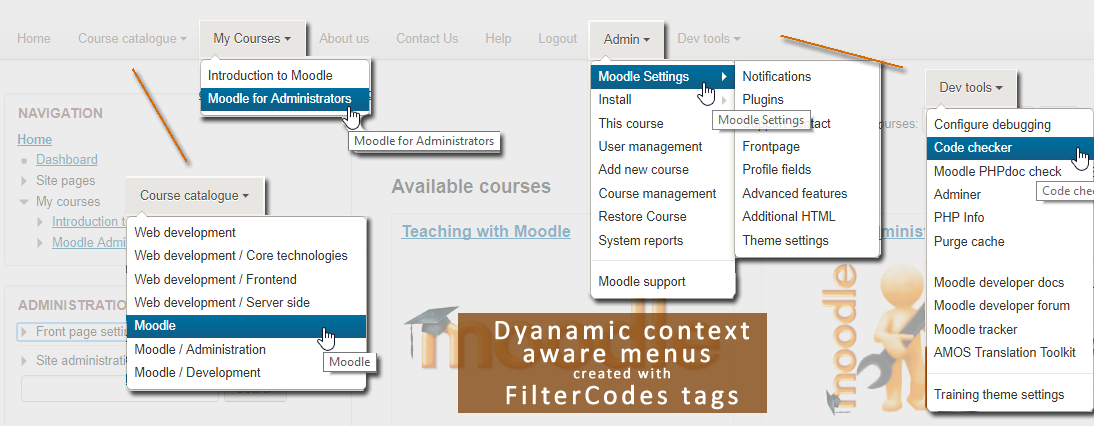
Transform your Moodle site with the FilterCodes Plugin! Elevate engagement by inserting about 200 dynamic plain-text tags like {firstname} to create personalized learning experiences, customize your site and course content, display progress bars, simplify Contact Form customization effortlessly and much more. FilterCodes empowers educators to revolutionize Moodle into a dynamic, personalized platform. Join the community of FilterCodes enthusiasts to unlock the potential of your Moodle LMS site.


Comments
Comments are no longer open for new posts. Existing comments remain available to read.
I’m really glad I came across this very interesting plugin. We needed to display the name of the group each student belongs to, and the {mygroups} tag worked perfectly for that.
However, I was wondering if it would be possible to create another tag, something like {mygroupsdescriptions}, which would display the description of the groups. I understand this might not be very ergonomic in cases where students belong to multiple groups, but in our situation each student only has one group. Such a feature would be extremely useful for us.
What do you think about this idea?
Thank you so much,
But - what you could do, is make use of the Pulse plugin, https://moodle.org/plugins/mod_pulse - what you would do is add a pulse activity into the course, that has a restriction set so only available once the course is completed. You then use the URL of this pulse activity in your filter code. The pulse activity can be set to be 'availble but not visible' so the students don't actually have to see it, you are just using it as a way of turning some other activity (in this case course completion) into a trackable activity. I do this all the time for various reasons.
We have Course Completion enabled. After all the activities are completed, the teacher must also indicate final completion. I would like to use Filter Codes to display an alert to the student that the teacher has not yet indicated final completion. Assuming it must be something similar to the code below. But where can I find the id value for the teacher indication of completion?
Thanks, John
{ifnotactivitycompleted id}{/ifnotactivitycompleted} : Will only display the content if the activity module specified by the id (see the activity's URL id=value), has NOT been completed.
The answer is - it depends. The fact that you are seeing the tag instead of either nothing or some text tells me that the email plugin that you are using is not passing its output through Moodle filters using the format_string function. This would need to be fixed first.
Next, it depends on the context in which the email is being sent. If the plugin is being sent within a course, the tags should work. However, if it is being sent in a system context or by a scheduled task, you will see the site summary/description instead of the course summary.
Unfortunately, I cannot predict how it will work without diving into your plugin's code.
Best regards,
Michael Milette
There isn't anything right now in FilterCodes that will enable you to achieve your goal. However, it is an interesting idea, especially the idea of having a list of courses in which you are a teacher. Please submit your feature request for further discussion at:
https://github.com/michael-milette/moodle-filter_filtercodes/issues
Best regards,
Michael Milette
Good plugin. Can its variables be used in email templates?
For example, I want to customize the emails users receive after self-enrolment. The plugin is enabled. I've tried adding {coursesummary} at the courses Enrollment settings, and at Language Customization (core_enrol - customwelcomemessageplaceholder), but the variable is not substituted with value, instead it shows a variable name in an email body.
Thanks,
Genii
Actually I don‘t have a GitHub account.
We have courses for each student where he/she can find their own learning-portfolio with different content that are in different tiles. So a course for every single student is usefull.
For a mobile view we are looking for a possibility, that on the frontpage is a picture that is the same for all students but the link behind the picture will be individual.
It could look like:
ifuserid 13 - then the pic source, then the course link (for the student with the id 13) - then /ifuserid
ifuserid 14 - then the same pic source, then the course link for student 14 - then /ifuserid … and so on
And this will be created for every student - so that everybody gets the same view on the frontpage of his mobile view but will guide her/him to the own course.
In the desktop view we are working with the boost-union navigation.
If there is an other possibility to link courses on the frontpage with the filtercodes please let me know, but actually I don‘t know which one to take.
Best regards
Wolfgang
There isnt an ifuserid tag yet. I am not sure what the usecase would be for something like that but if you have one, feel free to submit a feature request at https://github.com/michael-milette/moodle-filter_filtercodes/issues
Best regards,
Michael Milette
Thanks for your advice and best regards!
Wolfgang
There isn't a courseenrolmentenddate tag yet. However, please feel free to create a feature request by going to https://github.com/michael-milette/moodle-filter_filtercodes/issues
Best regards,
Michael
Best regards
Thanks
Thanks