
FilterCodes
Maintained by
Michael Milette
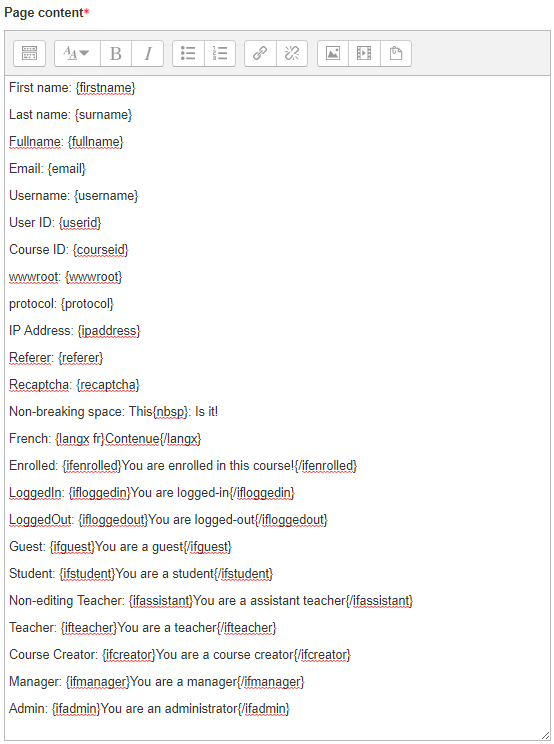
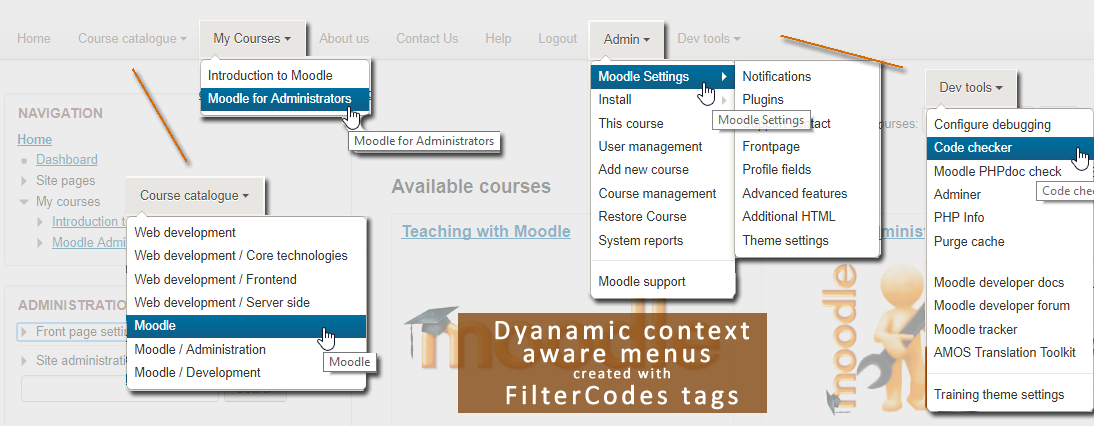
Transform your Moodle site with the FilterCodes Plugin! Elevate engagement by inserting about 200 dynamic plain-text tags like {firstname} to create personalized learning experiences, customize your site and course content, display progress bars, simplify Contact Form customization effortlessly and much more. FilterCodes empowers educators to revolutionize Moodle into a dynamic, personalized platform. Join the community of FilterCodes enthusiasts to unlock the potential of your Moodle LMS site.

Comments
Comments are no longer open for new posts. Existing comments remain available to read.
Regards
Binu
You can hide the displayed role using CSS to hide the fc-coursecontactroles class for the {coursecontacts} tag.
Best regards,
Michael
Best regards,
Michael
[root@ip-172-31-43-116 output]# pwd
/efs/itpanther/moodle/theme/moove/classes/output
[root@ip-172-31-43-116 output]# tree .
.
├── core
│ ├── course_renderer.php
│ └── course_renderer.php.bak
├── core_course
│ └── activity_navigation.php
├── core_renderer.php
└── renderer.php
2 directories, 5 files
[root@ip-172-31-43-116 output]#
Thanks again for your quick reaction. Indeed, i tried "Approuvé" (IOW using moodle own multi-language plugin) and ... it generates "ApprouvéGoedgekeurd". This is the issue I'll try to report.
Thanks,
C.
While filters work in many/most parts of Moodle, there are still parts of Moodle where they do not work. This is not a problem with the filter type plugins but with the way that the activity plugins were written - like the core Glossary, H5Ps and some quiz question types. So it is very possible that it does not work with some parts of the database plugin.
I would suggest that you report the issue in the Moodle Tracker at:
https://tracker.moodle.org
Hopefully, if it can be resolved with a relatively simple fix, someone will get it through quickly. Comment back with the tracker number and I will be happy to vote for it as I am sure others having multi-language sites will too.
Tip: When reporting the issue, show that Moodle's own Multi-Language Content plugin doesn't work. Sometimes, when you use a 3rd party plugin like FilterCodes as your example, someone might claim that it is an issue with the plugin instead of of seeing it as a core issue. Another way to accellerate the process is to also submit a fix for the issue if you have the ability.
Hope you can get this resolved quickly.
Best regards,
Michael Milette
I love this plugin, as it helps me resolve a lot of challenges in a multilingual env. But should it be possible that the {multilang xx}{/multilang} filter code does not work on Database field names ? The filter isn't interpreted in the templates and show as-is in the views. However, it works in the datafield. By exemple in the Single View, in French, I'm getting "{multilang fr}Intitulé de votre formation{/multilang}{multilang nl}Title van uw opleiding{/multilang}: Bonjour" and "{multilang fr}Intitulé de votre formation{/multilang}{multilang nl}Title van uw opleiding{/multilang}: Goeiendag" in Dutch.
Thanks for helping,
C.
I understand now where my mistake is
Have a nice day !
C.
The {langx} simply tags the text in a certain language so that screen readers correctly pronounce words. For example, if you have a Dutch word on an English page.
If you want to use the Multi-Language Content plugin, you should use the {multilang xx} FilterCodes tag. This gets converted to the HTML span tags that the Multi-Language Content plugin understands and can filter. For this reason, it is important that FilterCodes appears first in the list of filters followed by the Multi-Language Content filter in Manage Filters.
Alternatively, you might want to consider using the Multi-Language Content (v2) plugin available in on moodle.org/plugins. it is much more efficient, flexible and has a shorter syntax, {mlang xx}, than the Multi-Language Content combined with FilterCodes.
Last but not least, be sure to specify the language codes in lowercase, e.g., en and nl, not EN and NL.
Hope you find this information helpful.
Best regards,
Michael Milette
Helas, I already checked this: Multi-language content and Filter Codes are set on "content and headings" - sorry, I could have mention it in OP...
Any other idea ?
TIA
I'm trying to use the plugin to create a multilanguage (FR/NL) course. The translation in content is OK, but in doesn't work in section or activities titles :
exemple : {langx FR}Positionner la formation{/langx}{langx NL}De opleiding positioneren{/langx} generates : "Positionner la formationDe opleiding positioneren".
Should it work ? Did I miss a parameter somewhere ?
TIA
C.
Thanks a lot for your prompt and comprehensive response, it works perfectly now with the format_text() function.
Best regards,
Stephen
Thank you Stephen.
I am happy that FilterCodes has saved you and your team a lot of time.
As for the admin_setting_config_text and admin_setting_config_textarea methods, the fields themselves on your plugin's settings page should not be escaping the FilterCodes tags. In fact, when you save your settings, the content of these fields should maintain the integrity of the tags exactly as entered when writing to the database. For more information, see:
https://moodledev.io/docs/apis/subsystems/admin
Moodle filters are typically applied using Output API functions such as format_string and format_text. For more information, see:
https://moodledev.io/docs/apis/subsystems/output#string-formatting-functions
However, the admin_settings_... methods may be cleaning the input depending on the PARAM_ type you specified in your code. For more information, see:
https://docs.moodle.org/dev/lib/formslib.php_Form_Definition
Hope you find this information helpful.
Best regards,
Michael